

 darktable-org
darktable-curve-tool weird ILCE-7M3
Hi
While testing my new Sony ILCE-7M3 I stumbled upon the baseline tools directory and I wanted to create my own baseline based on that tool. So for a simple test I shoot one RAW+JPG with some over- and underexposed part in it. Test files:
http://p-bg.de/pics/PBG00152.ARW http://p-bg.de/pics/PBG00152.JPG
Then I did a:
for raw in $(ls *.ARW); do /darktable/tools/darktable-curve-tool-helper "$raw";done
which gave this output:
if you accumulated enough data, you can now output the curves with
darktable-curve-tool  -z -e PBG00132.ARW -n 16
then I did a:
/darktable/tools/darktable-curve-tool -z -e PBG00132.ARW | tee mycameracurves.sh
and executed that script. Now I have a new basecurve in darktable named "ILCE-7M3" but when I select it it looks not correct:
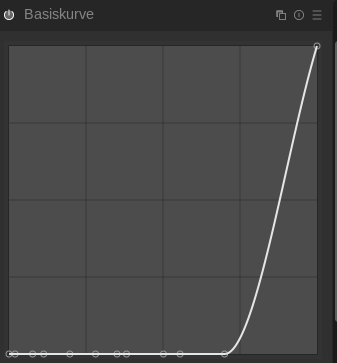
What I am doing wrong? In the camera settings I choose JPG to be maximum resolution (24MP) same as RAW, disabled any effects leaving it at "standart"... I looked in "darktable/src/external/adobe_coeff.c" and dcraw.c::adobe_coeff::table and they are the same... Anyone any ideas?

I just noticed that I took pictures in APS-C mode so the files are wrong size. I shoot another pair in 24MP format and corrected my images above. To be sure not to make any mistakes I followed the manual steps (from this guide: https://www.darktable.org/2013/10/about-basecurves/)
dcraw -6 -W -g 1 1 -w PBG00152.ARW && convert PBG00152.JPG PBG00152-jpg.ppm
darktable-curve-tool PBG00152.ppm PBG00152-jpg.ppm && darktable-curve-tool -z
gnuplot plot.basecurve
That gives this plots for the baseline:
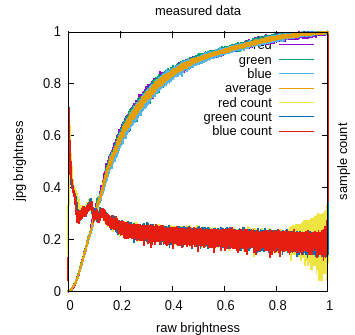
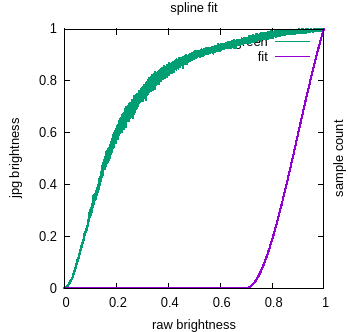
Again in the second plot the fitted curve is that odd again. I dont know whats wrong here as the green curve seems to look like what I would expect...
when I tried to create a custom base curve for my Canon 5Div, I had a similar curve. In the end, I created custom profiles according to https://pixls.us/articles/profiling-a-camera-with-darktable-chart

yeah I stumbled upon that page but I flinch from that procedure because of its complexity and pricey color charts (I guess some cheap card wont do it since it must be supported by ArgyllCMS???).
My thoughts on that basecurve tool was simply to get a fast and easy basecurve for my camera model, no super duper quality studio matching basecurve. I even read some people don't recommend this basecurve tool at all, but if that is the general opinion and this tool seems not to do fitting anymore correctly (if its not ours fault), maybe someone should remove it from the darktable repo?
Anyway, besides that I found two camera profiles from that author who wrote that color chart tutorial for my camera model: https://blog.pixelbook.org/2018/10/sony-alpha-7-iii-basecurve-and-camera-profile-for-darktable/
But I am not sure how to integrate them into darktable and especially which one I should use...
You have to decide using the basecurve or the profile. Then choose which way is best for you. Just import the files as styles (see https://darktable.gitlab.io/doc/en/styles.html) and apply them to your picture. Then you can define these as module presets (see https://darktable.gitlab.io/doc/en/module_presets.html) and default for your cam.
I had the same problem when trying to build a base curve, but was not lucky enough to find existing data for the Sony ILCE-6400. The above PR fixes the curve tool.

This issue did not get any activity in the past 30 days and will be closed in 7 days if no update occurs. Please check if the master branch has fixed it since then.
![github-actions[bot] avatar](https://avatars.githubusercontent.com/in/15368?v=4 "Published by a pub.dev verified publisher")
Anyway, besides that I found two camera profiles from that author who wrote that color chart tutorial for my camera model: https://blog.pixelbook.org/2018/10/sony-alpha-7-iii-basecurve-and-camera-profile-for-darktable/
Unfortunately this is not available anymore. Is anyone able to share the dtstyle?

So, it looks like PR #2971 fixed this issue, but the issue was forgotten to be closed.
That's why I'm closing the issue. Disclaimer: I trust the PR author's claim that the problem has been fixed and that a review has been conducted (by AP, who merged the fix) and the fix confirmed. I haven't double checked it now. But, if this problem remained from 2020, we would definitely see complaints about it from users.
