

 darktable-org
Empty log file on Windows when launching darktable from a shortcut or with the 'start' command
Describe the bug
Stumbled upon this when trying to help a user.
Juan's video of launching darktable from the command-line but with the start command is linked to this post:
https://discuss.pixls.us/t/lua-script-manager-disappeared-darktable/40057/23
His darktable-log.txt file was empty, as witnessed here:
https://discuss.pixls.us/t/lua-script-manager-disappeared-darktable/40057/20
So I tried (each time deleting any previously created log file from INetCache):
- adding
-d commonto a shortcut placed on the Windows desktop: log file is created but remains empty - starting from a CMD window with
darktable -d common: log file is created, content is present - starting from a CMD window with
start darktable -d commonas in the video: log file is created but remains empty
My system is Windows 10 Pro, theirs is Windows 11 (unspecified edition). I used darktable 4.5.0+1173~ge6ef3aa7e3, Juan used 4.4.2.
Steps to reproduce
Start darktable with -d common
- added to a desktop shortcut, like:
- from a CMD window, using
start darktable -d common
In both cases, the file darktable-log.txt remains empty.
Expected behavior
dt should write to the log file
Logfile | Screenshot | Screencast
No response
Commit
No response
Where did you obtain darktable from?
an online forum
darktable version
4.5.0+1173~ge6ef3aa7e3
What OS are you using?
Windows
What is the version of your OS?
10 Pro, 11 (unknown)
Describe your system?
No response
Are you using OpenCL GPU in darktable?
None
If yes, what is the GPU card and driver?
No response
Please provide additional context if applicable. You can attach files too, but might need to rename to .txt or .zip
No response

Can you try "C:\Program files\darktable\bin\darktable.exe" "-d common"
OR
"C:\Program files\darktable\bin\darktable.exe" ^-d common
I think the space between the d and common might give trouble to windows.

Darktable does not start at all, if "-d common" is used either at the CMD prompt or in the shortcut. I think that's because it has no command-line argument called -d common, only -d, which take a parameter common.
A space is there to separate command-line arguments; for paths with spaces, the double quotation marks are important to avoid splitting the string into multiple params on the spaces.
Can you try "C:\Program files\darktable\bin\darktable.exe" "-d common"
If you do that, you need to surround the whole command with "", i.e. ""C:\Program files\darktable\bin\darktable.exe" "-d common""

Fired up windows and checked the double quoting of arguments from the command line...
Double quotes need to surround an entity that has a space in it (i.e. the directory Program Files or in this case my home folder for testing this Bill Ferguson). If you surround -d common you get an error because it's really 2 entities, a flag and an argument. Double quoting around double quoted strings is required when passing multiple double quoted strings as an argument from a Lua script.
I fired up windows too. This worked in the shortcut:
C:\Windows\System32\cmd.exe /k "C:\Program Files\darktable\bin\darktable.exe" -d perf
but it changed the icon to be the cmd icon.
https://superuser.com/questions/1750060/how-do-i-properly-add-parameters-to-program-called-within-a-windows-command-shor
@gi-man @wpferguson : thank you for working this matter. So far I was entering manually the command line, but now I have created a shortcut.

@gi-man @wpferguson : thank you for working this matter. So far I was entering manually the command line, but now I have created a shortcut.
I would not default the shortcut to do a -d XXX all the time. The log file will grow and grow and I dont know what will happen once it is too large.
You can create a new shortcut and call it "darktable log" or "darktable debug" so you can start it that way only when you need to investigate something.
@gi-man : That is how I see it too. My default shortcut is just invoking dt, as I always do. But I have now on my desktop a specific debug shortcut that I can update if needed.
It may be so. I'm just baffled Windows won't take command-line arguments in a shortcut. However, I've done a search and there are many guides that do not mention any cmd /k hack.
For example
https://www.digitalcitizen.life/shortcut-arguments-parameters-windows/
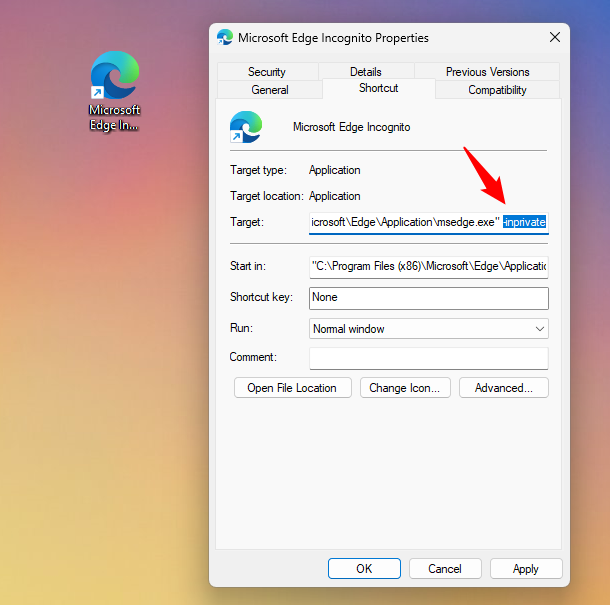
https://superuser.com/a/29571
Have you tried to add in the Target field
"c:\path\to\exe\program.exe" -option1 -option2
https://www.lifewire.com/command-line-parameters-video-games-3399930
:max_bytes(150000):strip_icc():format(webp)/003_command-line-parameters-video-games-3399930-a9169acf99c64905b21f971f87d2648f.jpg)
https://www.computerchum.com/user-guide-for-command-line-arguments-in-windows/
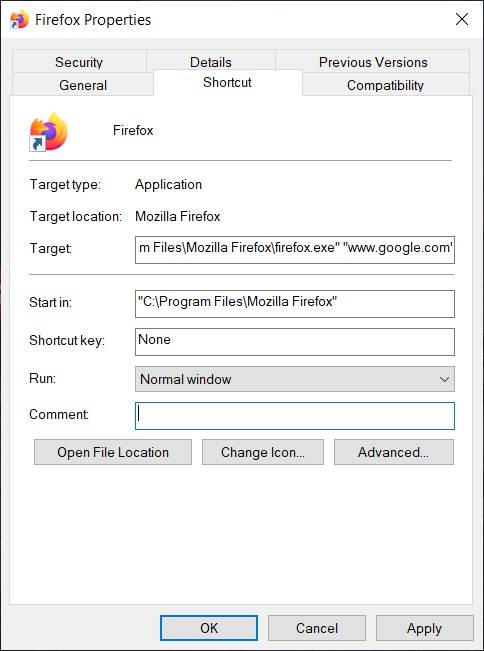
https://www.jarte.com/help_new/command_line_parameters.html
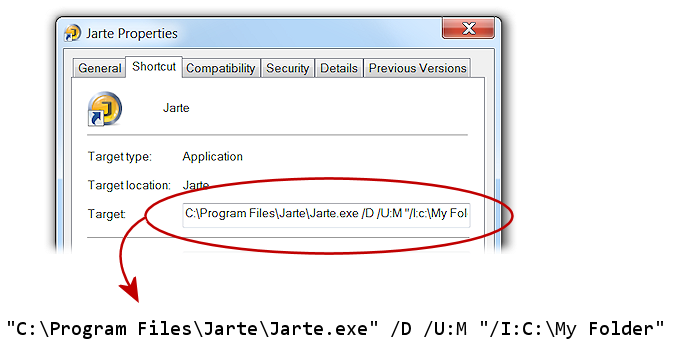
I'm wondering if those are all wrong? Unlikely. Or is it a recent Windows change? A mingw/cygwin limitation?
For me the most important shortcut that indeed works fine, and with the dt icon, is:
"C:\Program Files\darktable\bin\darktable.exe" --library F:\Marc\PICTURES\DarktableDatabase\DTcatalog1.db
That one works since I started to use dt (version 3.02). It's important for reasons of daily backup and backup via file history.
The other parameters have to do with tracing an issue. That's hopefully not a daily matter.
It is, on the forum, where Windows users are often uncomfortable with the command-line, to the point of not copy-pasting commands described for them, but typing, replacing \ with /, leaving out the :, and so on. For them, adding -d perf or -d opencl to a shortcut is way easier.
An option if someone really wants to do this is to change this line: https://github.com/darktable-org/darktable/blob/409867984996d9aac37e65fff8facfe32099ca24/src/common/darktable.c#L940
to be d_ so the users will need to type -d_perf It could be done as an OR (d perf or d_perf) to limit the documentation impact.
I dont like the idea of windows users creating a permanent link that makes the logfile grow forever. Hence why I havent suggested this change.
I have noted that shortcuts can be zipped. I am not actively participating on a forum, but another idea can be to zip the cmd /k shortcut(s) (as per @gi-man's tip) and offer them on the forum. I have embedded my shortcut zip files in a document with all kinds of dt tips. We probably need to test this by passing such as a zip file amongst us. Let me know if such an approach is desirable
Yes, I understand this can be done. I consider it to be a workaround.
Darktable behaves one way on Linux, and it behaves the same way when started from the Windows command line. I'm wondering why it behaves differently if using the shortcut, and if there is something the developers can do to change that. Maybe it's an inherent limitation of Windows -- but then why does it work with the examples given above? Or it's a limitation of the cygwin/mingw tooling (all I know is that those are some kind of libraries/environments used to port Linux code to Windows, please forgive my ignorance). If it's hard to fix, then we'll just live with it.
My ignorance is worse than yours. I am simply a dt on Windows user participating in the quality tests a few weeks prior to release.
@kofa73 : just found something on pixls.us you may like more as a workaround. Create a .bat file with content like this: @echo off "C:\Program Files\darktable\bin\darktable.exe" -d perf -d opencl -d memory -d tiling I attach it too. dt debug performance.bat.txt (just delete the .txt suffix to test it.
This issue has been marked as stale due to inactivity for the last 60 days. It will be automatically closed in 300 days if no update occurs. Please check if the master branch has fixed it and report again or close the issue.
![github-actions[bot] avatar](https://avatars.githubusercontent.com/in/15368?v=4 "Published by a pub.dev verified publisher")