

 darktable-org
Enable copy of a tag
Please enable the copy of a tag in lighttable / tagging as text into the clipboard. The only context (mouse right click) on a tag is "detach tag". Sometimes I need the text of a tag from a picture for publication, for example the latin name of an insect. But it is not possible to copy the tag from the picture.

You have "copy to entry" when right-clicking on a tag. You will then have it on entry field just above. Check menu:
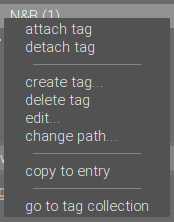

And please precise infos asked on template, especially darktable release for such request.
Sorry, I use Darktable 4.0.1 from ppa.launchpadcontent.net/ubuntuhandbook1/darktable/ on Ubuntu Linux 22/04 LTS. But this feature was not available in any version of DT until now.
This function has been around for a long time. Please also use the manual: https://darktable-org.github.io/dtdocs/en/module-reference/utility-modules/shared/tagging/
The pop-up menu entry “copy to entry” can be used to copy a selected tag to the text entry box. You can then edit this name and press Enter to create a new tag with that name, making it easy to create multiple tags with similar names.
And, of course, you can copy/paste the (hierarchical) tag from entry box.

We are talking about different elements. After export of a picture I need the tag of this picture for publication.
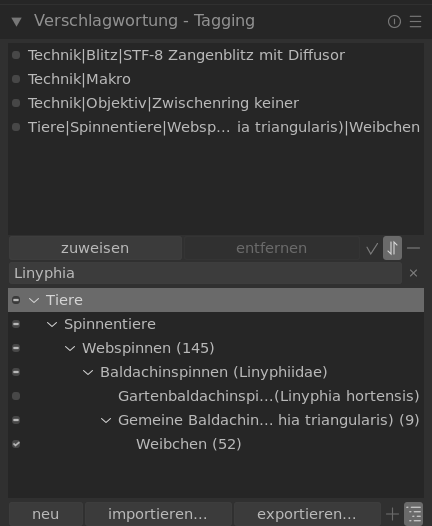
What I mean:
- Select a picture
- Select a tag in the upper list of tagging-module
- right-mouse-click to copy the text into the clipboard.
So it is sure to get a tag, that is assigned to the selected picture.
What you mean: "copy to entry" is only possible in the second list of the tagging-module. This list is not filled by selecting a picture but by typing in a part of a tag. Steps:
- select a picture
- read the tag, keep it in memory
- type a part of the tag in the entry to get a list in the second part of the tagging module
- with long hierachical tags you can't see the complete tag in the first part because its longer then the width of the element
- the part you type must lead to a unique tag
- select a tag
- right mouse click - "copy to entry"
- select the text in the entry
- right mouse click "copy" or Cntr.+c to copy the entry into the clipboard
This lasts much longer. You can make mistakes and get a tag, that is not assigned to the selected picture.
Example, 2 Tags: Tiere|Spinnentiere|Webspinnen|Baldachinspinnen (Linyphiidae)|Gartenbaldachinspinne (Linyphia hortensis) Tiere|Spinnentiere|Webspinnen|Baldachinspinnen (Linyphiidae)|Gemeine Baldachinspinne (Linyphia triangularis)|Weibchen
English: Animals|Spider| ... |German Name (latin name)|female
You have to type "triangularis" to get a unique result. By typing "Linyphia" (family) or "Baldachinspinne" (german name) you get more then one match.
OK, now I understand what you want. In addition to the procedure you described, the following is also possible at the moment (without entering any text):
- Select image
- See the marks in front of the tags (-) in the second (lower) list
- Follow the markers until you reach the hook symbol
- Right click on the tag with the hook symbol -> copy to entry.
This issue did not get any activity in the past 60 days and will be closed in 365 days if no update occurs. Please check if the master branch has fixed it and report again or close the issue.
![github-actions[bot] avatar](https://avatars.githubusercontent.com/in/15368?v=4 "Published by a pub.dev verified publisher")
This year I have done a lot of exports to my WordPress Website and to social media. Every time I miss to pic up a tag directly from the exported picture for tagging the picture in the targeted webseite. It's also difficult to export the metadata to wordpress thru the description-field when it includes some non-ascii-characters. Duplicating the tag to the description can be a way to work-arround the missing copy-feature. See WordPress-Ticket: https://core.trac.wordpress.org/ticket/58082 I think the described feature costs only a few lines of code but saves a lot of hand-work on export. Actually on DarkTable 4.4.2 - still missing this function.
This issue has been marked as stale due to inactivity for the last 60 days. It will be automatically closed in 300 days if no update occurs. Please check if the master branch has fixed it and report again or close the issue.