

 darktable-org
Portrait images not always aligned in culling view
Describe the bug/issue
It's on actual master but there since a long time (maybe since culling view is there). I'm not sure but seems I have found some way to reproduce it. See screenshot below to understand issue :
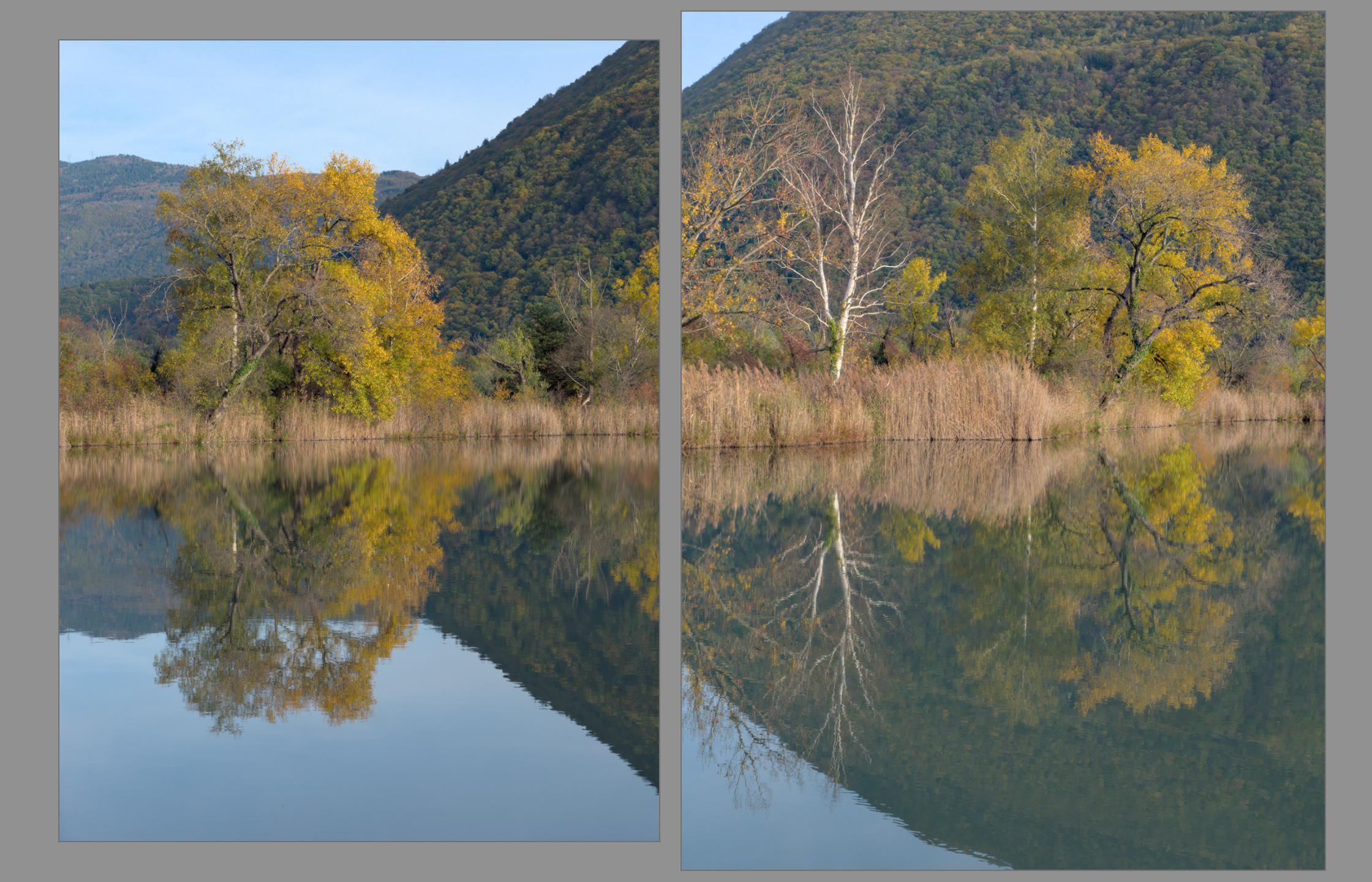
@AlicVB: this one for you. I hope you will reproduce and find the issue.
To Reproduce
- Have at least 2 portrait images following a landscape one
- Click on first portrait image (the one just after landscape one)
- Go to culling view (with here 2 images displayed)
- See the wrong alignment with the first image smaller than the second (like screenshot above)
If you can't reproduce, when on first step, go to darkroom, then go back to lighttable view and continue step 3 and 4.
I could also reproduce that when having a landscape after and then it could be the second image that its smaller instead of first one.
I often reproduce that but seems that sometimes not. Probably something that is related to have landscape is shown in culling view and some displayed error between landscape and portrait mode.
Expected behavior
When having 2 portrait images, always have them displayed same size on culling view.
Platform
- darktable version : actual master

I didn't reproduce, but I think I know where that comes from : the culling view is very dependent of the ratio of the image, and sometimes, even a very small difference in ratio makes big difference in image area size. Don't ask me why : that part of code is not mine, it's quite complex, and tbh, I've not manage to understand how the algo. works... The original author as left the boat some years ago... and doesn't answer to my solicitations :(
That said, we still have to ensure that the issue is not in the ratio computation...

If this could be related to the ratio, my images are on 4:3 ratios as I use a Panasonic Lumix G9. Maybe yours are classic 3:2 ratios one. That could explain that you can't reproduce.
This issue did not get any activity in the past 60 days and will be closed in 365 days if no update occurs. Please check if the master branch has fixed it and report again or close the issue.
![github-actions[bot] avatar](https://avatars.githubusercontent.com/in/15368?v=4 "Published by a pub.dev verified publisher")
@Nilvus is this still valid on master, there have been some fixes related ...

Seems that this is fixed partially. Just tested and if portrait follow a landscape one, it's fixed. But if 2 portrait images are before a landscape image, this remains.
@jenshannoschwalm it is. There is a line of code that is supposed to scale all images to same hight but it is not working as it should. I wrote more code to address this and test other improvements. Still need to clean the code up but I will create a pull request in the coming days

You can reproduce by cropping 2 images to slightly different aspect ratios by hand.
Thanks @Solarer for your work. I so assign that issue to you and put milestone 4.6.
@Nilvus, do you want to try it with the code of my PR? #15197
If the changes are ok from a feature perspective, I will clean up the code to make the code review easier.
@Solarer: your PR do not fix that issue. I still have the misalignment if I have 2 portrait images before a landscape one. Apart of that, your PR seems great.
Sorry: a change on my last comment. Your issue fix it but not completely. Seems that some cache update missing (or something like that).
I tested on a precise set of images. If I test on another set of images with 2 portraits one before a landscape one, I do not have the issue with your PR.
But, if I test first on master with such set of images, I so have of course the issue. If I close so darktable and then launch darktable from your PR, the issue remains only on set of images I have tested just previously on master.
Hope I'm clear here.
@Nilvus I think I know what you mean. Sometimes I needed to step through the images in darktable view so that the thumbs reload. If that is the case we might need to open another issue since I am not familiar with the code outside the functions I touched. Can this not be solved by manually deleting all cached images once when upgrading to version 4.6? Thumbs will only change when a picture is edited or we make a code change like this one. If we reload the thumbs more often than that automatically, that will have a performance impact.
If you meant something else, please share the pictures with me so that I can try for myself. You can blacken them if they are sensitive ;)
@Solarer
The code for dealing with the cache is in src/common/mipmap.c.
If you want some idea of how to use the functions, you can look at src/lua/image.c (the drop_cache and generate_cache functions).

@Solarer: I can deal with cache of course. But not all users can. Do as you can, your work improve already that mode, so thanks for that.
No, I mean: Do you know if we can automatically trigger a cache refresh for all users upgrading to 4.6? We already do a database migration - if we could integrate a one-time cache refresh into that process the display should be fixed for everyone who upgrades.
I don't think you want to automatically trigger a cache refresh on upgrade. I have 500K+ images, so it would take a lllloooooooonnnnnnggggggg time to complete.
Yeah, I meant deleting the cache so that it would be regenerated on demand when you open a collection
Yeah, I meant deleting the cache so that it would be regenerated on demand when you open a collection
I'm not sure this is an acceptable solution : lot of users spend nights to generate all the thumbnails of their collection with the command-line tool.
On the other hand, I'm quite surprised that the cached image cause trouble here, and we should find and fix this issue before anything :
- cached image are generated at fixed resolutions (MIP0=180x110 ; MIP1=360x225 ; MIP2=720x450 ...)
- the program ask the cache for a specific image at a specific resolution
- the cache search for the lowest MIP level that can fullfill the requirement
- if the cached image at this MIP level doesn't exist, it's created
- then the cached image at this MIP level is loaded and downscaled to the needed resolution
So in our case, I don't see how the cached image could be faulty... I may give it a try, but sadly not before next week...
I assume the logic is like this:
if(cached_image_exists)
   use_it();
Instead it should be
if(cached_image_exists)
   if(requested_resolution == cached_thumb_resolution)
      use_it();
   else
      regenerate();
It's something like the second point. Let take an example :
- start with an empty cache
- request thumb of imageid 123 at 50x50px
- lowest MIP level that fullfill the request is MIP0
- no MIP0 thumb exists for this image => create thumb at size 180x110px (MIP0) save it
- return downscaled version of this MIP0 image (180x110 => 50x50)
- now request thumb of imageid 123 at 100x100px
- lowest MIP level that fullfill the request is MIP0
- MIP0 thumb for this image exists
- return downscaled version of this MIP0 image (180x110 => 100x100)
- now request thumb of imageid 123 at 400x400px
- lowest MIP level that fullfill the request is MIP2
- no MIP2 thumb exists for this image => create thumb at size 720x450px (MIP2) save it
- return downscaled version of this MIP2 image (720x450 => 400x400)
And if we next request a 410x400, will it downscale the MIP2 correctly to 410x400 or will it reuse the 400x400 without scaling? Because from what we experience, the 400x400 is reused.
but I'm not sure this comes from here : if I test for example the "zooming" view mode in lighttable, everything works fine, but if the bug you suspect was here, we would get some wrong thumb size very often...
@AlicVB : I think this will not be for 4.6... Should I move the target release to 4.8?

@AlicVB : Moving this to 5.2, let me know if you still want to tackle this issue. TIA.
This issue has been marked as stale due to inactivity for the last 60 days. It will be automatically closed in 300 days if no update occurs. Please check if the master branch has fixed it and report again or close the issue.