

 darickc
ImageInfo shown partially off the screen
When showImageInfo is enabled it is shown partially off the screen like the attached screenshots. backgroundSize cover or contain makes no difference, resizeImages makes no difference.
I'm not sure what else it could be. An older magicmirror I have shows it completely on the screen

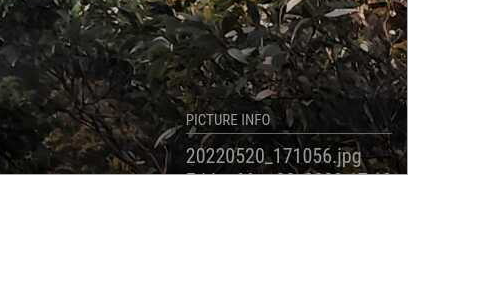

Part of the problem appears to be that the bottom of the image is actually below the screen. The monitor is 1920x1080 and I have set
      maxWidth: 1920,
      maxHeight: 1080,
I have found that adding the following to custom.css moves the bottom of the image to the bottom of the screen like it should be.
 .MMM-BackgroundSlideshow .images,
.MMM-BackgroundSlideshow .image,
.MMM-BackgroundSlideshow .transition,
.MMM-BackgroundSlideshow .gradient {
  position: absolute;
  top: 0;
  left: 0;
  height: 98%;
  width: 100%;
}
However, the image info is still off the screen
Hello,
I have the same problem with all 4 possibilities with the parameter imageInfoLocation. The info is never completely visible, always a bit cut off. Was there already a solution for this?
I don't know enough about it, but it seems to be related to this custom addition in custom.css:
body` {
	margin: 5px;
  	height: calc(100% - 10px);
  	width: calc(100% - 10px);
},

Same problem. I added this to my custom.css and it seems to fix it. You can play around with the numbers:
.MMM-BackgroundSlideshow .bottomRight {
  bottom: 50pt;
  right: 60pt;
}
Related, the progress bar has also always been a bit off screen for me. I did the same thing there:
.MMM-BackgroundSlideshow .progress {
    position: absolute;
    bottom: 30px;
    height: 30px;
    width: 100%;
}
