
flutter_widget_from_html

flutter_widget_from_html copied to clipboard
 daohoangson
position two divs next to eachother
Steps to Reproduce
I try to position two divs next to eachother. The HTML listed below uses three different ways (using float, using relative positioning and using a table). When opening the html in a browser, I see
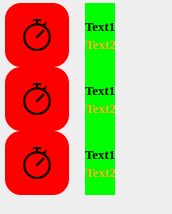
But when using HtmlWidget(html), I get errors like
Unable to guess child size (preferred size=64x64) on tight height: The RenderParagraph class does not support dry layout.
Dry layout not available for alignments that require baseline.

======== Exception caught by rendering library =====================================================
The following assertion was thrown during performLayout():
Assertion failed: file:///home/marc/snap/flutter/common/flutter/packages/flutter/lib/src/rendering/box.dart:1870:14
!_computingThisDryLayout
is not true
HTML
<!DOCTYPE html>
<html>
<head>
	<meta http-equiv="Content-Type" content="text/html charset=UTF-8">


</head>
<body style="background: #EEEEEE; font-family: 'Lucida Sans Unicode';">

	<div id="option-float" style="height: 64px;">
		<div style="background: #FF0000; height: 64px; width: 64px; border-radius: 16px; float: left; ">
			<div style="color: #FDA720;">
				<img src="https://cdn.icon-icons.com/icons2/785/PNG/512/stopwatch_icon-icons.com_64805.png" width="32" height="32" style="margin: 16px;">
			</div>
		</div>
		<div style="background: #00FF00; height: 64px; float: left; margin-left: 16px; display: table;">
			<div style="display: table-cell; vertical-align: middle; text-align: center; ">
				<span style="font-size: 0.8rem; font-weight: bold;">Text1</span> <br>
				<span style="font-size: 0.8rem; font-weight: bold; color: #FDA720;">Text2</span>
			</div>
		</div>
	</div>

	<div id="option-position" style="height: 64px;">
		<div style="background: #FF0000; height: 64px; width: 64px; border-radius: 16px; ">
			<div style="color: #FDA720;">
				<img src="https://cdn.icon-icons.com/icons2/785/PNG/512/stopwatch_icon-icons.com_64805.png" width="32" height="32" style="margin: 16px;">
			</div>
		</div>
		<div style="background: #00FF00; height: 64px; margin-left: 16px; display: table; position: relative; left: 64px; top: -64px; ">
			<div style="display: table-cell; vertical-align: middle; text-align: center; ">
				<span style="font-size: 0.8rem; font-weight: bold;">Text1</span> <br>
				<span style="font-size: 0.8rem; font-weight: bold; color: #FDA720;">Text2</span>
			</div>
		</div>
	</div>

	<table id="option-table" border="0" cellpadding="0" cellspacing="0">
	<tr>
		<td>
			<div style="background: #FF0000; height: 64px; width: 64px; border-radius: 16px; ">
				<div style="color: #FDA720;">
					<img src="https://cdn.icon-icons.com/icons2/785/PNG/512/stopwatch_icon-icons.com_64805.png" width="32" height="32" style="margin: 16px;">
				</div>
			</div>
		</td>
		<td>
			<div style="background: #00FF00; height: 64px; margin-left: 16px; display: table;">
				<div style="display: table-cell; vertical-align: middle; text-align: center; ">
					<span style="font-size: 0.8rem; font-weight: bold;">Text1</span> <br>
					<span style="font-size: 0.8rem; font-weight: bold; color: #FDA720;">Text2</span>
				</div>
			</div>

		</td>
	</tr>

    </table>

</body>
</html>
`HtmlWidget` configuration
HtmlWidget(html)
Testing environment
[✓] Flutter (Channel stable, 3.0.1, on Linux Mint 20.2 5.13.0-44-generic, locale
    en_US.UTF-8)
    • Flutter version 3.0.1 at /home/marc/snap/flutter/common/flutter
    • Upstream repository https://github.com/flutter/flutter.git
    • Framework revision fb57da5f94 (6 weeks ago), 2022-05-19 15:50:29 -0700
    • Engine revision caaafc5604
    • Dart version 2.17.1
    • DevTools version 2.12.2

[✓] Android toolchain - develop for Android devices (Android SDK version 33.0.0)
    • Android SDK at /home/marc/Android/Sdk
    • Platform android-TiramisuPrivacySandbox, build-tools 33.0.0
    • Java binary at: /home/marc/android-studio/jre/bin/java
    • Java version OpenJDK Runtime Environment (build 11.0.12+0-b1504.28-7817840)
    • All Android licenses accepted.

[✓] Chrome - develop for the web
    • Chrome at google-chrome

[✓] Linux toolchain - develop for Linux desktop
    • clang version 6.0.0-1ubuntu2 (tags/RELEASE_600/final)
    • cmake version 3.10.2
    • ninja version 1.8.2
    • pkg-config version 0.29.1

[✓] Android Studio (version 2022.1)
    • Android Studio at /home/marc/android-studio
    • Flutter plugin can be installed from:
      🔨 https://plugins.jetbrains.com/plugin/9212-flutter
    • Dart plugin can be installed from:
      🔨 https://plugins.jetbrains.com/plugin/6351-dart
    • Java version OpenJDK Runtime Environment (build 11.0.12+0-b1504.28-7817840)

[✓] VS Code (version 1.67.2)
    • VS Code at /usr/share/code
    • Flutter extension can be installed from:
      🔨 https://marketplace.visualstudio.com/items?itemName=Dart-Code.flutter

[✓] Connected device (2 available)
    • Linux (desktop) • linux  • linux-x64      • Linux Mint 20.2 5.13.0-44-generic
    • Chrome (web)    • chrome • web-javascript • Google Chrome 102.0.5005.61

[✓] HTTP Host Availability
    • All required HTTP hosts are available

• No issues found!
Expected results
I would like to have one working solution to put two divs next to eachother Thanks in advance!
