
blscd
 blscd copied to clipboard
 d630
d630
[Discontinued] Ranger-like file navigator (Miller columns) in GNU bash
README
blscd is a stupid ranger-like file browser/navigator (not manager) for the command line using stty(1), tput(1) and other Unix utilities.
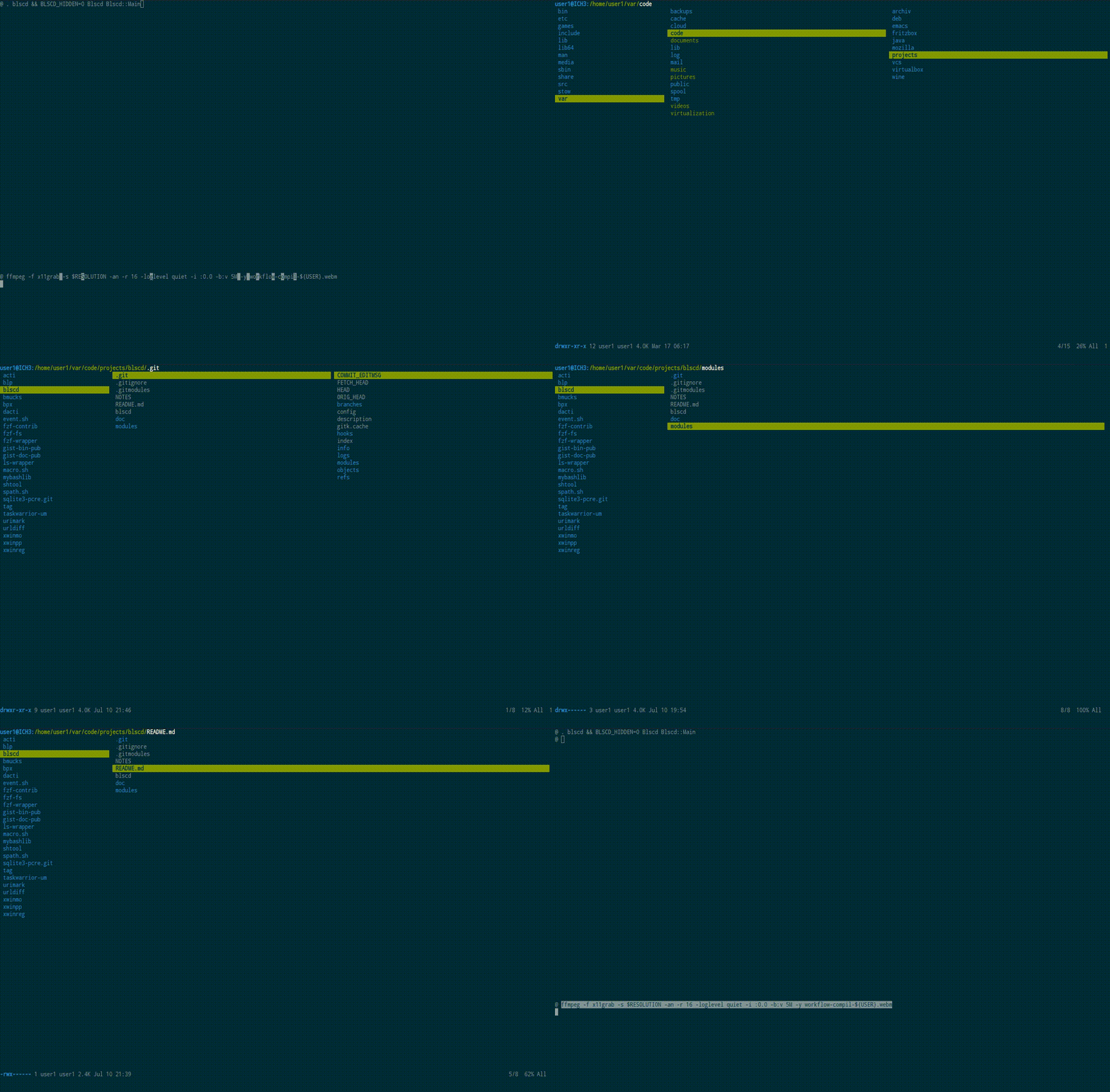
(Simple Terminal, Droid Sans Mono 11, Solarized Dark)
BUGS & REQUESTS
Please feel free to open an issue or put in a pull request on https://github.com/D630/blscd
GIT
To download the very latest source code:
git clone --recursive https://github.com/D630/blscd
In order to use the latest tagged version, do also something like this:
cd -- ./blscd
git checkout $(git describe --abbrev=0 --tags)
INSTALL
Just put ./bin/blscd and ./modules/spath.sh/spath.sh on your PATH. blscd will execute spath.sh via source.
USAGE
INVOCATION
blscd has been written as pseudo-module. In an interactive bash session do:
source blscd
Blscd Blscd::Main [ -h | --help | -v | --version ]

# or
Blscd Blscd::PrintHelp
Blscd Blscd::PrintVersion
What could also be an alias:
alias b='. blscd && BLSCD_SHOW_HIDDEN=0 Blscd Blscd::Main'
Otherwise put it in a wrapper script like this:
cat >> "${HOME}/bin/blscd.sh" <<'CODE'
#!/usr/bin/env bash

source blscd
BLSCD_SHOW_HIDDEN=0 Blscd Blscd::Main "$@"
CODE

chmod 755 "${HOME}/bin/blscd.sh"
ENVIRONMENT VARIABLES
BLSCD_AWK_IF          Default: '\>799'
BLSCD_SHOW_HIDDEN     Default: 1
BLSCD_SHOW_COL3       Default: 1
SHORTCUTS
Basics
        E                     Edit the current file in EDITOR
                              (fallback: vi) [edit]
        S                     Fork SHELL in the current directory
                              (fallback: bash, LC_COLLATE=C) [shell]
        ^L                    Redraw the screen [redraw]
        ^R                    Reload everything [reload]
        g?                    Open this help in PAGER [help]
                              (fallback: less)
        q                     Quit [quit]

Settings
        za                    Toggle filtering of dotfiles [toggle_hidden]
        zo                    Toggle drawing of Column 3 [toggle_col3]

Moving and jumping
        [                     Move up in the parent directory [parent_up]
        ]                     Move down in the parent directory [parent_down]
        D                     Move ten lines down [10_down]
        G     [ END ]         Move to bottom [bottom]
        J                     Move half page down [page_down]
        K                     Move half page up [page_up]
        U                     Move ten lines up [10_up]
        ^B    [ PAGE-UP ]     Move page up [page_up]
        ^F    [ PAGE-DOWN ]   Move page down [page_down]
        d                     Move five lines down [5_down]
        g-                    Jump to OLDPWD [chdir]
        gL                    Jump to /var/log [chdir]
        gM                    Jump to /mnt [chdir]
        gd                    Jump to /dev [chdir]
        ge                    Jump to /etc [chdir]
        gg    [ HOME ]        Move to top [top]
        gh    [ g~ ]          Jump to HOME [chdir]
        gl                    Jump to /usr/lib [chdir]
        gm                    Jump to /media [chdir]
        go                    Jump to /opt [chdir]
        gr    [ g/ ]          Jump to / [chdir]
        gs                    Jump to /srv [chdir]
        gu                    Jump to /usr [chdir]
        gv                    Jump to /var [chdir]
        h     [ LEFTARROW ]   Jump up [parent]
        j     [ DOWNARROW ]   Move down [down]
        k     [ UPARROW ]     Move up [up]
        l     [ RIGHTARROW ]  Open file [child]
        u                     Move five lines up [5_up]
CONFIGURATION
There is no configuration file at present.
COLORS
In order to change the default colors see the functions Blscd::Init and Blscd::DrawScreenTbar.
FILTER
Filtering of dotfiles works via GLOBIGNORE in Blscd::GetBlscdData. You can extend it easily; man 1 bash says:
        GLOBIGNORE
                A  colon-separated  list of patterns defining the set of
                filenames to be ignored by  pathname  expansion.   If  a
                filename  matched  by  a pathname expansion pattern also
                matches one of the patterns in GLOBIGNORE, it is removed
                from the list of matches.
KEYS
Modify keybindings in function Blscd::Init. You can use following functions:
        10_down
        10_up
        5_down
        5_up
        bottom
        chdir DIR
        child
        down
        edit
        get_key
        help
        hpage_down
        hpage_up
        page_down
        page_up
        parent
        parent_down
        parent_up
        quit
        redraw
        reload
        shell
        toggle_col3
        toggle_hidden
        top
        up
You may configure a binding like g? and ge by doing:
BlscdKeys=(
        [g]=get_key
        [g?]=help
        [ge]='chdir /etc'
)
OPENER
If a selected file is not a directory, the child function will invoke Blscd::Opener. Modify it in Blscd::Init. By default, we have:
function Blscd::Opener { command less "$1" ; }
SIZE
blscd is going to exit, if your terminal does not match the allowed height and width. See the head of Blscd::DrawScreen for this.
TIPS
- Reduce the start up time of blscd by replacing all tput commands in
Blscd::Initwith ANSI escape code for your terminal. In this way, you may avoid a lot of subshells. - blscd stores directory listings and inode infos in associative arrays just for once; any filesystem event after that will be ignored. If you want to see all current entries in a directory, quit blscd or reload everything via ^R. The Status bar data at the bottom is different: it is associated with the current cursor position and the size of the terminal columns number.
NOTICE
blscd has been written in GNU bash on Debian GNU/Linux 9 (stretch/sid) using these programs/packages:
- GNU Awk 4.1.1, API: 1.1 (GNU MPFR 3.1.3-p5, GNU MP 6.1.0)
- GNU bash 4.3.42(1)-release
- GNU coreutils 8.23: ls, stat, stty
- ncurses 6.0.20151024: tput
And has been tested in these terminal emulators:
- XTerm(320)
- rxvt-unicode (urxvt) v9.21
- st 0.6
For opening and editing files in blscd, I used:
- Vi IMproved 7.4 (Included patches: 1-963)
- less 458 (GNU regular expressions)
blscd is not portable; it does not work in ksh, mksh or zsh. Your bash version needs to handle associative arrays and namerefs via typeset/declare.
The usage of stat is not BSD-like (grep -c stat blscd => 3). Please open and issue with the correct invocation for your system.
When using blscd in the virtual console, some tput commands may not work.
CREDITS
blscd is a fork and rewrite of lscd v0.1.
SEE ALSO
Similar to this project and independent from lscd is deer, which is written in zsh.
LICENCE
Copyrights
GNU GPLv3
 d630
d630