

 custom-cards
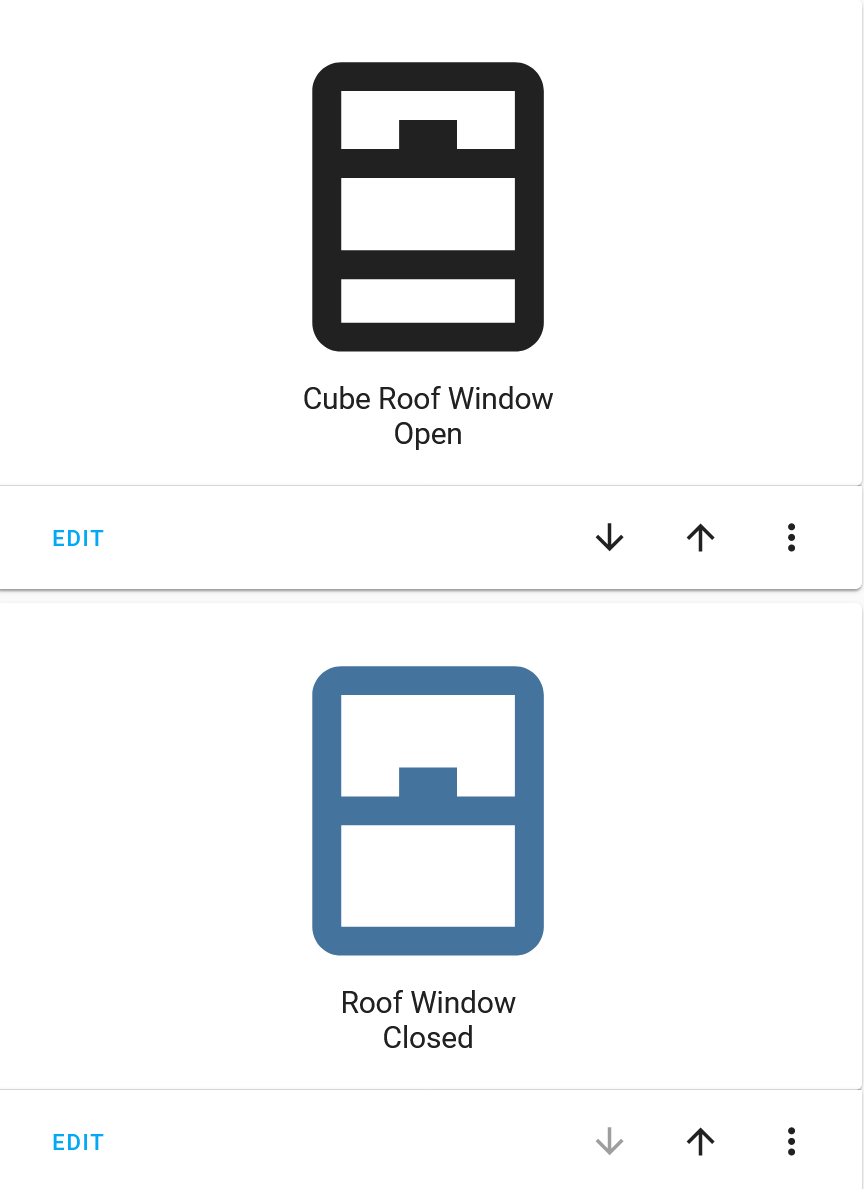
cover icon has wrong color
Checklist
- [x] I updated the card to the latest version available
- [x] I cleared the cache of my browser
Describe the bug If the entity is type of cover (class window) custom button card doesn't apply expected styles to icon.
What I found is:
- common window manifests states on/off in dev tools, while for covers it is open/closed.
- on the other hand, custom button card shows open/closed in both cases: windows and covers.
- color of cover icon is currently always set to
var(--primary-text-color);
Version of the card Version: 3.4.2
To Reproduce Here are two custom button cards with all defaults. Screenshot of this configuration is attached bellow. It's clearly seen that cover is not colored. Obviously
type: 'custom:button-card'
entity: cover.cube_roof_window
show_state: true
####
type: 'custom:button-card'
entity: binary_sensor.roof_window
show_state: true
And my cover declaration (mqtt)
cover:
  - platform: mqtt
    name: "Cube Roof Window"
    device_class: "window"
    state_topic: "shellies/cube-window/roller/0"
    command_topic: "shellies/cube-window/roller/0/command"
    position_topic: "shellies/cube-window/roller/0/pos"
    set_position_topic: "shellies/cube-window/roller/0/command/pos"
    availability_topic: "shellies/cube-window/online"
    payload_available: "true"
    payload_not_available: "false"
    qos: 1
    retain: false
    payload_open: "open"
    payload_close: "close"
    payload_stop: "stop"
    position_open: 100
    position_closed: 0
    optimistic: false
Screenshots
The image shows distinction between cover (entity on top) and window (bottom entity)
Expected behavior
Colour of cover icon should has assigned values var(--paper-item-icon-color) or var(--paper-item-icon-active-color) respectively depending on its state.
Desktop (please complete the following information):
- Browser: all
- Version: doesn't matter
Smartphone (please complete the following information):
- Device: N/A
- OS: N/A
- Browser N/A
- Version N/A
Additional context Add any other context about the problem here.

I thought it was just me!!! lock and cover seem to both have this issue for me, but binary_sensor and light seem to work just fine.

I've lost an hour trying to figure out why my cover entity icon doesn't show right. I can confirm color issue as well as icon does not reflect changed device_class for cover.

Here is my workaround for the time being:
      icon: |
        [[[
          if (states["cover.xyz"].state == 'open') return 'mdi:blinds-open';
          else if (states["cover.xyz"].state == 'closed') return 'mdi:blinds';
          else return 'mdi:exclamation';
        ]]]
      styles:
        icon:
          - color: |
              [[[
                if (states["cover.xyz"].state == 'open') return 'var(--paper-item-icon-active-color)';
                else return 'var(--paper-item-icon-color)';
              ]]]