

 cubewise-code
Simplify PowerBI connector
When getting a view for PowerBI, it would be nice to automatically get the member properties for the columns and rows dimensions to reduce complexity for the end user, who is trying to analyze data in PowerBI. Less code to write... What do you think?

I would like to simplify it.
So you are suggesting that for all dimensions on the rows/columns, we retrieve the "Member Properties" by default, right?
In the get_member_properties function, there are quite a few optional arguments to control what attributes, parents, etc you want. How would you deal with those? Shall we just always retrieve all attributes for every selected element in this shortcut approach?
I imagine the new function could look like this:
data, products, regions, cost_centres, month, year = tm1.power_bi.execute_view("Sales", "View1")
So instead of returning 1 dataframe, it would return 1 for the data + n for the dimensions

I like it. Makes it easier for people with minimal python knowledge to use it. You could either do this or looking for a Default Subset or view for the elementattributes for each dimension or you look for a custum View/Subset (I.e. "PowerBI")
I would like to simplify it.
So you are suggesting that for all dimensions on the rows/columns, we retrieve the "Member Properties" by default, right?
In the
get_member_propertiesfunction, there are quite a few optional arguments to control what attributes, parents, etc you want. How would you deal with those? Shall we just always retrieve all attributes for every selected element in this shortcut approach?I imagine the new function could look like this:
data, products, regions, cost_centres, month, year = tm1.power_bi.execute_view("Sales", "View1")So instead of returning 1 dataframe, it would return 1 for the data + n for the dimensions
Hi Marius,
Is there any documentation about what optional arguments are available in the get_member_properties function, and how to use them?
Thanks,
Carlton.

HI @carltoncheung,
it depends on the tool you are using. If you use Jupyer, just press SHIFT + TAB inside the parenthesis.
If you use PyCharm or VSC, it should just show you the arguments for the function.
You can also look at the definition of the function. We attach a docstring to every function. https://github.com/cubewise-code/tm1py/blob/e518e14147ce22c6f3eab0dd09cc0245a696f883/TM1py/Services/PowerBiService.py#L34
Hi @MariusWirtz
I think there is a catch while using get_member_properties , it throws error when dimension name and attribute names are same. For example : region dimension in planning sample instance
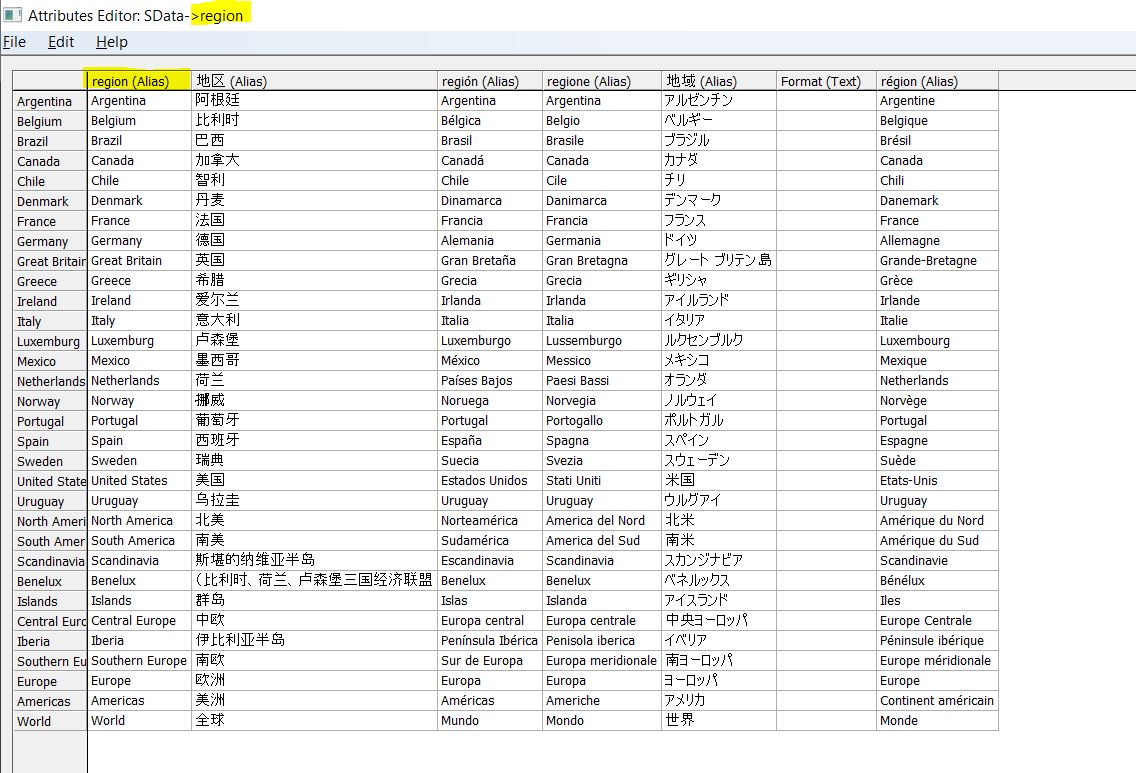

Hi @BhagyaCV,
thanks for the catch.
Would it solve your problem, if we allow you to provide custom attribute headers, like below?
from TM1py import TM1Service

with TM1Service(address="", port=12354, ssl=True, user="admin", password="apple") as tm1:

    region = tm1.power_bi.get_member_properties(
        dimension_name="region",
        hierarchy_name="region",
        attributes=["region", "Other Attribute"],
        attribute_names=["Region Name", "Other Attribute"])
Hey @MariusWirtz ,
That would be again Manual work. Does it make sense to add Prefix/Suffix to column header to distinguish between element and attributes ?
Just a thought.
Thanks in Advance
Hi @BhagyaCV,
sorry for the super late response on this one. I actually quite like the idea to be able to pass a prefix for the attribute in order to avoid name clashes.
I will open a PR to add a new argument to the function: attribute_column_prefix