

 cube-js
I can't see some columns
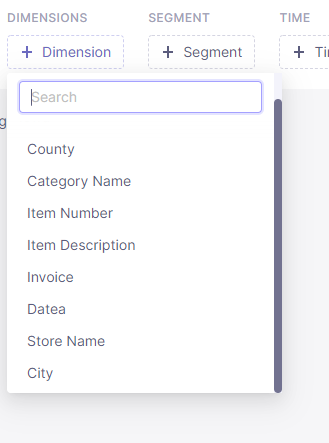
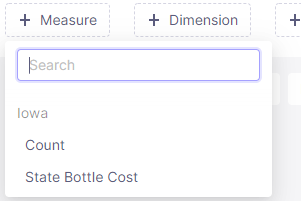
I have a database in postgres (22mln rows and 17 columns) and when I use Cube.js i can see one column in measures and 10 columns in dimensions.
Btw I dropped 2 columns to see if i will be able to see 2 others but it did not happen and now there is 8 columns in dimensions.

Hi @PatrykM11 I have to take a look at your schema first for more details. Could you sign up with free Cloud deployment where it can be reproduced so we can take a closer look there?

I'm new to BI tools like this but I think that I can't use Cloud with locally hosted database. Anyway thanks for contact I can paste some screenshots of my schema if it can help with anything.
Postgres
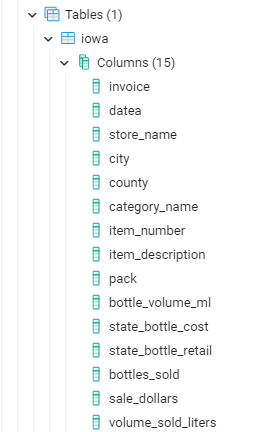
Generating

Dimensions
Measures
Could you share schema files to I can make sure they are defined there?
Hi @PatrykM11 How many of these fields are numbers ?
From my understanding, the cube schema compiler only generates string dimensions and do not specify which is a primary key automatically.

All missing columns are numerical, among those I can see, there is 1 numerical column.
Schema file look like this (missing columns are not defined).
cube(Iowa, {
sql: SELECT * FROM public.iowa,
preAggregations: {
// Pre-Aggregations definitions go here
// Learn more here: https://cube.dev/docs/caching/pre-aggregations/getting-started
},
joins: {
},
measures: {
count: {
type: count,
drillMembers: [categoryName, datea, storeName, city]
},
stateBottleCost: {
  sql: `state_bottle_cost`,
  type: `sum`
}
},
dimensions: {
county: {
sql: county,
type: string
},
categoryName: {
  sql: `category_name`,
  type: `string`
},

itemNumber: {
  sql: `item_number`,
  type: `string`
},

itemDescription: {
  sql: `item_description`,
  type: `string`
},

invoice: {
  sql: `invoice`,
  type: `string`
},

datea: {
  sql: `datea`,
  type: `string`
},

storeName: {
  sql: `store_name`,
  type: `string`
},

city: {
  sql: `city`,
  type: `string`
}
},
dataSource: default
});
Okay, so my hypothesis was correct.
Schema builder only generates automatically fields that are strings and will add the dimension of the primary key regardless it's type (however, you'll still have to add primarKey: true in the dimension object.
Until there's an improvement in the schema-compiler, you'll have to do it manually or do your own automation.
Please correct me @ivan-vdovin if I'm wrong ?