
gdbgui

gdbgui copied to clipboard
 cs01
cs01
Terminal output not rendering text (correctly) in Firefox
Describe the bug The terminal parts in the browser (Firefox 96.0 on Windows 10, accessed from remote machine running Ubuntu 18.04, gdb version 8.1.1, gdbgui version 0.15.0.1) don't render the text (correctly), instead just colorful rectangles appear (see screenshot)
To Reproduce Steps to reproduce the behavior:
- On Remote Ubuntu machine, call in terminal:
gdbgui -r /path/to/executable - Open http://~ip address of remote machine~:5000 (in Firefox)
Expected behavior gdbgui terminal parts render corectly
Screenshots
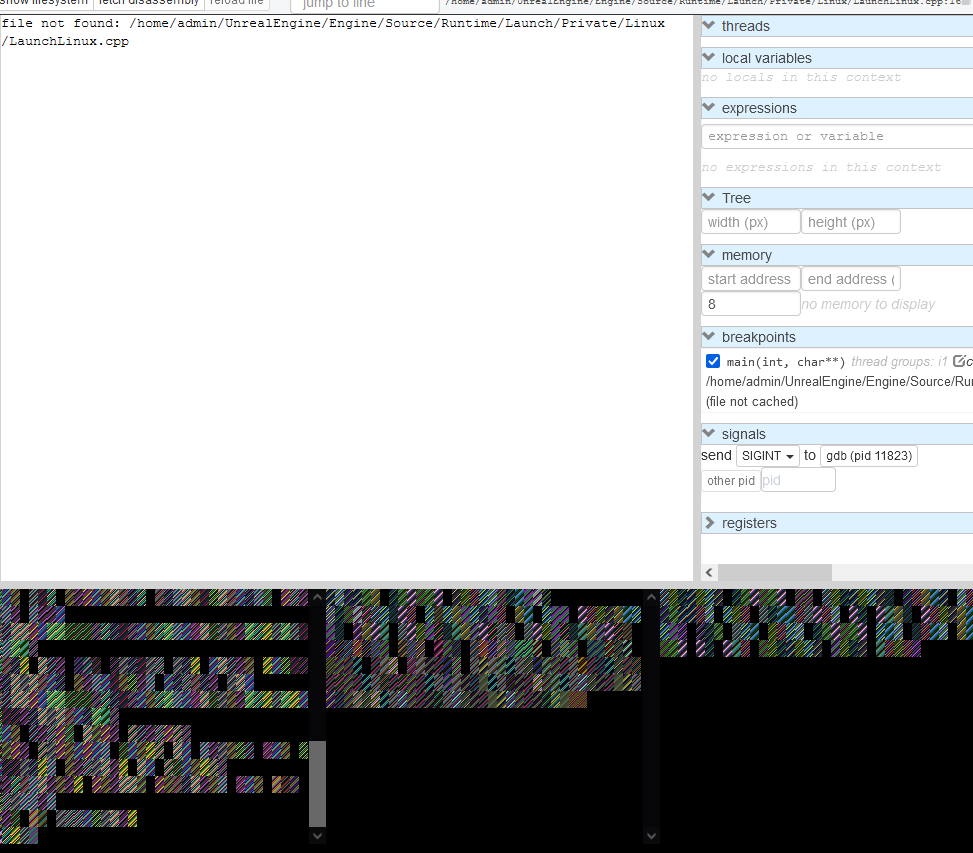
Please complete the following information:
- OS: Windows 10
- gdbgui version (
gdbgui -v): 0.15.0.1 - gdb version (
gdb -v): 8.1.1 - browser [e.g. chrome, safari]: Firefox
- python packages (
pip freeze): asn1crypto==0.24.0 cryptography==2.1.4 dnspython==1.15.0 enum34==1.1.6 idna==2.6 ipaddress==1.0.17 keyring==10.6.0 keyrings.alt==3.0 psutil==5.4.2 pycairo==1.16.2 pycrypto==2.6.1 pygobject==3.26.1 pyxdg==0.25 SecretStorage==2.3.1 six==1.11.0
Additional context It works in Edge, therefore I assume this is an issue with Firefox, however I don't know what to install to make it render correctly. I have no comparable project to try if the CLI parts would work there.
