

 crowdin
All options in settings file crowdin.properties
Here i want to ask about all the options that i can configure it in crowdin.properites
project-id api-token preserve-hierarchy auto-upload
files.source files.translation
No more options ?
cannot add a target language for translation for each file.source ?
best Regards, Nouha.

Hi Nouha!
Here is a documentation to view: https://support.crowdin.com/android-studio/

Hi @nhammami!
Currently, Android Studio Plugin doesn't support file target languages configuration, but we are going to implement this feature in the nearest plugin release.

Hi @BozhenaDobrovolska , @andrii-bodnar !
thanks for your reply,
I have other question about languages, i do some search and i read all documents about crowdin, but i can't find how to configure or it's possible to use a different placeholders for the same files.translation for example, in my project i have the French and Spanish languages (values-fr, values-es) so i use in my crowdin.properties files.translation=**/values-%two_letters_code%/%original_file_name%
but also i have for Chinese language, three different files, values-zh-rCN, values-zh-rHK and values-zh-rTW, so here i should use other placeholders %android_code% , i can't use a different placeholders for the same file.source ??
I want to use
files.translation=**/values-%two_letters_code%/%original_file_name% for french and Spanish and
files.translation=**/values-%android_code%/%original_file_name% for Chinese language
Best Regards, Nouha.
Hi @nhammami ! I believe that setting up language mapping for two of the four languages would help here, kindly check more details below: https://support.crowdin.com/advanced-project-setup/#adding-custom-language-codes
Then you may use only one placeholder for all languages in the exported path

hi @andrii-bodnar
I see that a new option was added excluded-target-languages, can i used it to exclude some languages for any file.source ?
Best Regards, Nouha.
Hi @nhammami
Yes, you can use it for any files group in your configuration file:
# Applies to default behavior, `sources` parameter
# and all filegroups that do not have such a configuration
excluded-target-languages=uk, fr

# or

files.source=...
files.excluded-target-languages=it, fr # For a specific filegroup, high priority
files.translation=...

files.1.source=...
files.1.excluded-target-languages=uk
files.1.translation=...

#etc.
Hi,
I have next configuration for chinese language files:
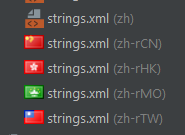 So where zh, zh-rCN - simplified chinese
And zh-rTW, zh-rMO, zh-rHK - traditional chinese
I want to have just 2 languages in crowdin (simplified chinese and traditional chinese)
And update all files properly..
Is it possible to configure it using properties and crowdin mapping?
I'm not fully understand how it works :( in both ways:
So where zh, zh-rCN - simplified chinese
And zh-rTW, zh-rMO, zh-rHK - traditional chinese
I want to have just 2 languages in crowdin (simplified chinese and traditional chinese)
And update all files properly..
Is it possible to configure it using properties and crowdin mapping?
I'm not fully understand how it works :( in both ways:
- when I upload the sources/translations
- when I download translations

Hi @nightwolf13, languages in the Crowdin project should correspond to languages in the Android Studio project
Hi @nightwolf13, languages in the Crowdin project should correspond to languages in the Android Studio project
So I have to have 5 languages in the crowdin, even there are only 2 real translations? How should I configure crowdin.properties in this case, because i have 1 chinese language available by two-letters code, and 4 languages with 'android-code'?
Maybe it will be a good option, for plugin to allow copy some translation to some specified files.
@nightwolf13 thank you
What is the difference between zh and zh-rCN languages in your project?
@andrii-bodnar , Just app name (for chinese region it should be slightly different). Yes, the problem with simplified can be solved using just zh file.. But what about traditional chinese? As I know it's used in these 3 regions (rTW, rHK, rMO)..
@nightwolf13 you need to create a custom language for the zh code (and set zh as an %android_code%)
Crowdin supports natively only the following codes:
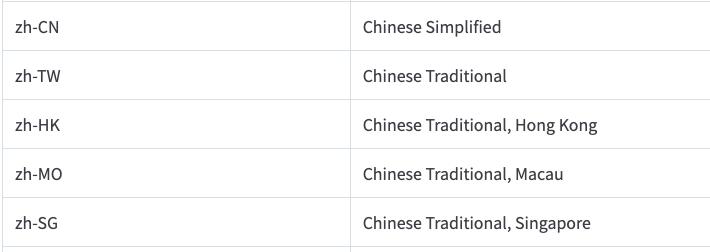
Then add to your Crowdin project other languages and configure the Automatically fill in regional dialects option in the project settings. It is useful when the project is translated into the language dialects (e.g., Spanish, Argentina). Translations from Spanish will be automatically copied to untranslated strings in Spanish, Argentina during the download.
@andrii-bodnar , Thanks! Looks like Automatic filling can solve this problem.. But am I right that in this case I will use 5n hosted words instead of 2n?
@nightwolf13 yes, currently there is no possibility to fill some languages with another language on the Crowdin Android Studio plugin side.
Though, on the other hand, the translation for some strings may be different for these dialects, so it may be incorrect to fill all the dialects (zh-TW, zh-HK, zh-MO) with just Chinese Traditional.