

 creack
Use pty with no command?
Thanks @creack for the great library and community support!
I have a question that I hope makes sense.
I am using a websocket api that sends stdin messages and receives stdout and stderr output from the command as well as exit codes.
For example, this API is used in a web UI, with the following string of messages sent and received
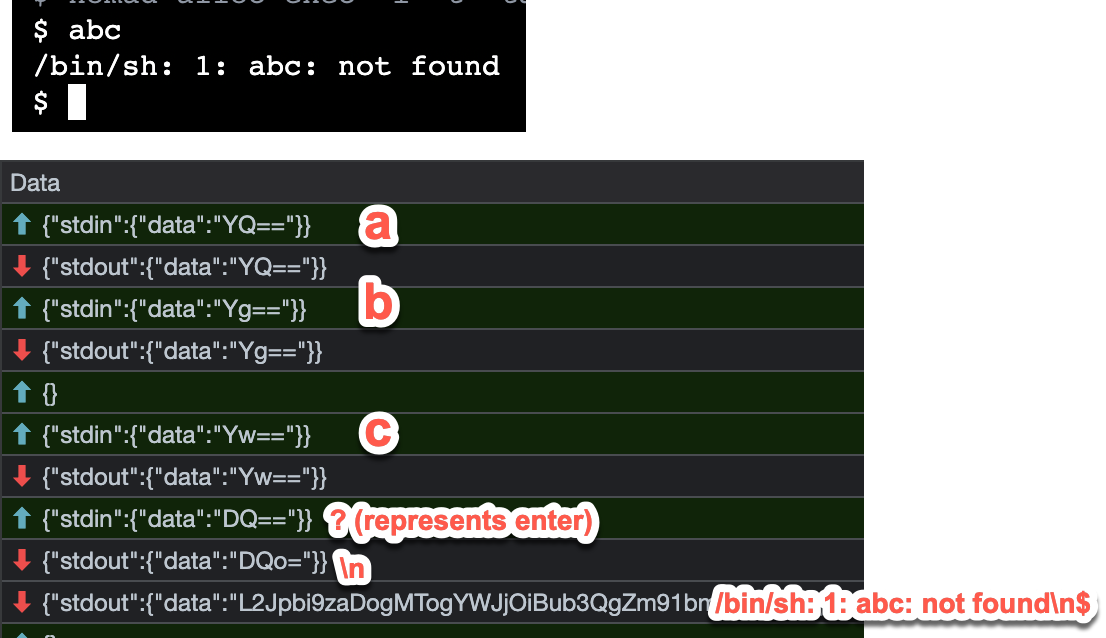
This web UI uses xterm.js to provide a terminal-like input ui and to interpret the responses, including ansi escape sequences, into terminal output.
I am building a terminal application that would like to leverage this same API, so a "terminal-in-a-terminal" like thing, where stdin is sent to the API and responses received are rendered in my application.
I would like to use creack/pty as the response interpreter, handling ansi escape sequences and the like, and holding a view of the terminal session that I can read into a string and render to the screen of my application.
So the flow is roughly like:
- stdin sent to websocket connection
- response received
- write response to pty
- read entire pty to string
- render string to screen
- repeat
If I use creack/pty this way, I don't actually have a command to start - it's just a nice box that interprets ansi escape sequences for me and allows me to retrieve the current "string view" of the terminal.
Here is my attempt to get a command-less pty, write to it, and read from it:
package main

import (
	"bytes"
	"fmt"
	"github.com/creack/pty"
	"io"
	"os"
)

func getPtyWithoutCommand() (*os.File, error) {
	// this function just pty.StartWithAttrs with command-specific stuff commented out
	pty, tty, err := pty.Open()
	if err != nil {
		return nil, err
	}
	defer func() { _ = tty.Close() }() // Best effort.

	// if sz != nil {
	// 	if err := Setsize(pty, sz); err != nil {
	// 		_ = pty.Close() // Best effort.
	// 		return nil, err
	// 	}
	// }
	// if c.Stdout == nil {
	// 	c.Stdout = tty
	// }
	// if c.Stderr == nil {
	// 	c.Stderr = tty
	// }
	// if c.Stdin == nil {
	// 	c.Stdin = tty
	// }
	//
	// c.SysProcAttr = attrs
	//
	// if err := c.Start(); err != nil {
	// 	_ = pty.Close() // Best effort.
	// 	return nil, err
	// }
	return pty, err
}

func main() {
	myPty, err := getPtyWithoutCommand()
	if err != nil {
		panic(err)
	}

	_, err = myPty.Write([]byte("test\n"))
	if err != nil {
		panic(err)
	}
	_, err = myPty.Write([]byte{4}) // EOT
	if err != nil {
		panic(err)
	}

	buf := new(bytes.Buffer)
	_, err = io.Copy(buf, myPty)
	if err != nil {
		panic(err)
	}
	fmt.Println(buf.String())
}
I get the following error
❯ go run test.go
panic: write /dev/ptmx: input/output error

goroutine 1 [running]:
main.main()
        test.go:52 +0x19c
exit status 2
Is what I'm trying to do sane at all? Is there a better way to achieve my goal here?
Thank you! Leo

Hi! I was tackling a similar problem and creack's pty might be a bit too abstracted for what you want. I just used the golang standard xterm terminal emulator https://pkg.go.dev/golang.org/x/term and a pipe.
Here's a partial snippet as an example of what I mean. Your stdin stream is fed into the stdin_writer and your stdout is written to the writer, don't forget to Flush()!
stdin_reader, stdin_writer := io.Pipe()
reader := bufio.NewReader(stdin_reader)

stdout_writer := bytes.Buffer{}
writer := bufio.NewWriter(&stdout_writer)

rw := bufio.NewReadWriter(reader, writer)
t := term.NewTerminal(rw, prompt)

// constantly be reading lines
go func() {
	for {
		line, err := t.ReadLine()
		if err == io.EOF {
			log.Printf("got EOF")
		}
		if err != nil {
			log.Printf("got err")
		}
		if line == "" {
			continue
		}
		log.Printf("LINE: %s", line)
	}
}()

Oh wow, thank you so much for this info @lgmugnier ! Somehow never came across the golang xterm emulator, this seems very likely to be exactly what I need...
If you copy/paste the above to my according stack overflow question here, it might reach more folks and I'd be happy to accept it as the answer for some internet points for you
Somehow never came across the golang xterm emulator, this seems very likely to be exactly what I need...
It took me a while to find it as well
If you copy/paste the above to my according stack overflow question here, it might reach more folks and I'd be happy to accept it as the answer for some internet points for you
already done : )