

 crabbly
Printing does not work when browser is not configured to open PDFs in the browser
Steps to reproduce:
- Configure your browser to not open PDF documents in the browser:
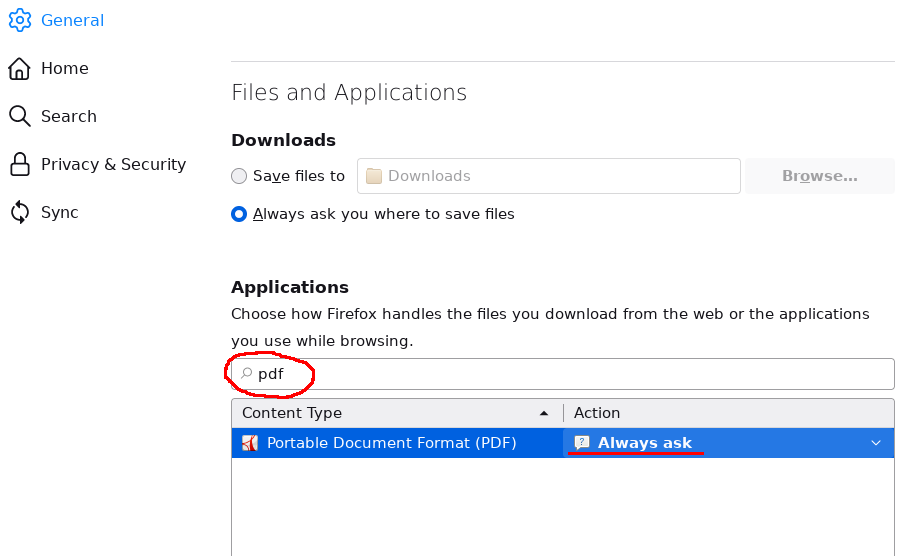
- Click the "Print PDF" button on https://printjs.crabbly.com/
Actual result:

I can reproduce it on both Windows and Linux with Firefox and Chrome.
Is this a known limitation? Can this be worked around in some way?

It could be related to #572. We have downgraded to v1.4.0 - before the problematic commit 72d3b78 (Remove print iframe from DOM once job is complete) - and with that version, your scenario works on our application.
@crabbly, do you intend to look into the issues caused by commit 72d3b78? There seems to be quite a lot of them!

@johannks: The issue still exists even after downgrading printjs to v1.4.0.
I am wondering if there is a way to overcome this honestly. if user in firefox doesnt allow a pdf to be opened in 'firefox' and its set to 'always ask' it will show a empty page in print js print dialog

At least in my case it would already help to detect such a user preference and adjust the behavior.
if you set anything except "Open in FF", there's probably no way to get it to print. Pretty annoying.
Edit: One possibility exists. When you put into iframe page rendered by PDF.js(https://mozilla.github.io/pdf.js/)
