

 cornerstonejs
Is there a way to check if a tool has been added already? Ex: "if(zoomTool.isGloballyAdded)" or something.
Prerequisites
- [x] Which version are you using? (Is it latest?)
- [x] Are you reporting to the correct repository?
- [x] Did you search existing issues? (Were any related?)
Description
Steps to Reproduce the issue
- When I do X
- Then Y
- I see behavior Z
Expected behavior: (What you expected to happen)
Actual behavior: (What actually happened)
CodeSandbox With Reproduction of Issue:

A warning is raised, but we could return something that can be checked:
- https://github.com/cornerstonejs/cornerstoneTools/blob/master/src/store/addTool.js#L27
You can also check the tracked state at cornerstoneTools.store.state:
https://github.com/cornerstonejs/cornerstoneTools/blob/master/src/store/index.js#L10-L28

@dannyrb Yeah, I was trying to avoid the warnings. Right now, they show up every time I hit the component since they get added from ngOninit. The state check might work, otherwise I'll just create a variable or observable that keeps track of when they were added myself. It might be a nice feature add in a future release though to have an option to check without warning.
@dannyrb what would be the actual check for the values within cornerstoneTools.store.state? When I console.log the first element of any of the arrays, I just get undefined or a generic object that also has undefined when output. I'm logging after a tool is added.
@dannyrb or anyone have an answer on this? I switched to a different task in the meantime since asking this question because I never got anything to show up. Let me know what I can show on here from what I've tried if it helps get this answered.
Output from console, when adding length tool, global tool sync is disabled:

Three tools, with global tool sync enabled:
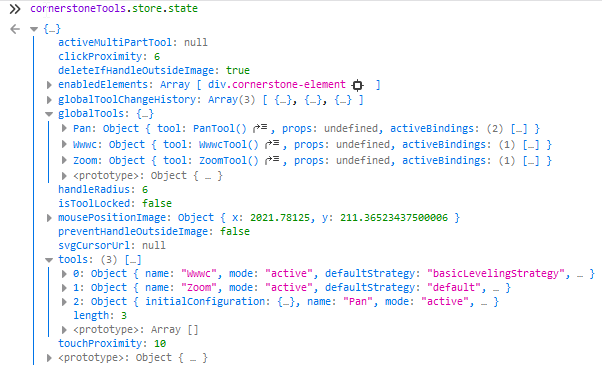
If you're global tool sync is enabled, you shouldn't need checks. Init and add tools when the route loads, destroy on exit?
@dannyrb I don't get those outputs for some reason. And I need the checks because I don't want to destroy when I switch routes. I need to maintain the state of the images/dicoms in that route when I leave it. I am already doing the init part when entering the route.
Are you caching some things for the current viewing session? If you store those in a "higher up" application state, you can still do a clean exit on the route's destroy, then restore on init.
@dannyrb No. The only caching used is for our images so that we don't need to make a new api call when loading images from a journal every time. It just seems like a lot to cache information for up to 4 possible images loaded with a ton of edits on them for such a simple situation like switching between two routes. I'd rather just deal with the warnings or create custom variables for checks to be honest unless there's a simple way to cache the information that I just don't know about.
to be able to get the above output you need to define a variable of the cornerstone store then you can access the tool's variable and check if your tool exists or not here is what I have done
// Get all cornerstoneTools store data
const storeInfo = cornerstoneTools.store.state;
console.log('storeInfo ',storeInfo );
// availableTool  is checking for tool you can ask for globalTools if you need
const availableTool = cornerstoneTools.store.state.tools ;
console.log('availableTool ',availableTool )
 const isAddedToCorner = availableTool!.find((t:any)=>t.name === `${toolName}`);
        if(  isAddedToCorner === undefined || isAddedToCorner.length === 0 ){
         // The tool is not added so we add it to cornerstoneTools
          console.log('toolName',`${toolName}`);
        }
