

 coolsnowwolf
fw3 reload 导致 upnp工作异常
反馈bug/问题模板,提建议请删除
1.关于你要提交的问题
upnpd在已经有客户端添加了映射规则的情况下,如果动了firewall规则,重启或者重载了firewall之后,upnpd 无法正确处理给客户端返回的已经存在的映射规则,导致客户端重复添加规则或者添加规则失败。
Q:是否搜索了issue (使用 "x" 选择)
- [X] 没有类似的issue
2. 详细叙述
upnp配置
重启或者reload firewall规则之前,使用Upnpc请求已经存在的
重启或者reload firewall规则之后
/etc/init.d/miniupnpd restart 重启后恢复
目前在hotplug以及firewall服务中涉及到 fw3 reload的后面添加了/etc/init.d/miniupnpd restart ,firewall 服务重启或者重载之后重启miniupnpd来规避,但是觉得不够优雅,希望屌大的看看能不能解
(1) 具体问题
A:
(2) 路由器型号和固件版本
A:X86,R5S均可复现
(3) 详细日志
无日志,上面的方法可以稳定复现。


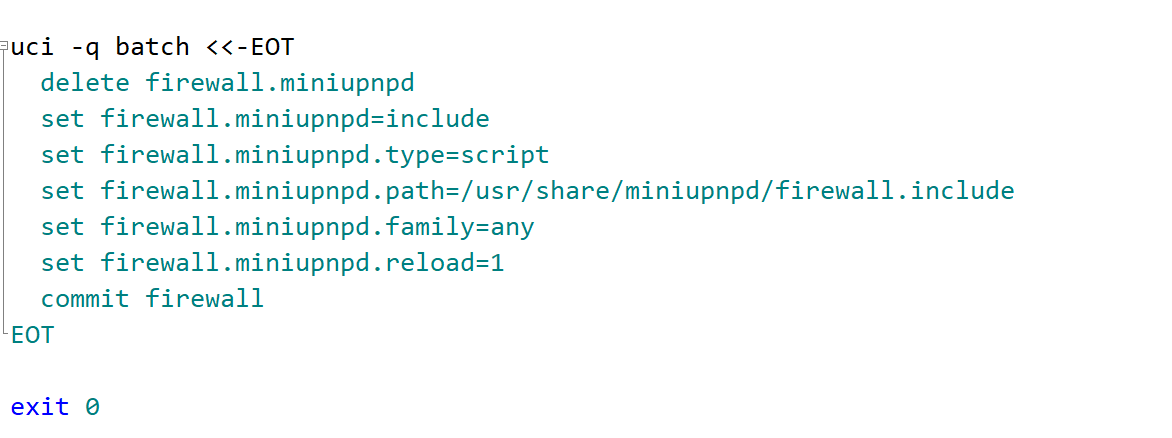
root@OpenWrt:~ # uci get firewall.miniupnpd.family any root@OpenWrt:~ # uci get firewall.miniupnpd.reload 1 root@OpenWrt:~ # uci get firewall.miniupnpd include root@OpenWrt:~ # uci get firewall.miniupnpd.type script root@OpenWrt:~ # uci get firewall.miniupnpd.path /usr/share/miniupnpd/firewall.include root@OpenWrt:~ # uci get firewall.miniupnpd.family any root@OpenWrt:~ # uci get firewall.miniupnpd.reload 1 root@OpenWrt:~ # service firewall reload =======firewall reload之后看起来还是有问题,restart之后miniupnpd规则会丢失========
reload之后的结果: ostrich@ubuntu:~$ upnpc -L Found valid IGD : http://192.168.50.1:5000/ctl/IPConn Local LAN ip address : 192.168.50.241 i protocol exPort->inAddr:inPort description remoteHost leaseTime 0 UDP 34217->0.0.0.0:0 '34217-bilibili' '' 0
restart之后: ostrich@ubuntu:~$ upnpc -L upnpc : miniupnpc library test client, version 2.1. (c) 2005-2019 Thomas Bernard. Go to http://miniupnp.free.fr/ or https://miniupnp.tuxfamily.org/ for more information. List of UPNP devices found on the network : Found valid IGD : http://192.168.50.1:5000/ctl/IPConn Local LAN ip address : 192.168.50.241 i protocol exPort->inAddr:inPort description remoteHost leaseTime
看了下,其实无论是restart还是reload firewall之后,看firewall里面的miniupnpd转发规则都是在的并且是正确的,只是通过客户端upnpc向路由器读取列表的时候有问题,所以判断是处理读取并且返回这部分转发规则的Upnpd服务逻辑哪里有问题,没有读取到firewall的转发规则,返回了0.0.0.0,根据关键字搜索定位到了upnpsoap.c,供大雕方便的时候瞄一眼
root@OpenWrt:~ # uci get firewall.miniupnpd.family any root@OpenWrt:~ # uci get firewall.miniupnpd.reload 1 root@OpenWrt:~ # uci get firewall.miniupnpd include root@OpenWrt:~ # uci get firewall.miniupnpd.type script root@OpenWrt:~ # uci get firewall.miniupnpd.path /usr/share/miniupnpd/firewall.include root@OpenWrt:~ # uci get firewall.miniupnpd.family any root@OpenWrt:~ # uci get firewall.miniupnpd.reload 1 root@OpenWrt:~ # service firewall reload =======firewall reload之后看起来还是有问题,restart之后miniupnpd规则会丢失========
reload之后的结果: ostrich@ubuntu:~$ upnpc -L Found valid IGD : http://192.168.50.1:5000/ctl/IPConn Local LAN ip address : 192.168.50.241 i protocol exPort->inAddr:inPort description remoteHost leaseTime 0 UDP 34217->0.0.0.0:0 '34217-bilibili' '' 0
restart之后: ostrich@ubuntu:~$ upnpc -L upnpc : miniupnpc library test client, version 2.1. (c) 2005-2019 Thomas Bernard. Go to http://miniupnp.free.fr/ or https://miniupnp.tuxfamily.org/ for more information. List of UPNP devices found on the network : Found valid IGD : http://192.168.50.1:5000/ctl/IPConn Local LAN ip address : 192.168.50.241 i protocol exPort->inAddr:inPort description remoteHost leaseTime
看了下,其实无论是restart还是reload firewall之后,看firewall里面的miniupnpd转发规则都是在的并且是正确的,只是通过客户端upnpc向路由器读取列表的时候有问题,所以判断是处理读取并且返回这部分转发规则的Upnpd服务逻辑哪里有问题,没有读取到firewall的转发规则,返回了0.0.0.0,根据关键字搜索定位到了upnpsoap.c,供大雕方便的时候瞄一眼
跟到了获取规则数据的upnpreplyparse.c文件中的GetValueFromNameValueList函数,然后就找不到这个读的数据是从哪儿写进来了-_-
root@OpenWrt:~ # uci get firewall.miniupnpd.family any root@OpenWrt:~ # uci get firewall.miniupnpd.reload 1 root@OpenWrt:~ # uci get firewall.miniupnpd include root@OpenWrt:~ # uci get firewall.miniupnpd.type script root@OpenWrt:~ # uci get firewall.miniupnpd.path /usr/share/miniupnpd/firewall.include root@OpenWrt:~ # uci get firewall.miniupnpd.family any root@OpenWrt:~ # uci get firewall.miniupnpd.reload 1 root@OpenWrt:~ # service firewall reload =======firewall reload之后看起来还是有问题,restart之后miniupnpd规则会丢失======== reload之后的结果: ostrich@ubuntu:~$ upnpc -L Found valid IGD : http://192.168.50.1:5000/ctl/IPConn Local LAN ip address : 192.168.50.241 i protocol exPort->inAddr:inPort description remoteHost leaseTime 0 UDP 34217->0.0.0.0:0 '34217-bilibili' '' 0 restart之后: ostrich@ubuntu:~$ upnpc -L upnpc : miniupnpc library test client, version 2.1. (c) 2005-2019 Thomas Bernard. Go to http://miniupnp.free.fr/ or https://miniupnp.tuxfamily.org/ for more information. List of UPNP devices found on the network : Found valid IGD : http://192.168.50.1:5000/ctl/IPConn Local LAN ip address : 192.168.50.241 i protocol exPort->inAddr:inPort description remoteHost leaseTime 看了下,其实无论是restart还是reload firewall之后,看firewall里面的miniupnpd转发规则都是在的并且是正确的,只是通过客户端upnpc向路由器读取列表的时候有问题,所以判断是处理读取并且返回这部分转发规则的Upnpd服务逻辑哪里有问题,没有读取到firewall的转发规则,返回了0.0.0.0,根据关键字搜索定位到了upnpsoap.c,供大雕方便的时候瞄一眼
跟到了获取规则数据的upnpreplyparse.c文件中的GetValueFromNameValueList函数,然后就找不到这个读的数据是从哪儿写进来了-_-
附上抓包请求数据
POST /ctl/IPConn HTTP/1.1
Host: 192.168.50.1:5000
User-Agent: Debian/bullseye/sid, UPnP/1.1, MiniUPnPc/2.1
Content-Length: 442
Content-Type: text/xml
SOAPAction: "urn:schemas-upnp-org:service:WANIPConnection:1#GetListOfPortMappings"
Connection: Close
Cache-Control: no-cache
Pragma: no-cache

<?xml version="1.0"?>
<s:Envelope xmlns:s="http://schemas.xmlsoap.org/soap/envelope/" s:encodingStyle="http://schemas.xmlsoap.org/soap/encoding/"><s:Body><u:GetListOfPortMappings xmlns:u="urn:schemas-upnp-org:service:WANIPConnection:1"><NewStartPort>0</NewStartPort><NewEndPort>65535</NewEndPort><NewProtocol>UDP</NewProtocol><NewManage>1</NewManage><NewNumberOfPorts>1000</NewNumberOfPorts></u:GetListOfPortMappings></s:Body></s:Envelope>


HTTP/1.1 200 OK
Content-Type: text/xml; charset="utf-8"
Connection: close
Content-Length: 4626
Server: OpenWRT/OpenWrt UPnP/1.1 MiniUPnPd/2.0
Ext:

<?xml version="1.0"?>
<s:Envelope
    xmlns:s="http://schemas.xmlsoap.org/soap/envelope/" s:encodingStyle="http://schemas.xmlsoap.org/soap/encoding/">
    <s:Body>
        <u:GetListOfPortMappingsResponse
            xmlns:u="urn:schemas-upnp-org:service:WANIPConnection:1">
            <NewPortListing>
                <![CDATA[<p:PortMappingList
                xmlns:p="urn:schemas-upnp-org:gw:WANIPConnection"
                xmlns:xsi="http://www.w3.org/2001/XMLSchema-instance" xsi:schemaLocation="urn:schemas-upnp-org:gw:WANIPConnection http://www.upnp.org/schemas/gw/WANIPConnection-v2.xsd"><p:PortMappingEntry><p:NewRemoteHost></p:NewRemoteHost><p:NewExternalPort>33585</p:NewExternalPort><p:NewProtocol>UDP</p:NewProtocol><p:NewInternalPort>33585</p:NewInternalPort><p:NewInternalClient>192.168.50.13</p:NewInternalClient><p:NewEnabled>1</p:NewEnabled><p:NewDescription>33585-bilibili</p:NewDescription><p:NewLeaseTime>0</p:NewLeaseTime></p:PortMappingEntry><p:PortMappingEntry><p:NewRemoteHost></p:NewRemoteHost><p:NewExternalPort>32990</p:NewExternalPort><p:NewProtocol>UDP</p:NewProtocol><p:NewInternalPort>32990</p:NewInternalPort><p:NewInternalClient>192.168.50.13</p:NewInternalClient><p:NewEnabled>1</p:NewEnabled><p:NewDescription>32990-bilibili</p:NewDescription><p:NewLeaseTime>0</p:NewLeaseTime></p:PortMappingEntry><p:PortMappingEntry><p:NewRemoteHost></p:NewRemoteHost><p:NewExternalPort>8568</p:NewExternalPort><p:NewProtocol>UDP</p:NewProtocol><p:NewInternalPort>8568</p:NewInternalPort><p:NewInternalClient>192.168.50.200</p:NewInternalClient><p:NewEnabled>1</p:NewEnabled><p:NewDescription>vod1-728a91b4</p:NewDescription><p:NewLeaseTime>0</p:NewLeaseTime></p:PortMappingEntry><p:PortMappingEntry><p:NewRemoteHost></p:NewRemoteHost><p:NewExternalPort>8567</p:NewExternalPort><p:NewProtocol>UDP</p:NewProtocol><p:NewInternalPort>8567</p:NewInternalPort><p:NewInternalClient>192.168.50.200</p:NewInternalClient><p:NewEnabled>1</p:NewEnabled><p:NewDescription>appmap</p:NewDescription><p:NewLeaseTime>0</p:NewLeaseTime></p:PortMappingEntry><p:PortMappingEntry><p:NewRemoteHost></p:NewRemoteHost><p:NewExternalPort>8632</p:NewExternalPort><p:NewProtocol>UDP</p:NewProtocol><p:NewInternalPort>8632</p:NewInternalPort><p:NewInternalClient>192.168.50.13</p:NewInternalClient><p:NewEnabled>1</p:NewEnabled><p:NewDescription>vod-83218187</p:NewDescription><p:NewLeaseTime>0</p:NewLeaseTime></p:PortMappingEntry><p:PortMappingEntry><p:NewRemoteHost></p:NewRemoteHost><p:NewExternalPort>8734</p:NewExternalPort><p:NewProtocol>UDP</p:NewProtocol><p:NewInternalPort>8734</p:NewInternalPort><p:NewInternalClient>192.168.50.13</p:NewInternalClient><p:NewEnabled>1</p:NewEnabled><p:NewDescription>vod-0b5b476d</p:NewDescription><p:NewLeaseTime>0</p:NewLeaseTime></p:PortMappingEntry><p:PortMappingEntry><p:NewRemoteHost></p:NewRemoteHost><p:NewExternalPort>8804</p:NewExternalPort><p:NewProtocol>UDP</p:NewProtocol><p:NewInternalPort>8804</p:NewInternalPort><p:NewInternalClient>192.168.50.13</p:NewInternalClient><p:NewEnabled>1</p:NewEnabled><p:NewDescription>vod-a2187b88</p:NewDescription><p:NewLeaseTime>0</p:NewLeaseTime></p:PortMappingEntry><p:PortMappingEntry><p:NewRemoteHost></p:NewRemoteHost><p:NewExternalPort>9343</p:NewExternalPort><p:NewProtocol>UDP</p:NewProtocol><p:NewInternalPort>9343</p:NewInternalPort><p:NewInternalClient>192.168.50.13</p:NewInternalClient><p:NewEnabled>1</p:NewEnabled><p:NewDescription>vod-c19a7ac4</p:NewDescription><p:NewLeaseTime>0</p:NewLeaseTime></p:PortMappingEntry><p:PortMappingEntry><p:NewRemoteHost></p:NewRemoteHost><p:NewExternalPort>9488</p:NewExternalPort><p:NewProtocol>UDP</p:NewProtocol><p:NewInternalPort>9488</p:NewInternalPort><p:NewInternalClient>192.168.50.13</p:NewInternalClient><p:NewEnabled>1</p:NewEnabled><p:NewDescription>vod-12750394</p:NewDescription><p:NewLeaseTime>0</p:NewLeaseTime></p:PortMappingEntry><p:PortMappingEntry><p:NewRemoteHost></p:NewRemoteHost><p:NewExternalPort>8579</p:NewExternalPort><p:NewProtocol>UDP</p:NewProtocol><p:NewInternalPort>8579</p:NewInternalPort><p:NewInternalClient>192.168.50.13</p:NewInternalClient><p:NewEnabled>1</p:NewEnabled><p:NewDescription>vod-f45b735a</p:NewDescription><p:NewLeaseTime>0</p:NewLeaseTime></p:PortMappingEntry><p:PortMappingEntry><p:NewRemoteHost></p:NewRemoteHost><p:NewExternalPort>8907</p:NewExternalPort><p:NewProtocol>UDP</p:NewProtocol><p:NewInternalPort>8907</p:NewInternalPort><p:NewInternalClient>192.168.50.13</p:NewInternalClient><p:NewEnabled>1</p:NewEnabled><p:NewDescription>vod-57a6a27d</p:NewDescription><p:NewLeaseTime>0</p:NewLeaseTime></p:PortMappingEntry></p:PortMappingList>]]>
            </NewPortListing>
        </u:GetListOfPortMappingsResponse>
    </s:Body>
</s:Envelope>