

 cookpete
NotSupportedError: The operation is not supported.
IOS Safari doesn't load video, just crossed player button, I use sentry for my project and i have captured this:

my product route page:
import React, {useEffect, useState} from 'preact/compat'
import ReactPlayer from 'react-player'
import {useParams, Redirect, useLocation} from "react-router-dom";
import Loader from "../../components/loader";
import request from "../../request"
import LayOut from "../../components/layout";
import bootstrap from './containerBootstrap.scss'
import LazyImage from "../../components/lazyImage";
import styles from './style.scss'
import CommentBlock from "../../components/CommentsBlock";
import { Helmet } from "react-helmet";

const ProductRoute = () => {
    const { data: locationData } = useLocation()
    const [productData, setProductData] = useState(locationData)
    const [loading, setLoading] = useState(false)
    const [error, setError] = useState('')
    const { id } = useParams()

    useEffect(() => {
        if (productData) return
        setLoading(true);
        (async () => await request(`/products/item/${id}`))().catch(e => {
            setError(e)
            setLoading(false)
        }).then(data => {
            setProductData(data)
            setLoading(false)
        })
    }, [id])


    if (error) return <Redirect to="/404" />
    if (!productData || loading) return <Loader />
    return (
      <>
          <Helmet>
              <title>{productData.title}</title>
              <meta name="description" content={productData.description}/>
          </Helmet>
          <LayOut>
              <div class={bootstrap.containerBootstrap}>
                  <div class={styles.product__layout}>
                      <div class={styles.product__cover}>
                          <LazyImage src={`/public/hentai/covers/${productData.cover}`}
                                     alt={productData.title} />
                      </div>
                      <div class={styles.product__info}>
                          <h1 class={styles.product__title}>
                              {productData.title}
                          </h1>
                          <p class={styles.product__description}>
                              {productData.description}
                          </p>
                          <span class={styles.product__info_short}>
                            Brand: <span class={styles.product__info_short_highlighted}>{productData.studio}</span>
                        </span>
                          <span class={styles.product__info_short}>
                            Release Date: <span
                            class={styles.product__info_short_highlighted}>{new Date(productData.releaseDate).toLocaleDateString()}</span>
                        </span>
                          <div class={styles.product__tagsContainer}>
                              {productData.tags.map(el => {
                                  return <div>
                                      {el}
                                  </div>
                              })}
                          </div>
                      </div>
                  </div>
                  <div class={styles.videoContainer}>
                      <ReactPlayer url={`/public/hentai/videos/${productData.video}`}
                                   width="100%" height="100%" controls
                                   config={{ file: { attributes: { controlsList: 'nodownload' } } }} />
                  </div>
                  <CommentBlock />
              </div>
          </LayOut>
      </>
    )
}

export default ProductRoute

What format is your video in? It looks like iOS just might not support it: https://caniuse.com/?search=video%20format

Maybe this? https://stackoverflow.com/a/47310447
I can try using url, but still seems quite strange that absolute path is not working, because I use
/public/hentai/videos/${productData.video} not public/hentai/videos/${productData.video}
Still happens, there is an example:
https://user-images.githubusercontent.com/32138582/154944414-e7d13324-fd65-49e4-aff6-3250162f3706.MP4
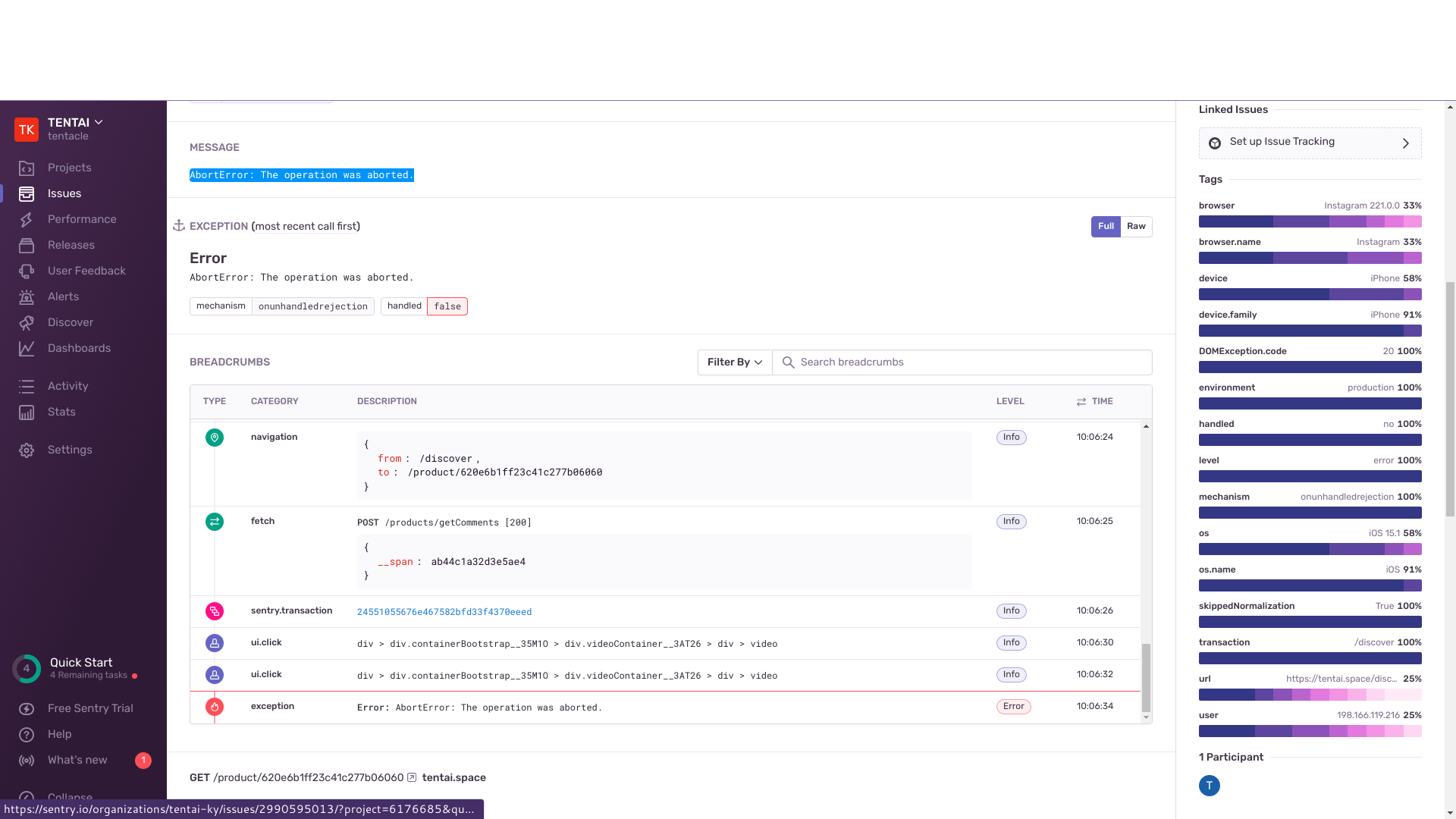
We actually have 2 issues in sentry:

Does the same thing happen if you hardcode a sample mp4, eg
https://test-videos.co.uk/vids/bigbuckbunny/mp4/h264/360/Big_Buck_Bunny_360_10s_1MB.mp4
If the sample works in your app then that narrows it down to something specific to how your videos are encoded and/or delivered to the browser.
@philosofonusus Please re-open with more detail if this is still an issue.