

 cookpete
Twitch controls not able to hide when controls set to false
Current Behavior
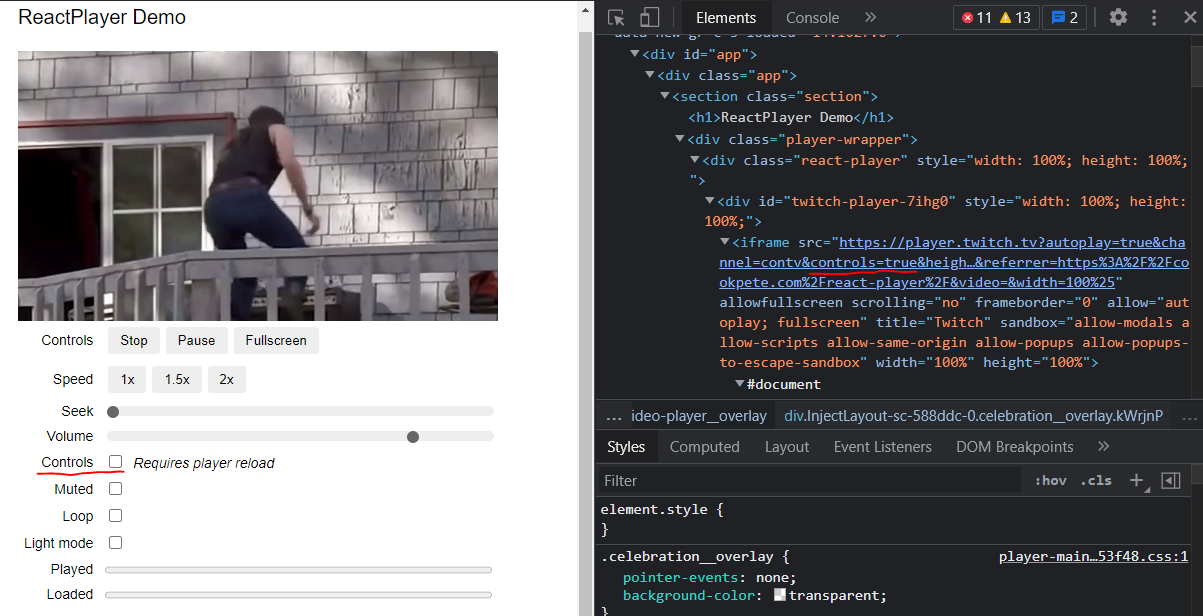
I want to hide controls from the Twitch stream channel when I set controls props to false but the controls query still shows true.
Expected Behavior
The controls should be hidden when I set the controls props to false.
Steps to Reproduce
- set controls props to false
- inspect the iframe and you will see the controls query is still true.
- Twitch stream control still shows
Environment
- URL attempting to play: https://cookpete.com/react-player/
- Browser: Google Chrome Version 92.0.4515.13
- Operating system: Windows 10
Other Information

Mine works fine , when I click the "Controls" checkbox the iframe source shows appropriately and the player also displays appropriately.

Mine works fine , when I click the "Controls" checkbox the iframe source shows appropriately and the player also displays appropriately.
If you use the Twitch Test A which is only a video then the Controls check box works fine. If you use the Test C and Custom URL with channel format, ex: twitch.tv/{channel name}, it will not work.
in the source code:
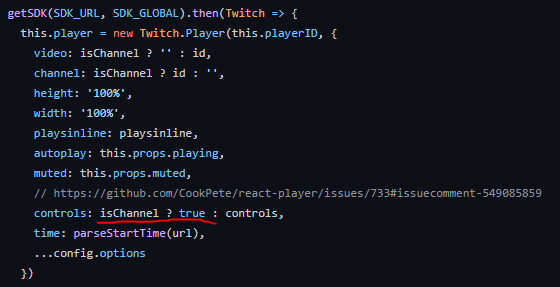
If the URL is "twitch.tv/{channel name}" which only contains channel name, it will set the Controls props always to true.