

 confluentinc
Windows: .env file problem with cp-all-in-one and cp-all-in-one-community
Hi,
I tried to follow the cp-all-in-one and cp-all-in-one-community installation guides here:
- https://docs.confluent.io/current/quickstart/ce-docker-quickstart.html
- https://docs.confluent.io/current/quickstart/cos-docker-quickstart.html
I used the suggested 5.4.1-post branch.
But after I run the docker-compose up -d --build command I got the following error message:
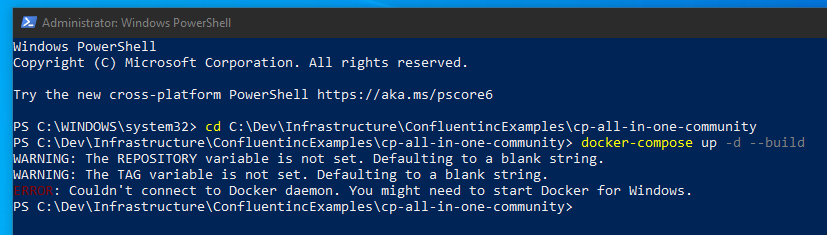
Probably the reason is that in the .env file there is a relative reference for ../utils/config.env and this command cannot parse it.
If I replaced .env file content with the content of ../utils/config.env it worked.
I run it on Windows 10 and in PowerShell.

@joesimon0102 Thanks for filing this issue and using the examples. I'm glad you found a workaround for this particular issue. Right now Confluent Platform is not supported on Windows (https://docs.confluent.io/current/installation/versions-interoperability.html#operating-systems) which also requires Docker to be ran on a supported OS (https://docs.confluent.io/current/installation/versions-interoperability.html#docker).
However, we've taken note of your issue and will evaluate our usage of the symbolic link and see if we can come up with a more widely suported method that meets our needs as well.
