

 compdemocracy
Performance issues with about 100 simultaneous users
Hi all,
I'm running a self-hosted instance of Polis on an Ubuntu 20.04 VPS (8GB RAM, 2.4GHz 4-core CPU). I'm deploying using docker-compose, and running into performance issues with about 100 simultaneous users.
What I've tried already to (successfully) boost performance:
-
server/docker.envfile:DEV_MODE=false,MATH_ENV=prod -
scale: 8for server indocker-compose.yml. I'm using Caddy as a reverse proxy and load balancer. (The 8 is arbitrary, any tips on finding the right value, or is this just trial-and-error?)
I'm measuring response times using JMeter. In my use case, we’re using Polis in a “live” setting with a live audience of approx. 100 or more people. To be on the safe side, I’m assuming that participants contribute a new statement every 5-10 seconds, while voting on a statement every 0.5-1.5 seconds. To simulate this, I’m simply sending POST requests at these intervals to /api/v3/comments and /api/v3/votes using my own machine’s cookies/token in the headers. The contributed statements are randomly generated strings using JMeter’s BeanShell PreProcesor.
Running the load test for five minutes, I’m seeing a continuous 100% CPU load of the math container (using docker stats), and while response times for the POST requests seem OK now (avg 700ms), GET requests to the public server interface can take many seconds during load, or even remain spinning altogether. With 100 devices simultaneously loading the interface as an embedded iframe I suspect this will cause an additional performance hit, so I’m a bit worried about the server not holding up. During an earlier run with a live audience the server docker container crashed altogether, which I’m hoping to avoid this time around.
I suppose my main questions are as follows:
- Is the performance I’m seeing “typical”? Based on other threads here on GH (e.g., https://github.com/compdemocracy/polis/discussions/1319), I was hoping that a 4-core CPU and 8GB RAM would be sufficient for handling 100 users relatively easily, but perhaps what was reported there did not take into account active/simultaneous use?
- Do you have any tips/ideas on bumping the performance up a notch without investing in more powerful hardware?
Looking forward to hearing from you, and thank you for creating such an awesome piece of software :)

If 100 participants submit comments at that rate for 5 minutes, that gives you 5000 comments, which is much larger than we have ever seen in any real world usage. Conversations with that many comments would tend to have several to tens of thousands of participants. Because the computational complexity of the math worker grows with the number of comments, you end up placing much higher load on the math worker this way, so it may be consuming more memory than expected, and not leaving enough for the server nodes to function well.
A much more accurate simulation would involve everyone submitting around 1 comment on average (could model this as a Poison distribution perhaps?).
If you're looking to improve scalability, I'd start by increasing your RAM. If you increase the memory on your machine, you may be able to leave more room for the math worker and server nodes to get along nicely. If you find that the bottleneck is not memory, but server node responsiveness, you can also try bumping the number of cores, and further increase the number of server nodes you're running.

If 100 participants submit comments at that rate for 5 minutes, that gives you 5000 comments, which is much larger than we have ever seen in any real world usage. Conversations with that many comments would tend to have several to tens of thousands of participants. Because the computational complexity of the math worker grows with the number of comments, you end up placing much higher load on the math worker this way, so it may be consuming more memory than expected, and not leaving enough for the server nodes to function well.
A much more accurate simulation would involve everyone submitting around 1 comment on average (could model this as a Poison distribution perhaps?).
If you're looking to improve scalability, I'd start by increasing your RAM. If you increase the memory on your machine, you may be able to leave more room for the math worker and server nodes to get along nicely. If you find that the bottleneck is not memory, but server node responsiveness, you can also try bumping the number of cores, and further increase the number of server nodes you're running.
@metasoarous Shoot, what you're saying makes a lot of sense! In our previous tests we received about 50 statements for approx 60 participants, so I'll recalibrate to simulate a more realistic scenario. For reference's sake, I'll post an update here with my new load test findings (probably some time next week).
Thanks a lot!
You're quite welcome. And yes, please do report back. The results will surely be helpful for others. Thanks!
@Simon-Dirks Folks might also be interesting in seeing your Caddy setup, if you're able to share that.
@Simon-Dirks Folks might also be interesting in seeing your Caddy setup, if you're able to share that.
Of course! I disabled the nginx-proxy in the docker-compose file, and added a Caddyfile in the root. The Caddyfile can be extremely basic:
[DOMAIN_NAME_HERE] { reverse_proxy 127.0.0.1:5000 127.0.0.1:5001 127.0.0.1:5002 }
I've added access logging as well, but this is of course optional: log { output file /var/log/polis-access.log }
In my case, I've set up the server with scale: 3 and ports: - "5000-5002:5000" in docker-compose.yml, these ports should match the ones in the Caddyfile.
That's all, run caddy start and you get SSL out of the box! (That was my main reason for switching). There's also a Caddy docker image, so that might be a cleaner way to do it, but I didn't test it myself.
@metasoarous As promised, here's an updated performance report! I've created a new conversation with six seed statements, and five rejected statements. I ran my load test for five minutes, and accepted all (randomly generated) incoming statements manually as a moderator.
I kept one participant window open where I voted randomly on newly accepted statements. Otherwise, all voting was simulated by voting continuously on a single comment through JMeter. I based my new load numbers on previous tests (avg of +-30 votes and 0.75 statements per participant).
JMeter setup with 100 participants:
- One initial GET request per participant for the embedded conversation.
- One initial
participationInitGET request per participant. - Each participant "votes" every 0 - 10 seconds (i.e., on average 60 votes per participant in five minutes). Note that these requests are all votes on a SINGLE comment.
- Each participant polls
math/pca2every four seconds. - Each participant submits a new statement every 0 - 300 seconds (i.e., two statements in five minutes on average). Note that all these comments were in reality submitted by a SINGLE participant
After the run, there were 172 accepted statements (so 166 added taking the initial seed statements into account). 5507 votes were cast.
During testing, moderating went smoothly, though sometimes with a little delay. The same goes for voting in a separate window. In general, I'd say the server held up very well!
I did notice +-5% of the voting requests returned 500 errors (polis_vote_err off the top of my head), but that might be related to the way I simulated voting in JMeter. Given that I generated random strings as statements, I naturally had a couple of 409/Conflict errors as well (when an identical string was generated).
In general, most requests finished in very reasonable times! More details below:

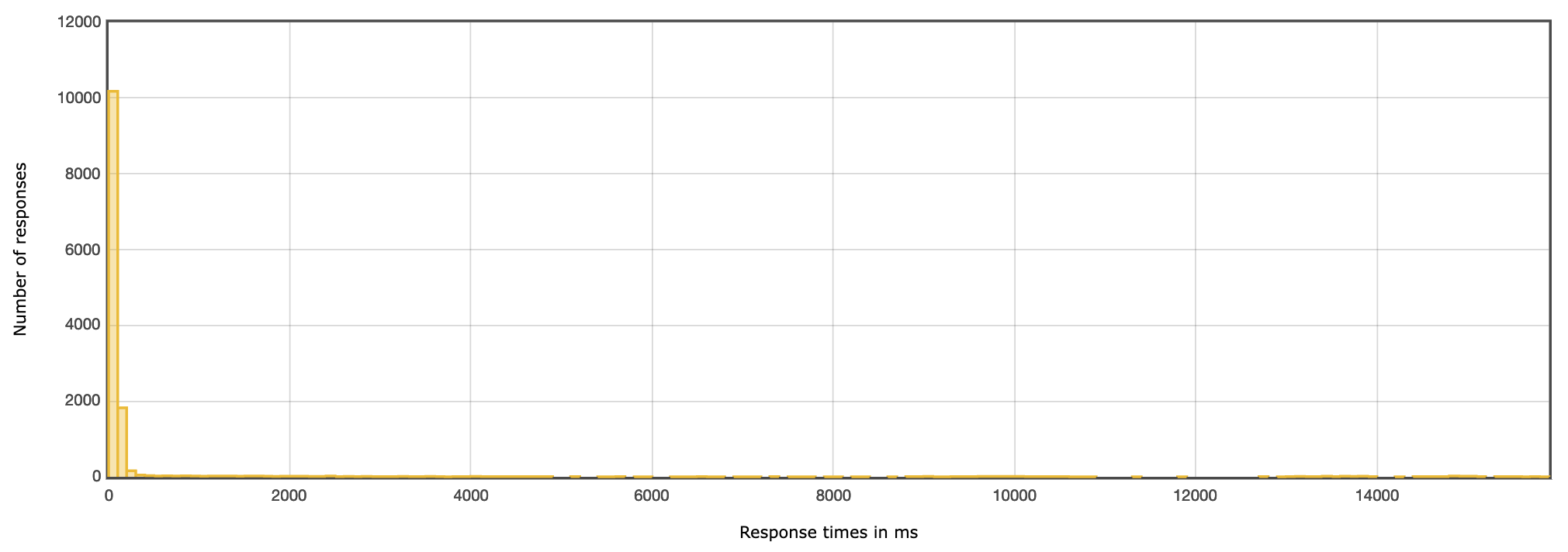
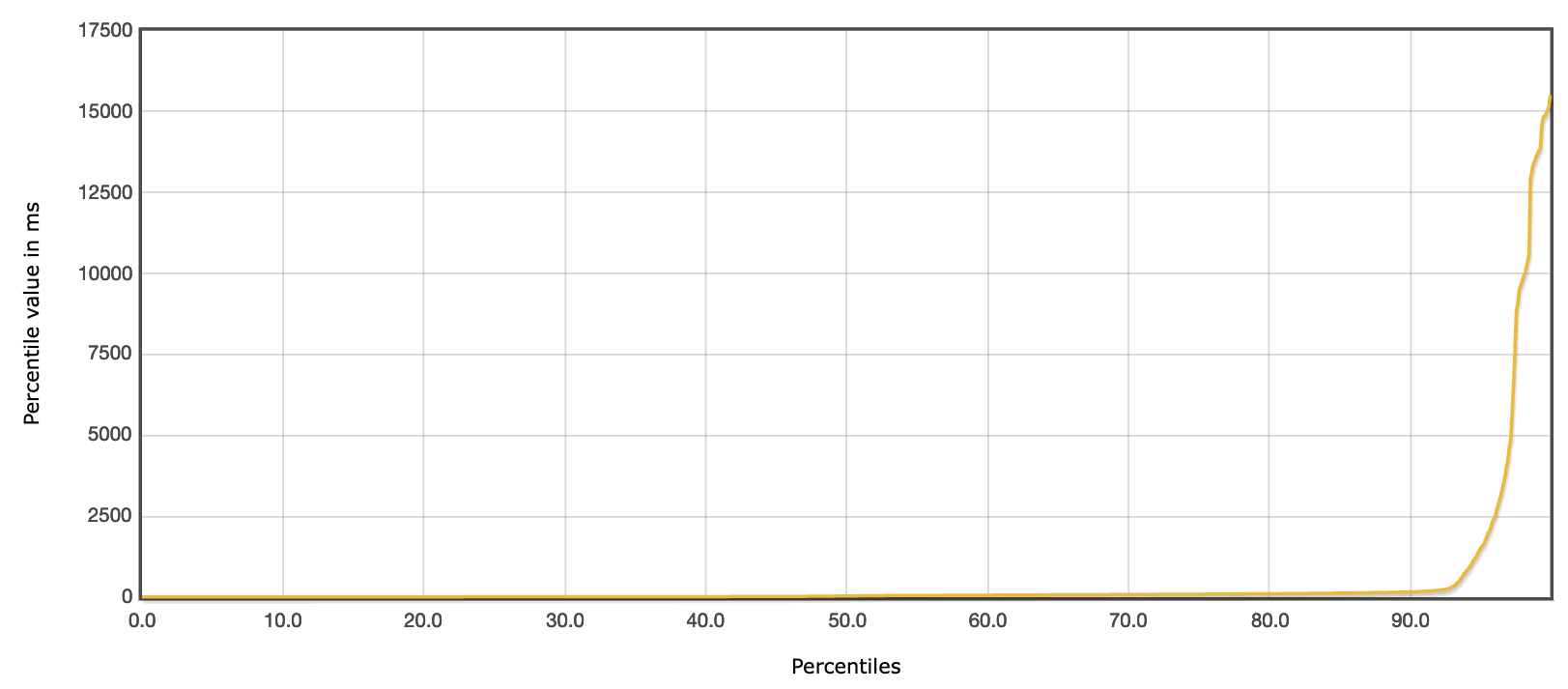
Finally, I've also written docker stats output to a file during the run to check CPU/memory usage:
stats_25_Aug_2022_09_23.txt
On average, most of the CPU load was taken by the math and postgres workers. The math worker on average seemed to take <1.4GB of RAM, the other workers barely anything (<100MB).
In other words, I'm happy and feeling a bit more confident for the big show coming up! Hope these stats are also of use to others. I'll close this issue for now and wish you all the best :)