

 commons-app
Save "raw" picture in history
Problem: Smartphones increasingly use post-processing and AI to make picture more vivid/interesting for instance by exaggerating colours or blurring the background. Unfortunately that often makes the pictures less representative of reality. The original is lost.
Idea: Also store a "rawer" version of the picture, if the camera app lets us have it. That one could be saved first, and then the post-processed picture could be saved as a new version of it. All versions stay visible in the file history, making it easy for user to decide which version they want to use:
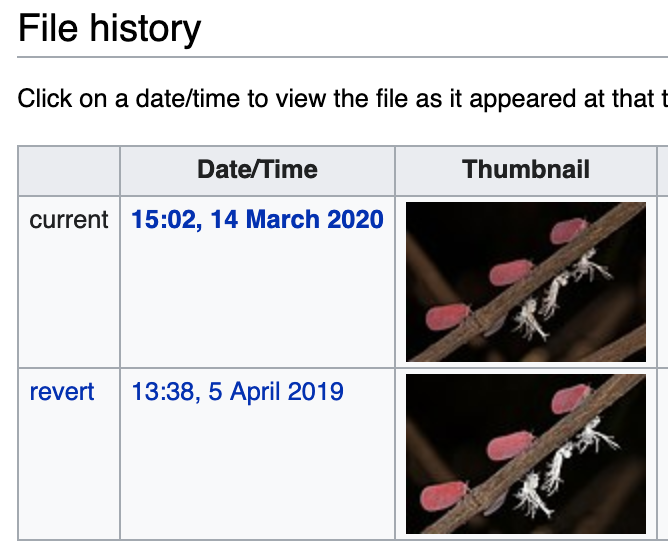
Note: The format and filenames of the "raw" versions (when they are saved) are very model-dependent and settings-dependent, but hopefully we can implement this for one model/setting as a proof of concept.


@deek121477 Yes thanks! What phone ad camera app are you using? The first step would be to figure out how to get the "raw" picture, please post your findings here :-)
Thank you for assigning me this issue @nicolas-raoul The phone that I would be using is Android and Adobe Photoshop Camera And I more thing as I am beginner to this project Can this issue be labeled as a good first issue or not?
It is a good first issue in the sense that it is limited to a rather specific area of the app. It is more difficult than the average "good first issue", though, but I am sure you can do it :-)
On my Pixel 4 phone the default camera has a setting called RAW+JPEG control which saves a .dng file in the Raw folder. My Galaxy phone also has an option to save raw images as a .dng.
Unfortunately I just discovered that DNG file upload is not implemented yet: https://phabricator.wikimedia.org/T21153 If we have a good proof-of-concept I believe we could raise the priority of that Phabricator ticket.
So I suggest starting with "HDR originals" rather than RAW, since they use JPG rather than DNG.
- Install the OpenCamera app and open it.
- Tap the 3 dots, tap HDR.
- Settings>Photo settings>Save all images for HDR mode.
- Take a picture (it takes time as the app actually takes 3 pictures.
- Go to Gallery, find the OpenCamera folder. It should have 4 pictures: Low brightness, normal brightness, high brightness, HDR result.
So for now the implementation would be:
- When uploading a picture, the Commons app first checks whether it is in a folder called "OpenCamera" and whether the 3 HDR pictures are present.
- If yes, upload all of the 4 pictures one after the other using the Commons "file history" feature shown in the screenshot above. The HDR result should be uploaded last. (The advantage is that in the future whenever more powerful HDR algorithms get developed, Commons people can regenerate the HDR images. Also, for pictures with a historical value, specialists will be able to see all details that are not visible in the result HDR.)
Thank you so much for giving the guidance for approaching the issue. I am done with OpenCamera Part and I have got 4 images too.
While uploading images on the commons app I have uploaded only 1 image as there was no option for 4 images to be uploaded. Here I am attaching the link to the image that I have uploaded:
https://commons.m.wikimedia.org/wiki/File:Air_is_wild_with_the_leaves.jpg?markasread=44574435&markasreadwiki=commonswiki
@deek121477 At https://commons.wikimedia.org/wiki/File:Air_is_wild_with_the_leaves.jpg you can see a link called Upload a new version of this file. You will have to discover what API calls the form behind that link use. :-)
@deek121477 At https://commons.wikimedia.org/wiki/File:Air_is_wild_with_the_leaves.jpg you can see a link called
Upload a new version of this file. You will have to discover what API calls the form behind that link use. :-)
Okay. I will try.
While cloning [email protected]:deek121477/apps-android-commons.git
I am getting a message of: [ permission denied(public key) Please make sure you have the correct access rights and the repository exists.] So can I use the git clone command of https://github.com/deek121477/apps-android-commons.git as in the android studio, all files are opening and working properly?
Also, is HAXM needed?
Have you tried all troubleshooting steps listed at https://docs.github.com/en/authentication/troubleshooting-ssh/error-permission-denied-publickey ?
Have you tried all troubleshooting steps listed at https://docs.github.com/en/authentication/troubleshooting-ssh/error-permission-denied-publickey ?
Not yet. I will try
Have you tried all troubleshooting steps listed at https://docs.github.com/en/authentication/troubleshooting-ssh/error-permission-denied-publickey ?
Not yet. I will try
Can I use HTTPS instead of SSH?
I think HTTPS would not allow you to make changes (I could be wrong).
You can start with HTTPS, though. Just make sure to make backups to not lose your changes.
I think HTTPS would not allow you to make changes (I could be wrong).
You can start with HTTPS, though. Just make sure to make backups to not lose your changes.
Okay.I will continue with HTTPS, and make sure about my backups too. I have gone through this article to understand difference between HTTPS and SSH. https://ourtechroom.com/tech/https-vs-ssh-in-git/
Actually, I tried making changes in the code But it was a bit confusing to find out code where photos get uploaded in history
Can you please help me? Understanding the code base is taking much time.
Hi @deek121477, Have you found the chain of method calls that performs the actual file upload? Would you mind posting the list of methods here?
@deek121477 I would suggest running the app in debug mode from your IDE (such as Android Studio), setting breakpoints, and actually uploading a picture using the app.
@nicolas-raoul I tried running in debug mode. But it runs very slow on my laptop(4GB RAM). Also setting breakpoints was a bit confusing. Is there any resource where I can learn more about setting breakpoints?
@deek121477 In case you're still looking for information about breakpoints, you could take a look at this resource: Breakpoints - Debug your app | Android Developers. You could also read the full guide here: Debug your app | Android Developers


@deek121477 Any progress on this? :-)
@bhavanagarlapati Please take one issue at a time. Do not hesitate to come back to this one after sending a pull request for your currently assigned one. :-)
@deek121477 Any progress on this? :-)
@bhavanagarlapati Please take one issue at a time. Do not hesitate to come back to this one after sending a pull request for your currently assigned one. :-)
No
@deek121477 Do you have plans to pursue this further? It's totally fine either way 🙂

@XxBrezxX Please focus on one issue at a time :-) Thanks for your enthusiasm!
Has this issue been completely resolved? Can I try this question? I'm using an Apple phone and I don't know if I can try this problem.


@ZIYANGSONG2003 I don't think an Apple phone would help here sorry! :'-(
@antungchen It is yours!