

 common-workflow-language
Items missing from installation guide
So, I am running on Ubuntu , so this is just my experience.
I need to install wheel node.js graphviz
and remove all instances of emphasize from the markdown.
For others having similar issues - please note what else you needed to do.

So, I am running on Ubuntu , so this is just my experience.
I need to install wheel node.js graphviz
and remove all instances of emphasize from the markdown.
For others having similar issues - please note what else you needed to do.
I needed to install graphviz and upgrade my pip. You'd also need to do an apt update.

Also I needed to close this block in prereq --> https://github.com/common-workflow-language/user_guide/pull/278
The wheel install is fixed in https://github.com/common-workflow-language/user_guide/commit/bb948f06736d0583dfef81cf185a857ea97d3587

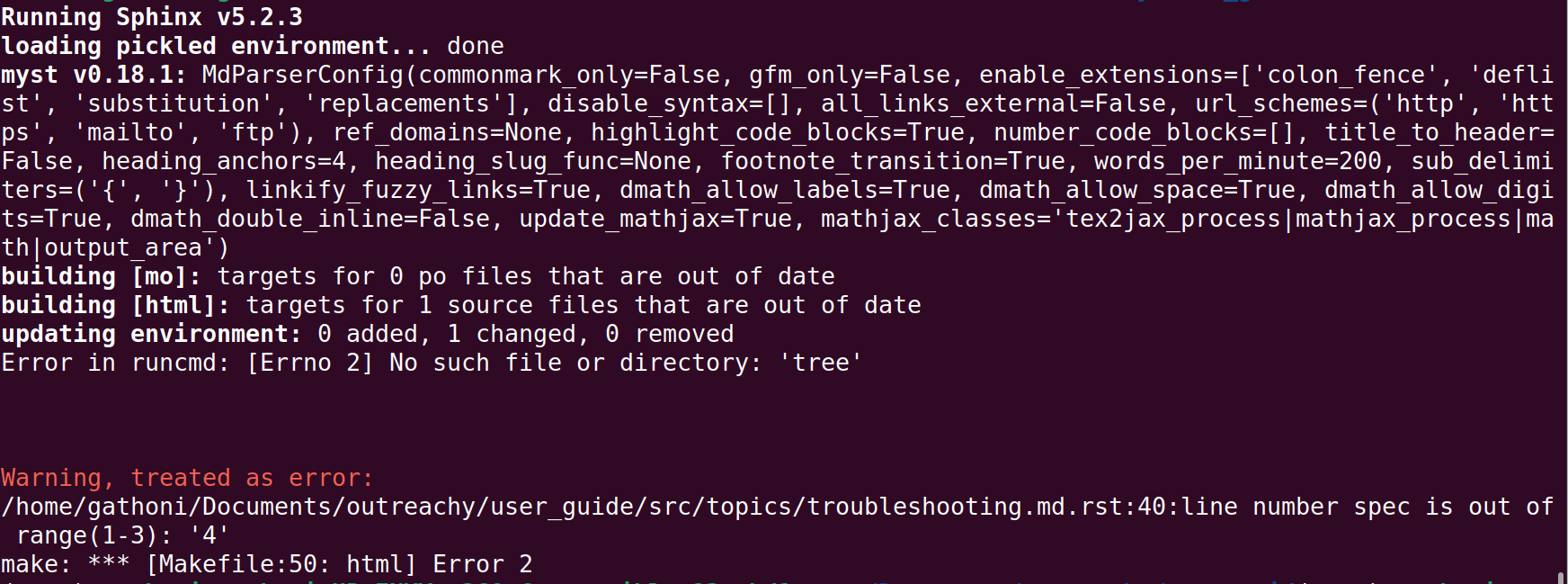
I followed the instructions in the setup tutorial. which included installing graphviz. However, I did not need to remove all the emphasize instances. Only the one on line 40 in src/topics/troubleshooting.md following this error message.

Hi. I am an Outreachy internship applicant. Perhaps a bit late to join the contribution phase. I am absolutely new to CWL and started going through the three guides (contribution, user & style). I was wondering if this could be a relevant task for me to take up, as I will have to start the installation process from scratch and work on (hopefully successive) bugs/ errors/ warnings I get. Please advise. Thank You.

Hello @swzCuroverse, when setting up the development environment on Ubuntu, I had similar issues as those mentioned here. I had to install:
- tree (that will fix the issue at https://github.com/common-workflow-language/user_guide/issues/279#issuecomment-1276996686)
- node.js
- graphviz
Will it be alright if i added a prerequisite section for Ubuntu under the buiding section of the contributing docs

I followed the setup tutorial too but for Windows (Windows 10). Few things that were different from the document: Step 2:
- upgrade of WSL from 1 to version 2 required Enabling "Virtual Machine Platform" from the Window Features (Turn on/off features) >> reboot.
- Windows subsystem for Linux was already checked.
Step 3: I did not understand this step as after rebooting Ubuntu did not ask to configure any username or password. When prompted at Step 5, I first tried blank (did not work) and then the password same as username, which worked.
Step 4: Docker setup did not prompt or initiated reboot but asked to close and log out. Post-logout steps were performed as listed in the tutorial.
After that everything worked except at the time of STAR Gnome Index creation. Received error for file format:
raise ValidationException(
schema_salad.exceptions.ValidationException: File has an incompatible format: {
  "class": "File",
  "location": "file:///home/dell/novice-tutorial-exercises/rnaseq/dm6.fa",
  "format": "https://edamontology.org/format_1929",
I changed the file format from https://edamontology.org/format_1929 to http://edamontology.org/format_1929 which debugged the error.
I followed the setup tutorial too but for Windows (Windows 10). Few things that were different from the document: Step 2:
* upgrade of WSL from 1 to version 2 required Enabling "Virtual Machine Platform" from the Window Features (Turn on/off features) >> reboot.

* Windows subsystem for Linux was already checked.
Step 3: I did not understand this step as after rebooting Ubuntu did not ask to configure any username or password. When prompted at Step 5, I first tried blank (did not work) and then the password same as username, which worked.
Step 4: Docker setup did not prompt or initiated reboot but asked to close and log out. Post-logout steps were performed as listed in the tutorial.
After that everything worked except at the time of STAR Gnome Index creation. Received error for file format:
raise ValidationException(
schema_salad.exceptions.ValidationException: File has an incompatible format: {
  "class": "File",
  "location": "file:///home/dell/novice-tutorial-exercises/rnaseq/dm6.fa",
  "format": "https://edamontology.org/format_1929",
I changed the file format from
https://edamontology.org/format_1929tohttp://edamontology.org/format_1929which debugged the error.
I followed the setup tutorial too but for Windows (Windows 10). Few things that were different from the document: Step 2:
* upgrade of WSL from 1 to version 2 required Enabling "Virtual Machine Platform" from the Window Features (Turn on/off features) >> reboot.

* Windows subsystem for Linux was already checked.
Step 3: I did not understand this step as after rebooting Ubuntu did not ask to configure any username or password. When prompted at Step 5, I first tried blank (did not work) and then the password same as username, which worked.
Step 4: Docker setup did not prompt or initiated reboot but asked to close and log out. Post-logout steps were performed as listed in the tutorial.
After that everything worked except at the time of STAR Gnome Index creation. Received error for file format:
raise ValidationException(
schema_salad.exceptions.ValidationException: File has an incompatible format: {
  "class": "File",
  "location": "file:///home/dell/novice-tutorial-exercises/rnaseq/dm6.fa",
  "format": "https://edamontology.org/format_1929",
I changed the file format from
https://edamontology.org/format_1929tohttp://edamontology.org/format_1929which debugged the error.
@simplyrucha -- since you were using the instructions from the Novice guide - I would open issues there for these differences here https://github.com/carpentries-incubator/cwl-novice-tutorial/issues --> since this is the repo for the User Guide.
It looks like the http issues was already addressed in bio-cwl-tools which the User Guides users --> https://github.com/common-workflow-library/bio-cwl-tools/pull/144
I would also re-try the installl if you have any issues with the install from the cwltool itself here --> https://github.com/common-workflow-language/cwltool --> if those have the same issues then I would also place an issue in that repo.