

 colbymillerdev
Previous And Next Button position Bug
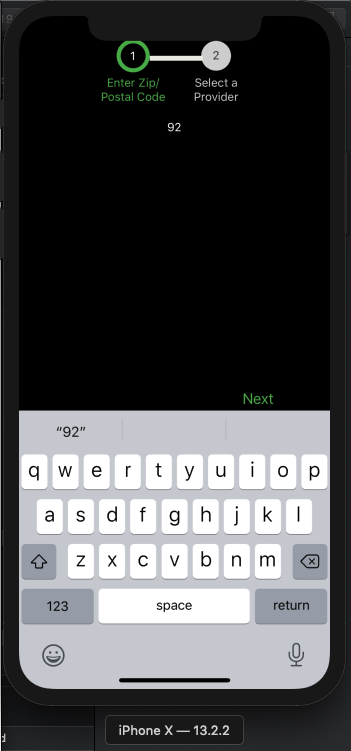
When using TextInput component ,The Previous And Next Button will show upon the keyboard


Having the same issue as well. Here is a screenshot where I am on step 1 but the keyboard covers the "Next" button.
In another screen of mine I was having this issue and was able to apply the "KeyboardAvoidingView" provided by the "react-native" library.
Maybe could do the same? Or possibly open up the whole "action row" to be styled as one component/container?


Decided to play around with it myself to see if what I suggested was even an option. Here is a rough first idea that seems to work.
import React from 'react';
import {KeyboardAvoidingView, Dimensions, Platform, View} from 'react-native';
const windowHeight = Dimensions.get('window').height;
const actionRowPosition = (windowHeight * .10);
console.log(actionRowPosition);
const ProgressButtons = props => (
<KeyboardAvoidingView behavior={Platform.OS === "ios" ? "padding" : "height"}>
<View style={{ flex: 1, flexDirection: 'row', marginBottom: actionRowPosition}}>
<View style={{ position: 'absolute', left: 60, bottom: 40 }}>{props.renderPreviousButton()}</View>
<View style={{ position: 'absolute', right: 60, bottom: 40 }}>{props.renderNextButton()}</View>
</View>
</KeyboardAvoidingView>
);
export default ProgressButtons;
Having this issue too in 1.3.4. This hasn't been fixed yet for iOS. It works fine on Android 11.
My workaround without having to mess with the module code is to wrap this around the ProgressSteps component.
<KeyboardAvoidingView style={{ flex: 1 }} behavior="padding" keyboardVerticalOffset={-40}></KeyboardAvoidingView>
if only Platform.OS === 'ios'. If for Android, remove the behavior="padding" prop.
I do wish we can send in styles props to customize the button row container since there is so much whitespace around the button row. l'm looking at the module code has a marginTop: 90 which is big for me. I would have to change the position, bottom values of 40 too.
