

 codota
Tabnine Extension was unable to download its dependencies
please complete the following information:
- OS version: Linux
- Editor: VS Code
- Editor version:
- Programming language:
- TabNine extension version: v3.4.26
- Engine version (could be located within Tabnine Hub):
Issue Details:
I use VS Code remote on Linux. After installing TabNine, the status bar always show tabnine: Starting.
Maybe it is because the remote machine can't connect to the network to download files.
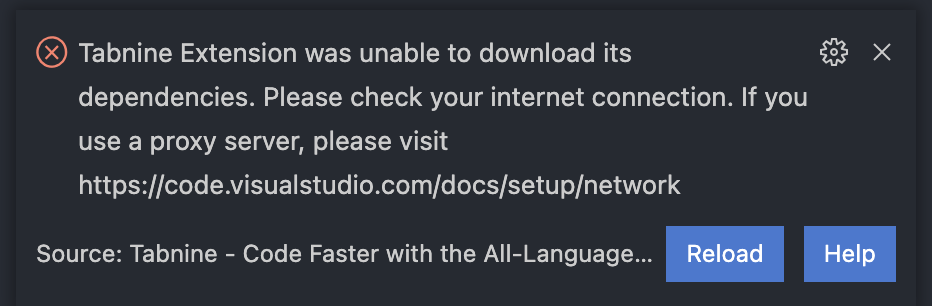

And Tabnine::config doesnot work for me.
gz#6305

Can you uninstall Tabnine? Then remove the folder's content of the binary files, It should be located at /home/{UserName}/.vscode-server/data/User/globalStorage/tabnine.tabnine-vscode/binaries/ And after that, reinstall Tabnine. If it fails again with this error, perhaps try to reinstall the dependencies using a visx file from https://marketplace.visualstudio.com/_apis/public/gallery/publishers/TabNine/vsextensions/tabnine-vscode/3.4.26/vspackage
Would you please let me know if that works?

Running into this issue, tried the suggested fix and the VSIX file still fails. Both the one listed above me and the current version at: https://marketplace.visualstudio.com/_apis/public/gallery/publishers/TabNine/vsextensions/tabnine-vscode/3.5.13/vspackage
I'm on my own machine with no configured proxies. I can freely install other extensions without problems

Getting this error but we are behind a proxy with pretty much everything blocked. What domains would we need to whitelist in order for this to finish install?
The failure message included 'Source: Tabnine AI (Extension)'

This issue has been automatically marked as stale because it has not had recent activity. It will be closed if no further activity occurs. Thank you for your contributions.
![stale[bot] avatar](https://avatars.githubusercontent.com/in/1724?v=4 "Published by a pub.dev verified publisher")