

 codota
Unsatisfiable read, closing connection: delimiter re.compile(b'\r?\n\r?\n') not found
please complete the following information:
- OS version: Win10
- Editor: Jupyter notebook
- Editor version: IPython 7.13.0
- Programming language: python
- TabNine extension version: 1.1.0
Hi - Identified that when I have this cell in my notebook tabnine stops working. Haven't figured out what might be the issue.
def plotWordCloud(df):
    text = ""
    for index, row in df.iterrows():
        text += str(row['Feedback_Verbatim_Cleaned_Stopwords_Badwords_Removed'])

    wordCloud = WordCloud(width=1600, height=800).generate(text)
    plt.figure(figsize=(12,7))
    plt.imshow(wordCloud, interpolation="bilinear")
    plt.axis("off")
    plt.title('Cluster #' + str(cluster) + ': Mean Response ' + str(meanNPS))
    plt.show()

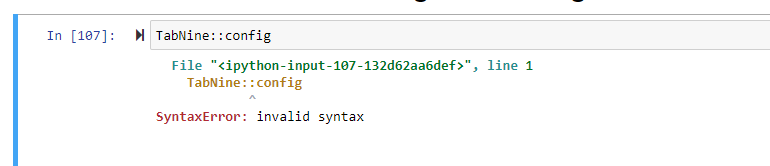
Can you please provide us with TabNine logs? Type TabNine::config in you editor, the logs are located at the bottom of the page. thanks

Hi - When you say editor you mean the jupyter notebook? I'm trying to run that and getting an invalid syntax error. I also tried running it in the command prompt without any success.
Note sure if this means that TabNine is not running:
This is what I'm seeing in the cmd prompt: [I 13:47:13.668 NotebookApp] Unsatisfiable read, closing connection: delimiter re.compile(b'\r?\n\r?\n') not found within 65536 bytes
This seems to be happening because of Tornado rejecting large requests. Here's the relevant issue:
https://github.com/tornadoweb/tornado/issues/2632
I think this can be fixed by sending the payload in HTTP body instead of sending via query string. Although this will still cause the issue of sending frequent large HTTP calls, which would be bad for remote jupyter instances -- I notice that the entire jupyter notebook's code gets sent. For large jupyter notebooks, this would perhaps result in poor performance?

I have the same issue and as a workaround increasing the max URI size accepted by Tornado seems to work. I did the following:
- (Skip if you're not using a reverse proxy) Changed my Nginx configuration to accept larger headers with this directive in the
serversection:-
large_client_header_buffers 4 256k;
-
- Changed line 181 in
~/anaconda3/envs/<_your environment name_>/lib/python3.7/site-packages/tornado/httpserver.pyto a constant header size of 256k:-
max_header_size=262144,Please note that this change will likely be overwritten by any updates to the Tornado package through pip!
-
I don't know what the maximum value for max_header_size is nor what are the implications of raising it, but doing this allowed me to use TabNine in my notebook. I changed the Tornado package's code because there does not seem to be a directive to pass options to the HTTPServer object in Jupyter's configuration. It would make more sense to implement this in Jupyter's code instead (as a constructor argument for the HTTPServer object), but grepping the Jupyter's package files did not return any references to HTTPServer, so I went with the easier path. Avoiding a >64kB URI in the first place would probably be the best approach to be fair...

A better approach is to monkey patch httpconnection of tornado, see https://stackoverflow.com/questions/70181005/how-to-increase-http-header-size-in-jupyter

This issue has been automatically marked as stale because it has not had recent activity. It will be closed if no further activity occurs. Thank you for your contributions.
![stale[bot] avatar](https://avatars.githubusercontent.com/in/1724?v=4 "Published by a pub.dev verified publisher")