

 codecadwallader
Unable to show UI: The 'ResourceAssembly' property of the 'Application' type cannot be changed after it has been set
Environment
- Visual Studio version: VS 2022 Community
- CodeMaid version: 12.0.300
- Code language: C#
Description
Attempting to access the Options or About menu items under Extensions -> CodeMaid causes an error dialog to appear:
Microsoft Visual Studio The 'ResourceAssembly' property of the 'Application' type cannot be changed after it has been set.
All other functionality such as Sort Lines work fine.
It seems that installing VS2022 + CodeMaid has also broken CodeMaid in VS2019 which produces the same error as above.
I've uninstalled both copies & reinstalled in VS2022 but the problem persists.

Thanks for reporting the issue. This sounds very familiar because we recently had to add an explicit set for that property to support VS2022. I wonder if sometimes this property is attempting to switch to a different value and that is causing the error message above.
Here is an example of that line of code that is in the AboutWindow: https://github.com/codecadwallader/codemaid/blob/dev/CodeMaidShared/UI/Dialogs/About/AboutWindow.xaml.cs#L21
The same line of code is present in OptionsWindow and all other WPF dialogs.
Since I cannot reproduce it, would you be willing to use the debugger to see what the before/after values are for that line of code? Alternatively I can add some diagnostic error messages and make a CI build.

I can't seem to reproduce the problem when debugging CodeMaid.VS2022.
On first run the Application.ResourceAssembly property in the AboutWindow ctor is null, it's then assigned to the current assembly (SteveCadwallader.CodeMaid.VS2022, Version=12.0.0.0, Culture=neutral, PublicKeyToken=5e10ffd6b4d2c330).
When reshowing the about window Application.ResourceAssembly is still set to the assembly & Application.ResourceAssembly = Assembly.GetExecutingAssembly(); runs without any exception.
I added some logging & installed a release VSIX; the behaviour is different
public AboutWindow()
{
	try
	{
		TempFile.AppendText($"setting ResourceAssembly from {Application.ResourceAssembly}");
		Application.ResourceAssembly = Assembly.GetExecutingAssembly();
	}
	catch (Exception ex)
	{
		TempFile.AppendText(ex.ToString());
		throw;
	}
Produces
AboutWindow.xaml/.ctor: setting ResourceAssembly from BG8.Supercharger, Version=1.12.0.1600, Culture=neutral, PublicKeyToken=17601423b833f6b9
AboutWindow.xaml/.ctor: System.InvalidOperationException: The 'ResourceAssembly' property of the 'Application' type cannot be changed after it has been set.
   at System.Windows.Application.set_ResourceAssembly(Assembly value)
   at SteveCadwallader.CodeMaid.UI.Dialogs.About.AboutWindow..ctor() in C:\Users\alexk\Desktop\codemaid-dev\CodeMaidShared\UI\Dialogs\About\AboutWindow.xaml.cs:line 24
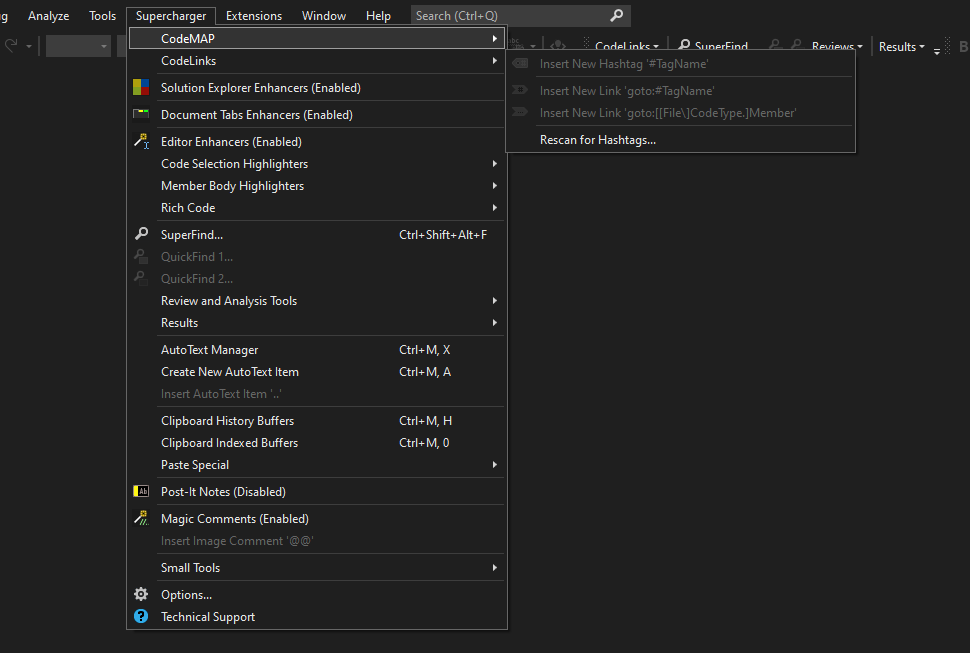
So ResourceAssembly is BG8.Supercharger - which is a diferent extension I have installed (https://marketplace.visualstudio.com/items?itemName=MichaelKissBG8.Supercharger22)
If I disable Supercharger then CodeMaid works as expected. Very odd!, perhaps the other extension is doing something it shouldn't.
Interesting find! Thanks for taking the time to do that investigation. It is possible that extension is doing the same kind of initialization that was suggested to use for VS2022 compatibility. However I thought extensions were more isolated from each other and would not have expected the bleed over you're seeing.
I wonder what happens if you were to try the following:
if (!Application.ResourceAssembly) {
  Application.ResourceAssembly = Assembly.GetExecutingAssembly();
}
I would expect either CodeMaid's UI to fail or Supercharger's UI to fail, depending on which one happened to get loaded first.
Same behavior here - I also had Supercharger installed, and after disabling it, CodeMaid worked.

I can confirm that I have reproduced this issue in VS 2019 when SuperCharger is enabled. Both About and Options produce this error when executed from the CM menu under Extensions.

There is a workaround listed in #906 that if a solution is not open the dialogs do not seem to conflict. I'm curious if Supercharger doesn't load until a solution is opened and that prevents our extensions from conflicting?
Supercharger appears to be loaded before a solution is opened, but a number of its features are disabled.
FYI I loaded up VS 2022 yesterday and this behavior occurs there as well.
Thanks for the workaround. That's definitely better than having to disable Supercharger.