

 codecadwallader
While Debugging, Codemaid doesn't do anything
Environment
- Visual Studio version: Microsoft Visual Studio Community 2019 Version 16.8.4
- CodeMaid version: 11.2
- Code language: C#
- Unity Version 2020.1.4f1 (My specific use case has me attaching the Debugger to Unity)
Description
While in debug mode, clean up/reorganize doesn't do anything. It is reasonable not to reorganize code while debugging is active. However, Codemaid doesn't provide any information as to why it isn't running.
Steps to recreate
1 Attach to Unity 2 Click Reorganize Active File
Current behavior
Reorganize and Code cleanup do nothing.
Expected behavior
Display a message or warning when the editor is in debug and you try to reorganize the code or run clean up.

Thanks for reporting the issue. Indeed it is deliberate that we do not attempt to run cleanup/reorganization while in a debug session. Usually trying to make any code edits while debugging throws error dialogs (although there are some limited edit & continue scenarios supported in later versions) so it seemed like a second error dialog from CodeMaid could be redundant.
There is a diagnostics mode (off by default) in CodeMaid that will display a message explaining why cleanup/reorganization is not running. It is a bit chatty being at the diagnostic level but it can be helpful at times. It can be turned on at CodeMaid->Options->General->Diagnostics mode. Here's an example of the code that is checking for the debugger: https://github.com/codecadwallader/codemaid/blob/dev/CodeMaid/Logic/Cleaning/CodeCleanupAvailabilityLogic.cs#L101
Hope it helps!

I thought it might be because of the way the debugger attaches to unity so I opened a different project to see what happens when I debug and try to make a change. With default settings in VS, I was able to add some code, and I deleted and added a function. I didn't get any error from VS. If I try to add a breakpoint it makes an empty circle with a warning sign.
If I hover over the icon it brings up a message which says the source is different from the original, but it still lets me make the changes. I checked my settings to see if maybe I had turned something off which would throw a dialog or something up to warn about changes while in debug but VS doesn't seem to care that much.
I think this is exasperated while using Unity because Unity compiles the code and then runs it. In Unity, if it detects a change I have it set to stop my game from running. Then I can restart it in Unity and it will use the newly changed code that it compiles.
At the end of the day, it's kind of a minor inconvenience but it has, indirectly, led me to two other discoveries. The first is a bug. With Include Access Levels in Regions unchecked, Private members seem to get categorized first but once a region exists the internal and public members aren't added to their regions. If a region had no private members and so it's not created, when an internal is encountered then it will be created, and so on. The only thing which seems to get the items put into a region is when you include Access Level in the Region Title
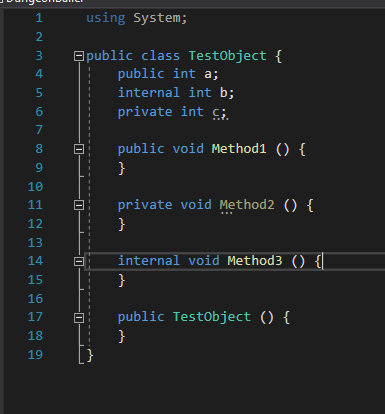
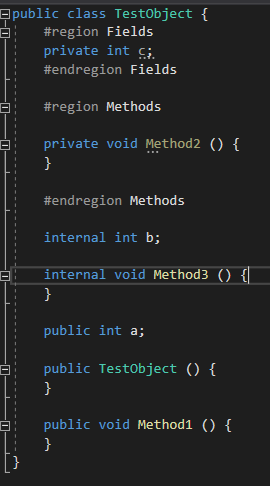
The other thing is more of a feature request. I'd like to be able to add a custom region and have it ignored by the Remove Existing Regions flag. Or some way to put some things in a place and have them not get moved. In Unity, I can use a preprocessor code that exposes private or internal data members to the editor so that you can change their values in the editor. The order that they appear in the source file is the order they show in the editor and there are some tags and things that allow you to group them in the editor and so on. For now, keeping Existing regions will do the trick, but it also means an empty region won't clear automatically and items that should be placed into a region that currently exists don't get the new items added to them.
Thanks
Thanks for all of the information. It might be helpful to split these out to separate issues so others could see/comment/assist.