

 codecadwallader
File Header is inserted again, even if it already exists
Environment
- Visual Studio version: 2019 Pro
- CodeMaid version: 11.1
- Code language: C#
Description
The file header is being inserted multiple times, even when it's not changed at all.
Probably related to this issue, however I am seeing this behavior even without the leading/trailing lines.
I think it's probably because CodeMaid skips formatting for comments that start with no spaces e.g. //abc instead of // abc. However, we had to do this so that CodeMaid wouldn't mess up our copyright banner (also see issue 548)
See attached settings for repro.
Steps to recreate
- "Enable Automatic Cleanup On Save" (General->Features) and "Run format comments during cleanup" (Formating)
- Set the File Header for C# in the Cleaning->Update options to...
//%BANNER_BEGIN%
// ---------------------------------------------------------------------
//%COPYRIGHT_BEGIN%
//<copyright file="My File.cs" company="My Company">
//     Copyright (c) 2018-present, My Company, Inc. All Rights Reserved.
//</copyright>
//%COPYRIGHT_END%
// ---------------------------------------------------------------------
//%BANNER_END%
- Save the file w/ ctrl+s and watch your header multiply!
Current behavior
The header is being inserted again and again even though it's already there.
Expected behavior
The header should only exist once. CodeMaid Settings.zip

Thanks for reporting the issue and for including your settings. I was able to reproduce it and trace it down to trailing whitespace similar (but a little different) to #310
The second line of hyphens includes a trailing space. Here's a screenshot of the settings with white space visible:
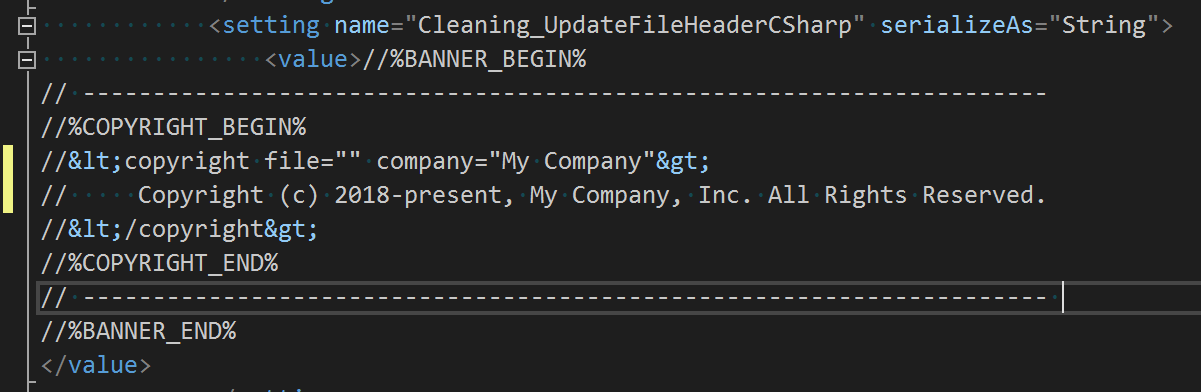
When cleanup runs, this end of line space is removed.. and then when cleanup next runs the copyright header is considered different and gets inserted again. Deleting that space resolved the issue for me.
Hope it helps!

Hello! I noticed that if I save a file the header gets added correctly, but If run Cleanup All Code on a project the header is not added at all, while the rest of the cleanup is carried out as expected. Ideas?

Thanks for reporting the issue, I have been able to reproduce it. I found this error message in diagnostics mode:
InsertFileHeaderDocumentStart must be called on the UI thread.
It sounds like we need to add logic to marshal back onto the UI thread for this cleanup operation.