

 cloudinary
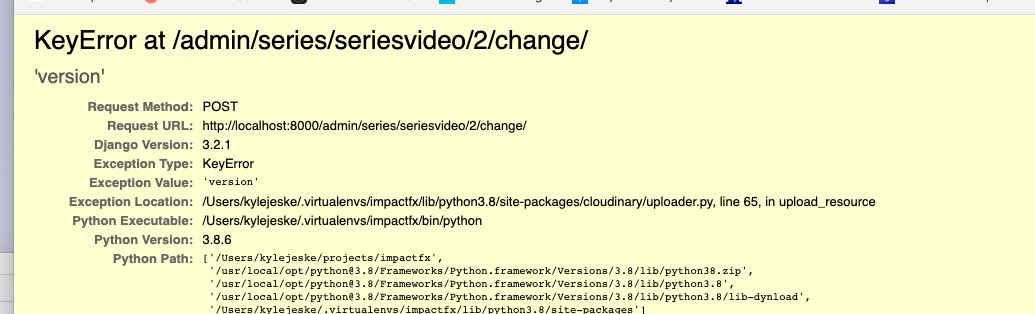
Version 1.29 result['version'] is not defined
Bug report for Cloudinary Python SDK
Before proceeding, please update to the latest version and test if the issue persists
Describe the bug in a sentence or two.
…

Issue Type (Can be multiple)
Uploading large files returns this payload
{'status': 'pending', 'resource_type': 'video', 'type': 'upload', 'public_id': 'course/cvranbgknyfq13qis1cg', 'batch_id': '1bc9a412ce028327465e810d99187c3bda6b793a04a6a0d9dfcaa1fb0f4cb1dd'}
and it does not actually contain the version etc that the sdk expects.. so the entire upload crashes django
Steps to reproduce
upload any large file
Error screenshots or Stack Trace (if applicable)
…
Operating System
- [ ] Linux
- [ ] Windows
- [ ] macOS
- [ ] All
Environment and Frameworks (fill in the version numbers)
- Cloudinary Python SDK version -2.29
- Python Version - 3+
- Framework (Django, Flask, etc) - django 3+
Repository
If possible, please provide a link to a reproducible repository that showcases the problem

Hi @northkode, Thanks for raising this.
The case you're running into where the version and other API response fields are not available upon upload is not actually a bug, but rather it's because the uploads you're making are set to be Asynchronous. This means Cloudinary receives your upload request and immediately returns a "pending" response while at the same time triggering a background job internally to actually perform the upload processing on the Cloudinary side. Because the upload processing is performed asynchronously (in the background) the initial response you receive will not have the full API upload response that is returned when you perform Synchronous uploads.
If you want to use Async uploads then you will want to configure a notification_url so that you will receive a webhook JSON response with the full API upload response once the asynchronous upload has been processed. Notification Reference: https://cloudinary.com/documentation/notifications#upload_api_notifications
Otherwise, you will need to turn off Async uploads in your Upload Preset (if that's where this is defined) or remove async: true as a parameter from your upload() code if you're passing this parameter via code and not as part of an Upload Preset and that will result in all upload requests containing the full response because that will only be returned once we process the upload on Cloudinary side synchronously.
If you're using Async uploads because you need to perform an [incoming transformation(https://cloudinary.com/documentation/transformations_on_upload#incoming_transformations) for large videos which are bound by the 300MB online manipulations limit, then what you will want to do is use the notification_url approach above with an endpoint on your server that can receive the full JSON response once the upload + incoming transformations have processed on Cloudinary side and then you could populate your database with those details. You will then want to remove the checks to extract those fields from the initial "pending" response to avoid the not defined issues.
Please let me know if you have any questions.
