

 clariusdev
'plugins_imageformats_qjpeg' not found when deploying from app bundle
Hey everyone,
I have found a bug related to android app deployment.
When installing the android example app via deploy: default apk, everything works as expected. I can connect to the probe and receive images.
When installing the android example app via deploy: app from app bundle, I can still connect and set the probe to imaging (LED is green), but the imaging callback is not called.
I think this may be related to these log messages:
15:19:05.518 qt.core.plugin.loader    D  : Trying... "/data/app/~~5l9gyR9I3bMa2LG22d1vVg==/me.clarius.sdk.solum.example-Q32mlzKjHUcME5UDjzh0Zw==/lib/arm64/libplugins_imageformats_qjpeg"
15:19:05.518 qt.core.plugin.loader    D  : Trying... "/data/app/~~5l9gyR9I3bMa2LG22d1vVg==/me.clarius.sdk.solum.example-Q32mlzKjHUcME5UDjzh0Zw==/lib/arm64/plugins_imageformats_qjpeg"
15:19:05.518 qt.core.plugin.loader    D  : Trying... "/data/app/~~5l9gyR9I3bMa2LG22d1vVg==/me.clarius.sdk.solum.example-Q32mlzKjHUcME5UDjzh0Zw==/lib/arm64/libplugins_imageformats_qjpeg.so"
15:19:05.518 qt.core.plugin.loader    D  : Trying... "/data/app/~~5l9gyR9I3bMa2LG22d1vVg==/me.clarius.sdk.solum.example-Q32mlzKjHUcME5UDjzh0Zw==/lib/arm64/plugins_imageformats_qjpeg.so"
15:19:05.518 qt.core.plugin.loader    D  : Trying... "/data/app/~~5l9gyR9I3bMa2LG22d1vVg==/me.clarius.sdk.solum.example-Q32mlzKjHUcME5UDjzh0Zw==/lib/arm64/libplugins_imageformats_qjpeg_arm64-v8a.so"
15:19:05.518 qt.core.plugin.loader    D  : Trying... "/data/app/~~5l9gyR9I3bMa2LG22d1vVg==/me.clarius.sdk.solum.example-Q32mlzKjHUcME5UDjzh0Zw==/lib/arm64/plugins_imageformats_qjpeg_arm64-v8a.so"
15:19:05.518 qt.core.plugin.loader    D  : Trying... "/data/app/~~5l9gyR9I3bMa2LG22d1vVg==/me.clarius.sdk.solum.example-Q32mlzKjHUcME5UDjzh0Zw==/lib/arm64/liblibplugins_imageformats_qjpeg"
15:19:05.518 qt.core.plugin.loader    D  : Trying... "/data/app/~~5l9gyR9I3bMa2LG22d1vVg==/me.clarius.sdk.solum.example-Q32mlzKjHUcME5UDjzh0Zw==/lib/arm64/libplugins_imageformats_qjpeg"
15:19:05.518 qt.core.plugin.loader    D  : Trying... "/data/app/~~5l9gyR9I3bMa2LG22d1vVg==/me.clarius.sdk.solum.example-Q32mlzKjHUcME5UDjzh0Zw==/lib/arm64/liblibplugins_imageformats_qjpeg.so"
15:19:05.518 qt.core.plugin.loader    D  : Trying... "/data/app/~~5l9gyR9I3bMa2LG22d1vVg==/me.clarius.sdk.solum.example-Q32mlzKjHUcME5UDjzh0Zw==/lib/arm64/libplugins_imageformats_qjpeg.so"
15:19:05.518 qt.core.plugin.loader    D  : Trying... "/data/app/~~5l9gyR9I3bMa2LG22d1vVg==/me.clarius.sdk.solum.example-Q32mlzKjHUcME5UDjzh0Zw==/lib/arm64/liblibplugins_imageformats_qjpeg_arm64-v8a.so"
15:19:05.518 qt.core.plugin.loader    D  : Trying... "/data/app/~~5l9gyR9I3bMa2LG22d1vVg==/me.clarius.sdk.solum.example-Q32mlzKjHUcME5UDjzh0Zw==/lib/arm64/libplugins_imageformats_qjpeg_arm64-v8a.so"
15:19:05.518 qt.core.plugin.loader    D  : "plugins_imageformats_qjpeg" not found
Apparently Qt does not find its jpeg plugin, which would explain why we dont get any images in that case.
Any help with this would be much appreciated, as we cannot deploy our app to production as long as this does not work.
Environment:
- SDK variant: solum-10.1.1-android.arm64-v8a.aar
- Development platform: Linux, Android Studio 2022.1.1
- SDK version: 10.1.1
- Clarius App version: N/A

Ensure the install process extracts the .so files during install with android:extractNativeLibs="true" in your manifest file:
https://github.com/clariusdev/solum/blob/2715f999182a8c503ad56c3262bb77fd380d304c/android/src/examples/solum_android/app/src/main/AndroidManifest.xml#L12

Yes the flag is set. I am using the exact code from the solum_android example, only filled in the certificate.
Hi I could not reproduce your issue, I followed the steps at https://developer.android.com/studio/command-line/bundletool#build-test-app-bundle to deploy from a bundle and was able to run the test app correctly:
% ./gradlew bundle
% bundletool build-apks --bundle=/path/to/app-debug.aab --output=app-debug.apks
% bundletool install-apks --apks=app-debug.apks
Ensure the libs for your target architecture are present in the bundle, for example for arm68-v8a:
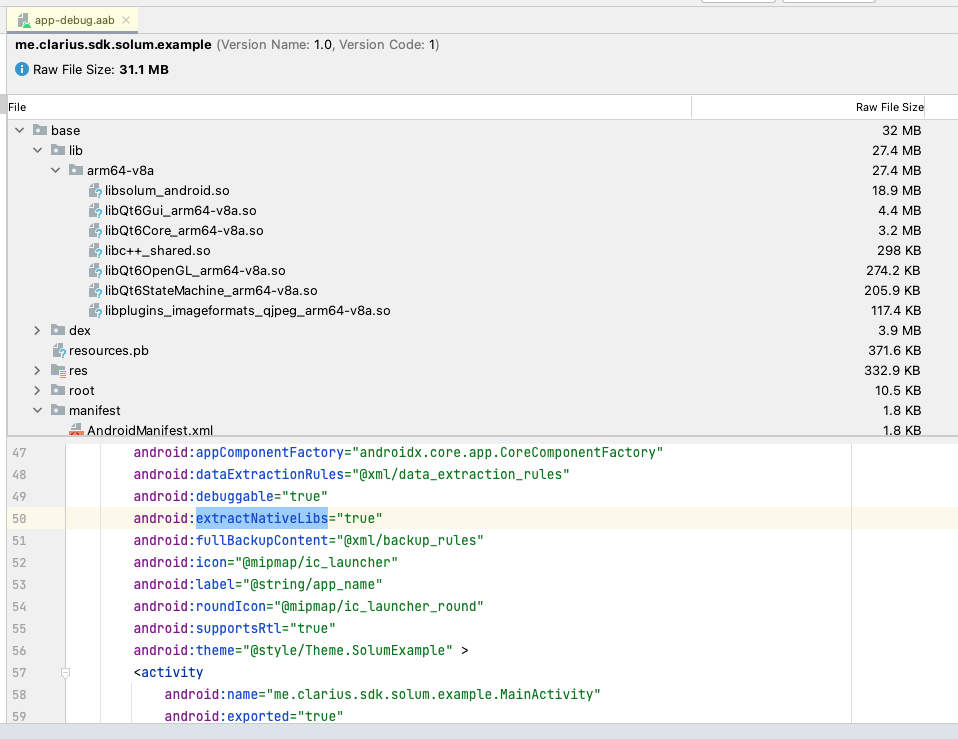
Note that we do not provide a multi-architecture AAR, if you want to make a multi-architecture bundle, you will have to assemble the libs yourself.
We are using 'deploy apk from app bundle' in the android studio launch configuration:

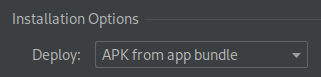 I pulled the installed artifacts from the phone, the library files are all present.
I managed to find a solution to the problem, see this stackoverflow post
Adding android.bundle.enableUncompressedNativeLibs = false to gradle.properties resolves the issue.
The option will be deprecated in gradle 8, alternatively putting
android {
   packagingOptions {
        jniLibs {
            useLegacyPackaging = true
        }
    }
}
into the app's build.gradle file works as well.
To be honest, I'm puzzled why the current setup works at all, since solum seems to search for the libraries under /lib/arm64. The offical docs specify that libaries are only available from /lib/arm64-v8a/.
One possibility is that when deploying from apk, the lib location gets aliased to /lib/arm64 automatically. This apparently does not happen when deploying from bundle. When bundle compression is enabled by setting that flag, the location is aliased again.
Maybe the problem could be solved by changing the ld library path of solum to /lib/arm64-v8a ?
Thank you for investigating. The native library path is not hardcoded in Solum, I use the path reported by Context.getApplicationInfo().nativeLibraryDir from the context object passed to Solum's constructor. I was considering changing the parameter and take the path directly. Cons: harder for devs to find the correct value (can be mitigated by doc and code samples). Pros: allow devs to pass custom paths; could hint devs that native path is important and help debug similar issues.
I will also look at Gradle's useLegacyPackaging and update the example if it works.
