chhoumann
[FEATURE REQUEST] Pass data to Obsidian Quickadd macro
Is your feature request related to a problem? Please describe. May be a new feature, or just me not understanding what's possible. I'm on MacOS and trying to use "Shortcuts" to gather data and send to Obsidian. The specific use case is capturing todo's on the go using Siri/iPhone.
Have been playing with:
I'm using "Advanced URI" to capture the command name to run, that happens to be a Quickadd Capture template that adds a task in appropriate file and I'm also using the Tasks plugin to manage my tasks (which requires specific character for due date).
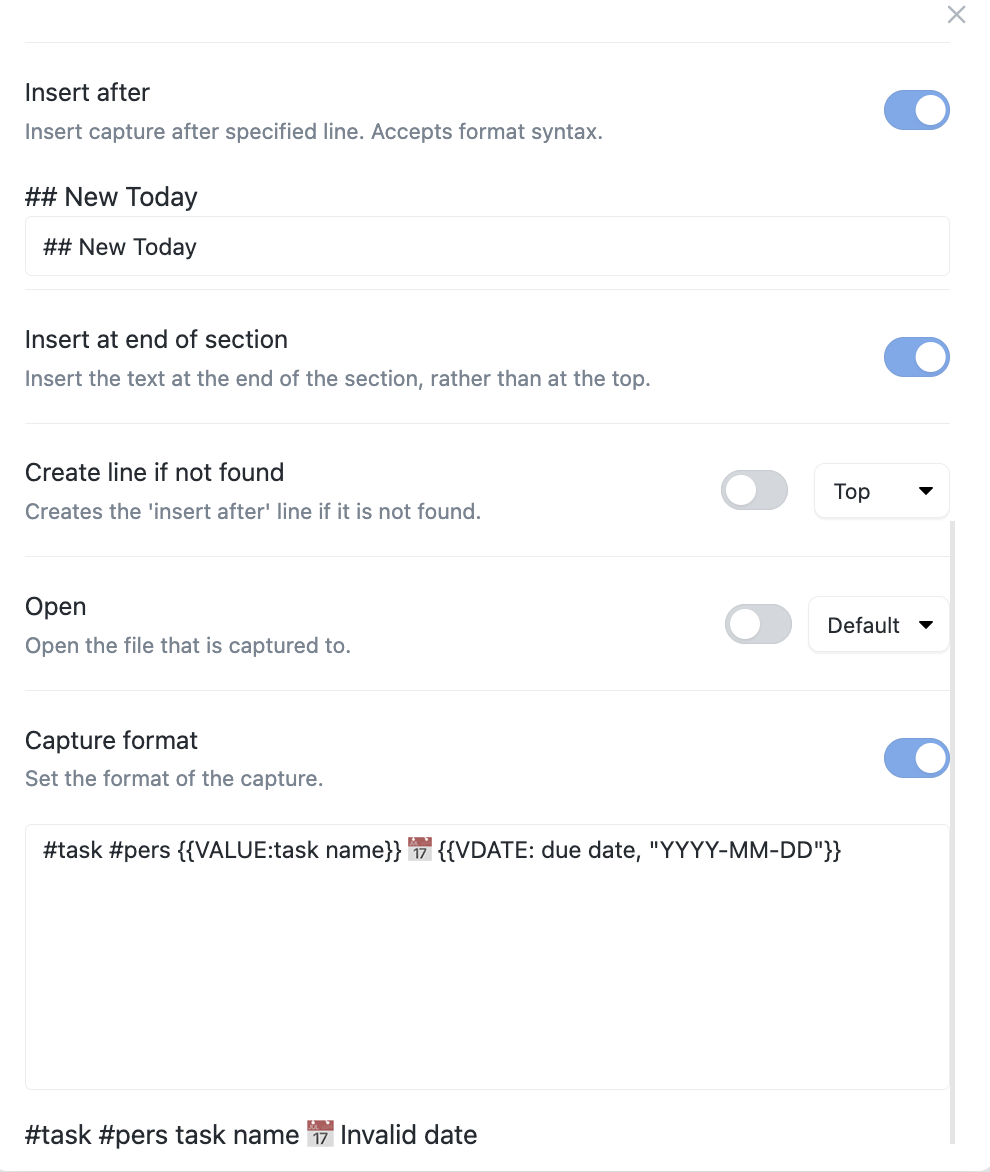
I have successfully gotten quick add command through this obsidian URI, but cannot figure out how to pass data to it. To restate: I can use Shortcuts to call my Quickadd capture template, but it gets to obsidian and requests the variable fields anyway. This is not the behavior I'm looking for.
Describe the solution you'd like Looking to be able to capture data through Siri/Shortcuts, and pass data, whatever that may be to a Quickadd Command of my choosing/definition. This may be possible now, I just cannot figure out the syntax on the URI.
Additional context
Add any other context or screenshots about the feature request here.
I've tried many permutations of the syntax of the command. I realize my current shortcut is double encoding the obsidian command, I've tried that with and w/out this double encoding. My current state shortcut:
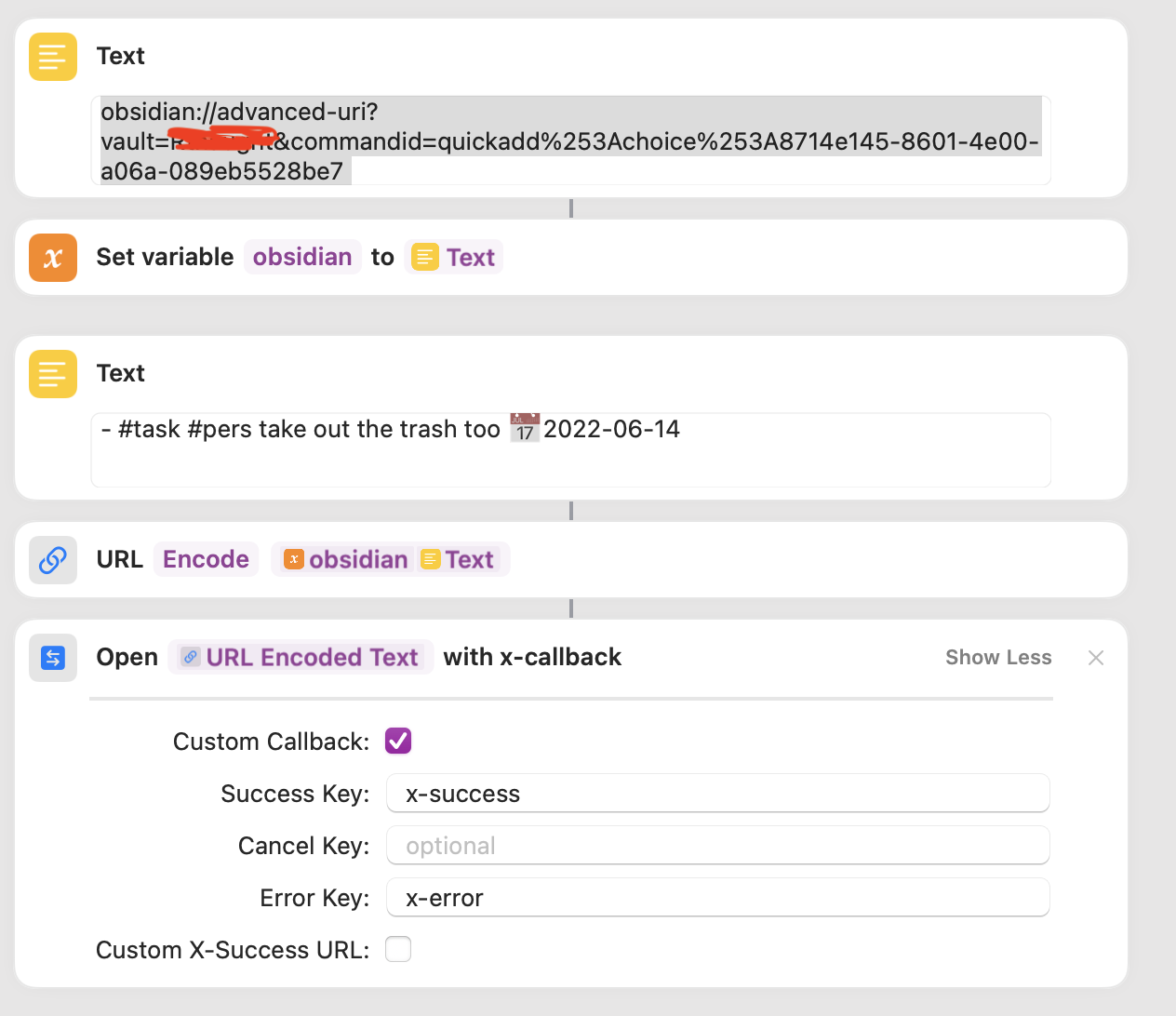

Was looking for a way do accomplish exactly this task as well. Finally found this thread. So it looks like it is currently not possible. Feature highly appreciated!
Use case: Would like to call an URL like this:
obsidian://advanced-uri?vault=notes&commandname=QuickAdd%3A%20Capture+Entry¶m1=entry1¶m2=entry2
And than access the values by {{VALUE:param1}} ...


Another +1 from me please! (I'm glad I found this thread, before I spent too much time trying to make this work 😛)
I've got a very sweet Quick Add workflow where it pastes my input into a today's-date-specific part of a today's-date-specific file. I'm loving it! I was hoping to up my game a bit by using a Siri shortcut to pass text to my quick add workflow so I can quickly enter content without having to wait for Obsidian to launch. Once that's possible I might set up dictation input too!

+1 on this! I’d like to interface directly with obsidian from drafts in this way


&commandname=QuickAdd%3A%20Capture+Entry¶m1=entry1¶m2=entry2
- @ts2111 I'm assuming the params is what is not working?
I'm wondering if this Execute arbitrary code would help in this case?
Execute any javascript code via eval. Requires extra setting to be enabled
I'd also love to have this feature. Honestly this is the only thing that's preventing this plugin from being integrated with Apple shortcuts and unlocking new workflows for Apple users.

For those looking for this... I have found workarounds to this (for tasks and simple atomic notes on the go) by leveraging Reminders. One simple shortcut adds a reminder to a specific list in Reminders. The 2nd shortcut runs few times throughout the day to pull data from that list and write directly to a file in my vault. This allows me to add tasks even on my watch w/out ever having to launch obsidian... something that even this option doesn't accomplish.
This could, however, still be useful for other types of workflows.
@gotkd21 What does the second shortcut look like? does it leverage QuickAdd?
My issue is not being able to use QuickAdd capture settings. I already have a shortcut to write stuff to files in my vault, but there are powerful settings inside QuickAdd that leverage stuff like creating a file from a template if it's not present, adding to the end of a specific section, formatting with date/time etc... it is probably possible to do these in shortcuts as well, but when I change a QuickAdd capture I also need to change the shortcuts to mirror the exact same settings. I want to leverage the existing QuickAdd capture settings and format when I'm passing data from share sheets, dictation or OS level input.
@erauner12
I'm wondering if this Execute arbitrary code would help in this case?
it's so close... I am able to invoke the functions in the QuickAdd API with eval, however it doesn't recognise the variable 😢
I've tried with URIs below (first unencoded, then encoded versions)
obsidian://advanced-uri?eval=this.app.plugins.plugins.quickadd.api.executeChoice('test', {'param1': 'test'})
obsidian://advanced-uri?eval=this.app.plugins.plugins.quickadd.api.executeChoice%28%27test%27%2C+%7B%27param1%27%3A+%27test%27%7D%29

obsidian://advanced-uri?eval=this.app.plugins.plugins.quickadd.api.executeChoice('test', {'param1': "test"})
obsidian://advanced-uri?eval=this.app.plugins.plugins.quickadd.api.executeChoice%28%27test%27%2C+%7B%27param1%27%3A+%22test%22%7D%29

obsidian://advanced-uri?eval=this.app.plugins.plugins.quickadd.api.executeChoice('test', {param1: "test"})
obsidian://advanced-uri?eval=this.app.plugins.plugins.quickadd.api.executeChoice%28%27test%27%2C+%7Bparam1%3A+%22test%22%7D%29

obsidian://advanced-uri?eval=this.app.plugins.plugins.quickadd.api.executeChoice('test', {param1: 'test'})
obsidian://advanced-uri?eval=this.app.plugins.plugins.quickadd.api.executeChoice%28%27test%27%2C+%7Bparam1%3A+%27test%27%7D%29
it invokes the choice I named test but it still pops up the text input box and doesn't read the variable I'm passing in. the format I'm trying to read the parameter is {{VALUE:param1}}
No... the 2nd shortcut is simply writing to files, so no, it would not work in your case. I've wanted to do what you're trying as well.. .but got to the exact same spot you did, and just gave in on those more complex use cases.
I've just come across this https://github.com/Vinzent03/obsidian-advanced-uri/issues/77
I don't have time now but will try to see if I can make this work later
So I debugged a bit and found the issue, the issue is that I had spaces in the URI before URL encoding it, which makes sense in retrospect.
so doing
obsidian://advanced-uri?eval=this.app.plugins.plugins.quickadd.api.executeChoice('test',{param1:'test'})
instead of
obsidian://advanced-uri?eval=this.app.plugins.plugins.quickadd.api.executeChoice('test', {param1: 'test'})
fixed it and now I'm able to read the parameter as {{VALUE:param1}} inside the choice. 🎉
Just documenting my workarounds here -- I couldn't get the above code to work. The API that I used to access QuickAdd was this.app.plugins.getPlugin("quickadd").api.executeChoice(...
My resulting shortcut looked like this:
Very nifty trick for executing plugin code, thanks for figuring this out @akaralar

Hi all,
@akaralar and @jshph, this seems exactly what I have been looking for in ages but I cant get the {{VALUE:param1}} to be added via quick add. im not super technical so I must be doing something wrong :)
currently I have this
obsidian://advanced-uri?vault=pkm&commandid=quickadd%253Achoice%253Ae65658ce-3de9-4783-be02-cd3f6c56a5aa&eval=this.app.plugins.plugins.quickadd.api.executeChoice('test',{param1:'test'})
which I encode ofc
it does open quick add and asks for the parameter but its always empty
this is my quickadd syntax
#task {{VALUE:param1}} {{VALUE:task name}} 📅 {{VDATE:due date,YYYY-MM-DD}} {{VALUE:tags}}
any tips on what im doing wrong?
thx!
Z

@zeltak No idea what you're doing wrong, you can inspect my shortcut here if you want https://www.icloud.com/shortcuts/784818488fe649f1bef7597c3a25c765
and this is how I capture it
thx @akaralar !
I followed your script 1:1 but get the following error in obsidian
Eval is not allowed. Please enable it in the settings.
any clue?
best
Z
@zeltak no idea unfortunately, I haven't seen that one and I have no idea why you get that
Based on the msg above, I tried following URI:
obsidian://advanced-uri?vault=pkm&eval=this.app.plugins.plugins.quickadd.api.executeChoice('test',{param1:'test'})
It works well only if the parameter content is a single line text. But advanced URI will be failed if it is a multiline text.
I add a QuickAdd Macro to get the content from clipboard. And in Apple's shortcut, set the content to clipboard first, then open following URI:
obsidian://advanced-uri?vault=<vault-name>&eval=this.app.plugins.plugins.quickadd.api.executeChoice('<choice-name>')
Here is the macro script:
module.exports = async (params) => {
  const content = await navigator.clipboard.readText()
  params.variables['content'] = content
}
Hope this is helpful if you need to add a multiline text as parameter.