

 chhoumann
[BUG] Quickadd always adds to the top of the template
Describe the bug Created a quickadd to capture to the daily note. A new note is created using the template that I have specified in the template path. The issue is that when I run QuickAdd, it creates the QuickAdd above the template instead of at the end of the note. I have selected "write to bottom of file". Still it keeps adding to top of the file.
See this quick gif as example: https://p111.p2.n0.cdn.getcloudapp.com/items/2NuPBoG9/415839e1-bde1-440a-a2bd-857c680d4f19.gif?source=viewer&v=ac14ceb01b803ae9e0d4f44a8dee2e6e
And here are the main settings:
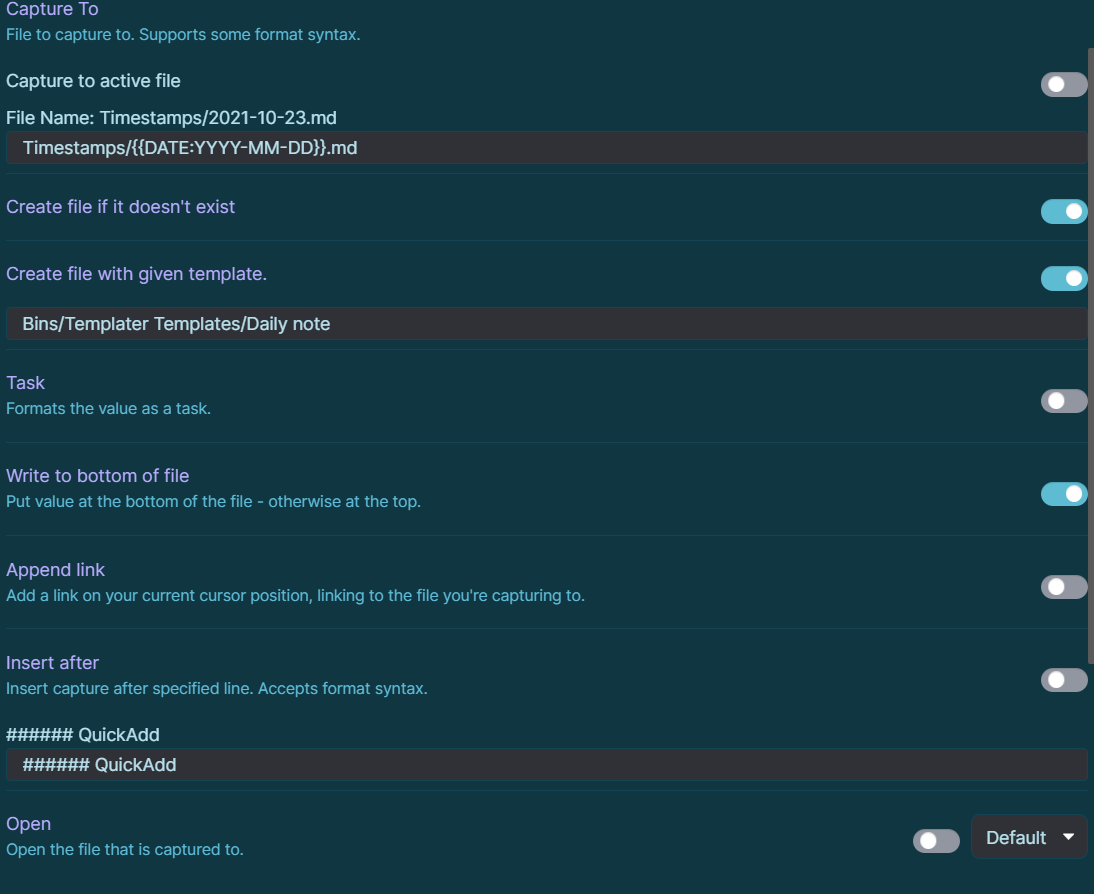
To Reproduce Please see above
Expected behavior Expecting QuickAdd to add to the end of the note instead of at the top of the note.
Screenshots Please see above
Desktop (please complete the following information): Windows 10 QuickAdd plugin version 0.4.17 Obsidian version 0.12.19


I have just encountered this as well. In trying to sort out a formatting issue when trying to add a table row, I turned off "insert after section" and turned on "insert at end of file" and it inserted on line 1 of the file, above my templated insertion, even.
