

 cheton
Externalize Data & Flat Data Structure
Two questions:
-
How do you externalize the data and use the loadData method? I see that I can provide an initial data structure from outside of the InfiniteTree by using the data option, but if I specify a loadOnDemand option then that newly added data is loaded directly into the tree itself not to the initial data. This ends up with a condition where my data is split between the initial data and the specific tree node.
-
Is there an example of how to use the flat tree data structure?
Thanks. Cool library.

You initial data will be modified after on-demand loading.
With a data structure like below:
const data = {
    id: 'fruit',
    name: 'Fruit',
    children: [{
        id: 'apple',
        name: 'Apple'
    }, {
        id: 'banana',
        name: 'Banana',
        children: [{
            id: 'cherry',
            name: 'Cherry',
            loadOnDemand: true
        }]
    }]
};
After calling the loadData(data) method, all nested child nodes of your data will be transformed into Node objects, as shown below:
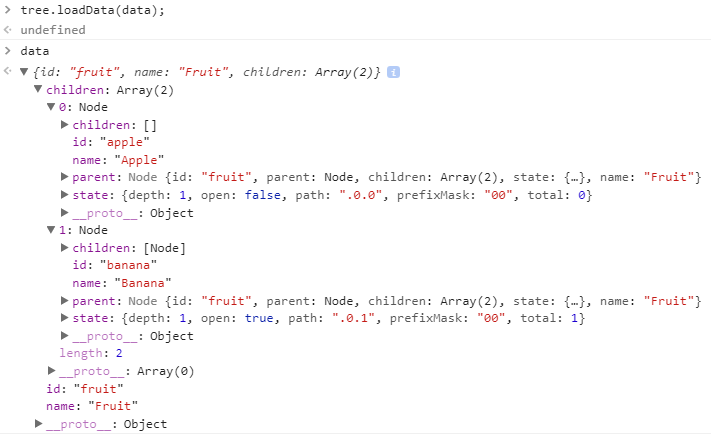
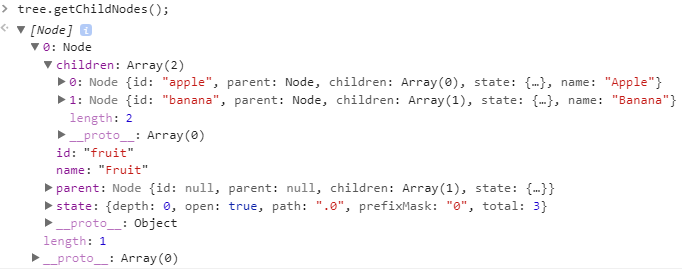
If you want to update the reference to your initial data, you can use data = tree.getChildNodes() to return the tree nodes and update the reference.

- Is there an example of how to use the flat tree data structure?
Each Node object will have a "state" object with a flat tree structure, this is a reserved key for internal use. If you're interested to know how it works, you can check out an example at https://github.com/cheton/flattree#flat-list-view
@letthewookiewin @cheton Or you could modify the tree.nodes attribute then call the tree.update() method to update the initial data.
