

 chanan
BlazorStrap V1 BSDropdown sometimes doesn't close automatically on outside click
I'm using version 1.5.1
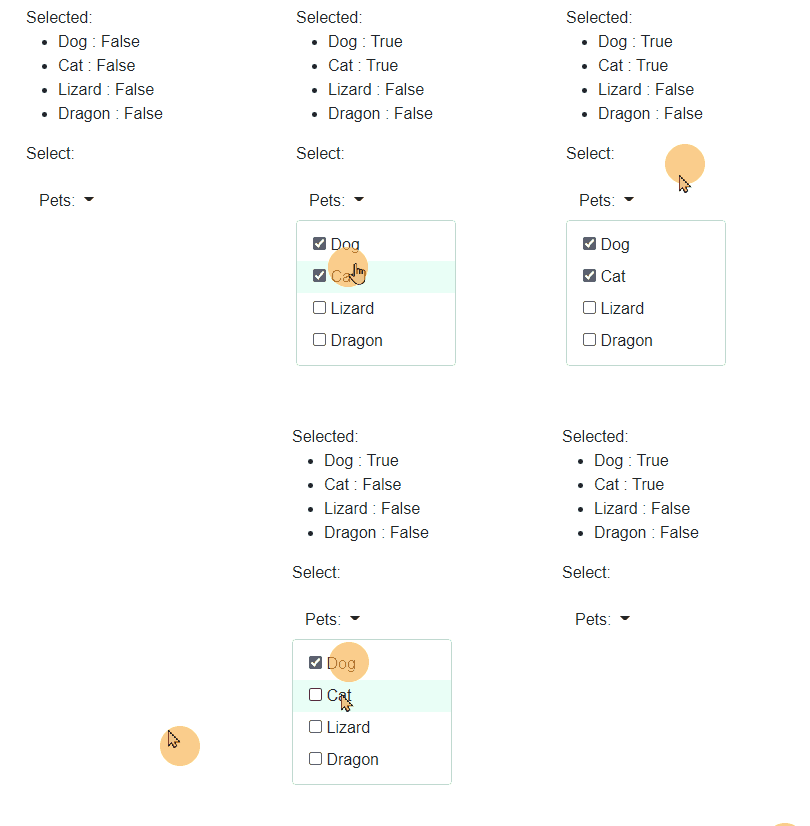
BSDropdown does not close/hide BSDropdownMenu in some cases when clicking outside.
Consistently can be reproduced with following steps:
- Dropdown items should have label>input[type=checkbox] for items (not sure if this is important)
- Click on BSDropdownToggle to open the dropdown
- Click on BSDropdownMenu without clicking on actual item
- Click outside of BSDropdownMenu
- BSDropdownMenu stays open
It can also be reproduced sometimes without step 3 but inconsistently. Same problem on Firefox latest and Edge latest.
Page with dropdown for reproduction:
@page "/"

<PageTitle>Index</PageTitle>

<p>
    Selected:
    <ul>
        @foreach (Model m in models)
        {
            <li>
                @m.Name : @m.IsSelected
            </li>
        }
    </ul>
</p>

<p>
    Select:
</p>

<p>
    <BSDropdown>
        <BSDropdownToggle>Pets:</BSDropdownToggle>
        <BSDropdownMenu>
            @foreach (Model m in models)
            {
                <BSDropdownItem StayOpen="true">
                    <span>
                        <label>
                            <input type="checkbox" @bind="m.IsSelected" /> @m.Name
                        </label>
                    </span>
                </BSDropdownItem>
            }
        </BSDropdownMenu>
    </BSDropdown>
</p>

@code
{
    List<Model> models = new List<Model>
    {
        new Model("Dog"),
        new Model("Cat"),
        new Model("Lizard"),
        new Model("Dragon"),
    };
}
Github repo in which issue can be reproduced on index page: https://github.com/stanac/BlazorStrapBug

Can repo even without doing the steps above. To completely fix this issue would likely need some major changes to how dropdowns work in V1. They are using the focus state on the dropdown toggle to close. I'll see if I can come up with a solution to work within the existing code, but so far tried a few dozen things already. The best solution is to use the V5 style and add the event listener. While I'm not unwilling to make then needed changes. I do want to try to avoid opening pandoras box in turning V1 into a stripped down version of V5.
If it ends up going that route it would be better to. A) Add bootstrap 4 support to V5. B) Backport V5 to V4 and change the classes to bootstrap 4.

Thank you for prompt reply. I understand how complex this would be to fix. It may be best to leave it open as a known issue and I will look for a workaround.