
MarkdownToPlayground
 MarkdownToPlayground copied to clipboard
 cescofry
Turns markdown files in formatted Swift playgrounds
#MarkdownToPlayground
Aka mkdtoplg
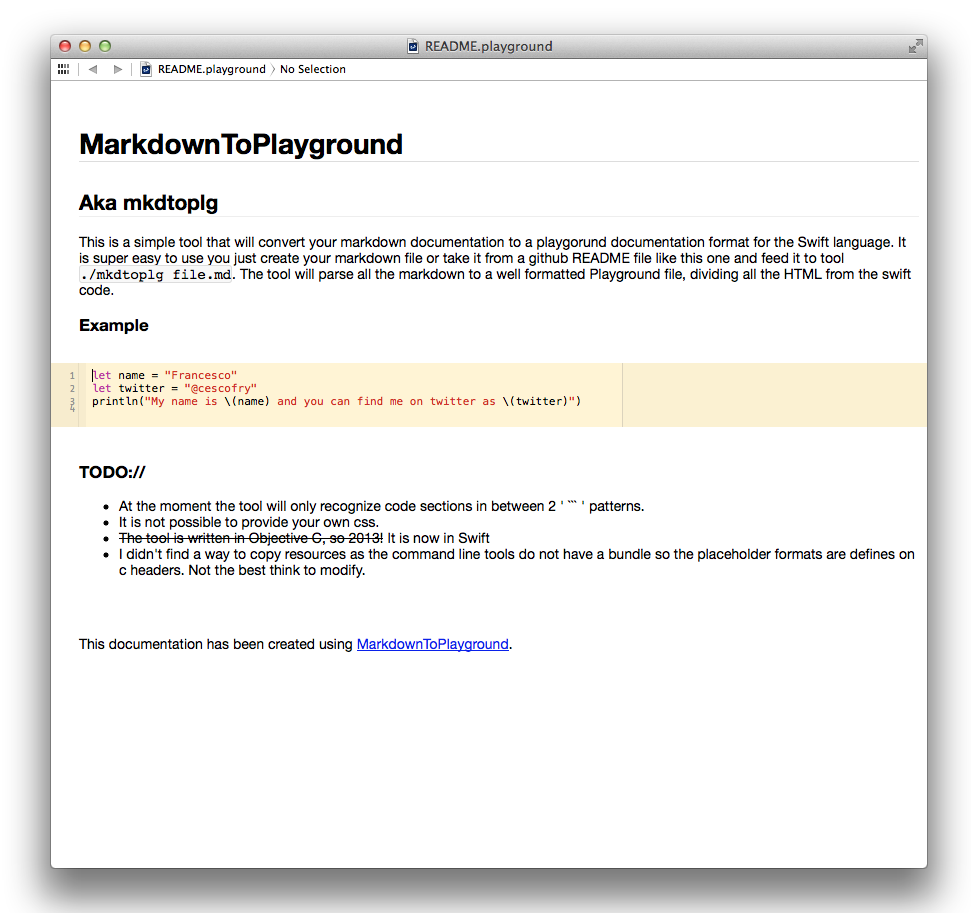
This is a simple tool that will convert your markdown documentation to a playgorund documentation format for the Swift language.
It is super easy to use you just create your markdown file or take it from a github README file like this one and feed it to tool ./mkdtoplg file.md. The tool will parse all the markdown to a well formatted Playground file, dividing all the HTML from the swift code.
Build&Run
In order to run the tool from XCode the Run scheme needs to include on Arguments Passed on Launch:
- the absolute path of a .md file with no options
- the absolute folder path of where the output playground is expected to be created with the -o option
Swift Code Example
let name = "Francesco"
let twitter = "@cescofry"
println("My name is \(name) and you can find me on twitter as \(twitter)")
This README will become:
TODO://
- At the moment the tool will only recognize code sections in between 2 ' ``` ' patterns.
- It is not possible to provide your own css.
The tool is written in Objective C, so 2013!It is now in Swift- I didn't find a way to copy resources as the command line tools do not have a bundle so the placeholder formats are defines on c headers. Not the best think to modify.
 cescofry