

 celador
Prompt for username and password for org is not coming
Issue Type: Bug
1). Creating a force.com project 2). Prompt for New org will appear. Selected New Org. 3). Prompt for Sandox, production, custom will appear. Selected Sandox. 4). Prompt for deploying and commiting code will appear. Selected No. 5). Prompt for username and password is not appearing to login in org.
Extension version: 3.22.5 VS Code version: Code 1.43.1 (fe22a9645b44368865c0ba92e2fb881ff1afce94, 2020-03-18T07:01:20.184Z) OS version: Windows_NT x64 10.0.18362
System Info
| Item | Value |
|---|---|
| CPUs | Intel(R) Core(TM) i5-7300U CPU @ 2.60GHz (4 x 2712) |
| GPU Status | 2d_canvas: enabled flash_3d: enabled flash_stage3d: enabled flash_stage3d_baseline: enabled gpu_compositing: enabled multiple_raster_threads: enabled_on oop_rasterization: disabled_off protected_video_decode: enabled rasterization: enabled skia_renderer: disabled_off_ok video_decode: enabled viz_display_compositor: enabled_on viz_hit_test_surface_layer: disabled_off_ok webgl: enabled webgl2: enabled |
| Load (avg) | undefined |
| Memory (System) | 7.86GB (1.16GB free) |
| Process Argv | |
| Screen Reader | no |
| VM | 0% |

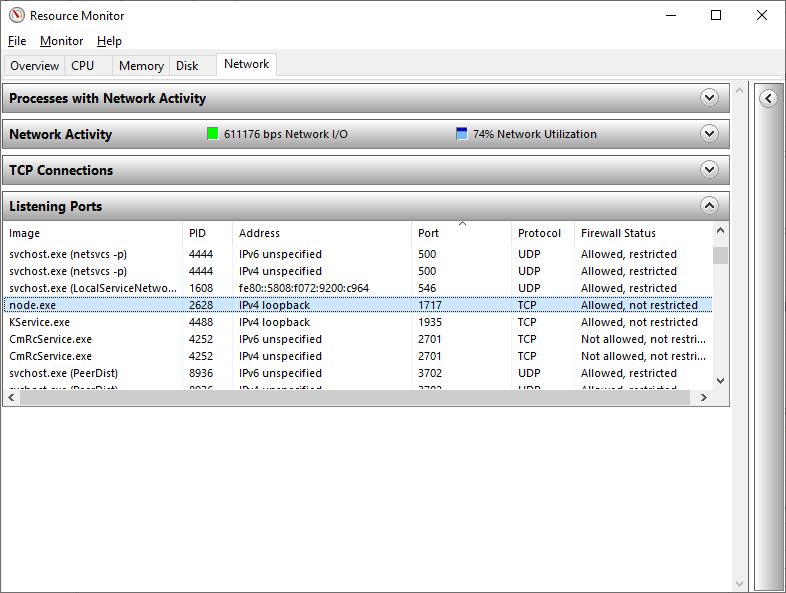
Few threads where asking to check the port number for my issue that it should run on 1717 port number. My node application is running on 1717.
Yes, this uses sfdx for login, so look-up how to change the port sfdx uses and it should then work for you. To test you can try and login via sfdx cli commands.

ETA: I tested via sfdx cli as @daishi4u recommended, and found it was a problem with CLI. For some reason, uninstall/reinstall of CLI resolved it. Thank you, daishi4u!
I am experiencing the same error, right after I upgraded Visual Studio Code to version 1.43.1 Version: 1.43.1 (system setup) Commit: fe22a9645b44368865c0ba92e2fb881ff1afce94 Date: 2020-03-18T07:01:20.184Z Electron: 7.1.11 Chrome: 78.0.3904.130 Node.js: 12.8.1 V8: 7.8.279.23-electron.0 OS: Windows_NT x64 10.0.17763
1)Open an existing force.com project 2). Prompt for New org/saved org will appear. Selected saved Org. 3). ForceCode: Executing 1 Task(s) message appears 4). No prompt to log into the org

I have the exact same issue where I don't get a prompt to login to the org. I tried uninstalling and re-installing CLI but that didn't help. I read somewhere a .forcecode folder should get created automatically with settings.json file, but there is no such folder created for me. Can someone please help?
