
testng-eclipse

testng-eclipse copied to clipboard
 cbeust
Incorrect discplay of non ASCII character in TestNG results window
Problem Statement
Non ASCII characters are not correctly shown in the results of running suite window in eclipse. This issue is not appearing on Mac OS platform but it appears in WIndows platform.
Please note that the necessary eclipse and TestNG configurations to change the encoding to UTF-8 were made. Moreover, the console logs show proper characters and also the testNG HTML results show proper character but the Results Window shows incorrect symbols.
Mac output:
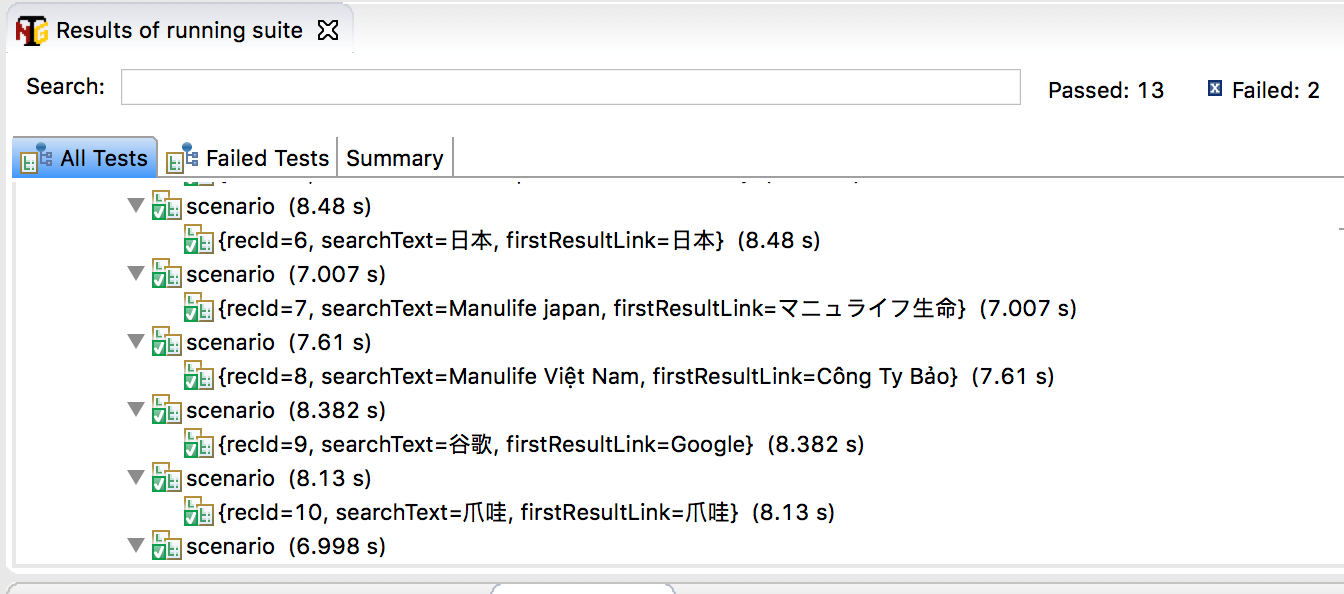
Windows Output:

Any relate message in "Error Log" view
"Windows -> Show View -> Others -> Error Log"
The Dependency Management tool for your project
- [ ] Maven
- [ ] Gradle
- [ ] Ant
- [ ] Eclipse Buildpath (aka. Use "TestNG Library" for your project in Eclipse)
Operating System
- [x] Windows
- [ ] Linux
- [ ] OSX
