

 capacitor-community
Unable to set userId to null
Describe the bug setUserId method does not accept null.
https://github.com/capacitor-community/firebase-analytics/blob/master/src/web.ts#L83
To Reproduce
   FirebaseAnalytics.setUserId({
       userId: null,
   });
Expected behavior When the user logs out, it must be possible to assign null value to it.
See here: https://firebase.google.com/docs/reference/android/com/google/firebase/analytics/FirebaseAnalytics#public-void-setuserid-string-id



Could you try undefined? This should work, as it is the default value
See https://github.com/capacitor-community/firebase-analytics/blob/master/src/web.ts#L80
As long as the condition is !userId, the result will be the same using null or undefined.
See this test on Chrome's console:
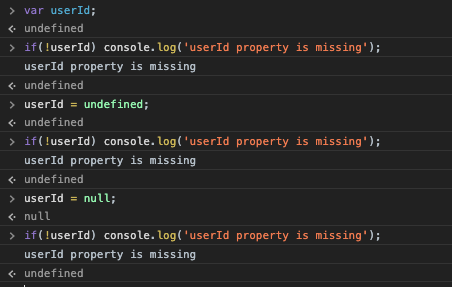
IMHO the condition must be:
if (userId === undefined)
I'm just thinking about whether that is possible with the web version; In the docs there is nothing of userId = undefined: https://firebase.google.com/docs/reference/js/firebase.analytics.Analytics#setuserid
And the type of the parameter is string, which is not assignable to undefined
I have been doing some tests and, in web version, you can pass null to setUserId method and it works properly. I have tried it with undefined as well, and in this case it is not working.
So, IMHO, you must change L82 this way:
BEFORE
if (!userId) {
AFTER
if (userId === undefined) {
My test screenshot (using setUserId(null);):
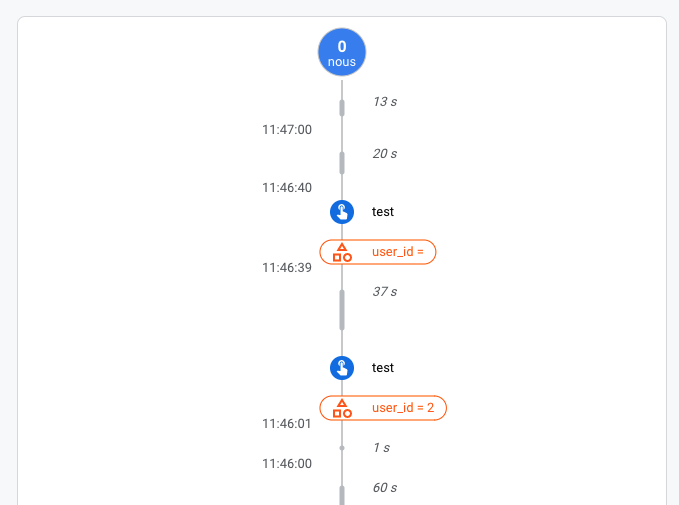
Isn't the user_id=null just the same as user_id="" ? This would be a more elegant solution IMHO
I think userId="" may work... But:
my proposal was NULL because in the Android and iOS documentation says:
The user ID to ascribe to the user of this app on this device, which must be non-empty and no more than 256 characters long. Setting the ID to null removes the user ID.
Okay, i think i have the perfect idea, i'm just gonna do it and propose my changes in a Pull-Request
Okay, i think i have the perfect idea, i'm just gonna do it and propose my changes in a Pull-Request
Thank you.
Is this project dead?? 24/03/2022 and still isn't possible set null the userId?


Looks like
@capacitor-firebase/analyticssupports this:setUserId(...).
No, it seems that the documentation is wrong :(

It's not posible to change the user with this plugin. The documentation says: 'Setting the value to null removes the user property.' But with this plugin is not posible to set the user to null. In my iOS app when a someone logs out and then logs in with another user, the analytics persist the old user.
