

 callstack
JSX element type 'Wrapper' does not have any construct or call signatures.
Environment
- "typescript": "^4.5.2"
- "@linaria/babel-preset": "^3.0.0-beta.14",
- "@linaria/core": "^3.0.0-beta.13",
- "@linaria/react": "^3.0.0-beta.14",
- "@linaria/shaker": "^3.0.0-beta.14",
- "react": "^17.0.2",
- "react-dom": "^17.0.2",
- node -v v14.18.1
Description
Hi, I have a problem with a typecheck of components. When I create styled component from a html element and use it I get ts error: "TS2604: JSX element type 'Wrapper' does not have any construct or call signatures."
Workaround is to set types manually: styled.div<React.FunctionComponent<React.HTMLAttributes<HTMLDivElement>>>
Reproducible Demo
Doesn't work
import { styled } from '@linaria/react';

const Wrapper = styled.div`
    padding: 10px;
`;

const CancelPage = () => {
    return <Wrapper>x</Wrapper>;
};

export default CancelPage;

Works:
import { styled } from '@linaria/react';
import * as React from 'react';

const Wrapper = styled.div<React.FunctionComponent<React.HTMLAttributes<HTMLDivElement>>>`
    padding: 10px;
`;

const CancelPage = () => {
    return <Wrapper>x</Wrapper>;
};

export default CancelPage;

Hi @fabulator!
I think the problem is in missed import * as React from 'react'; in the first case. Could you please add it and check?

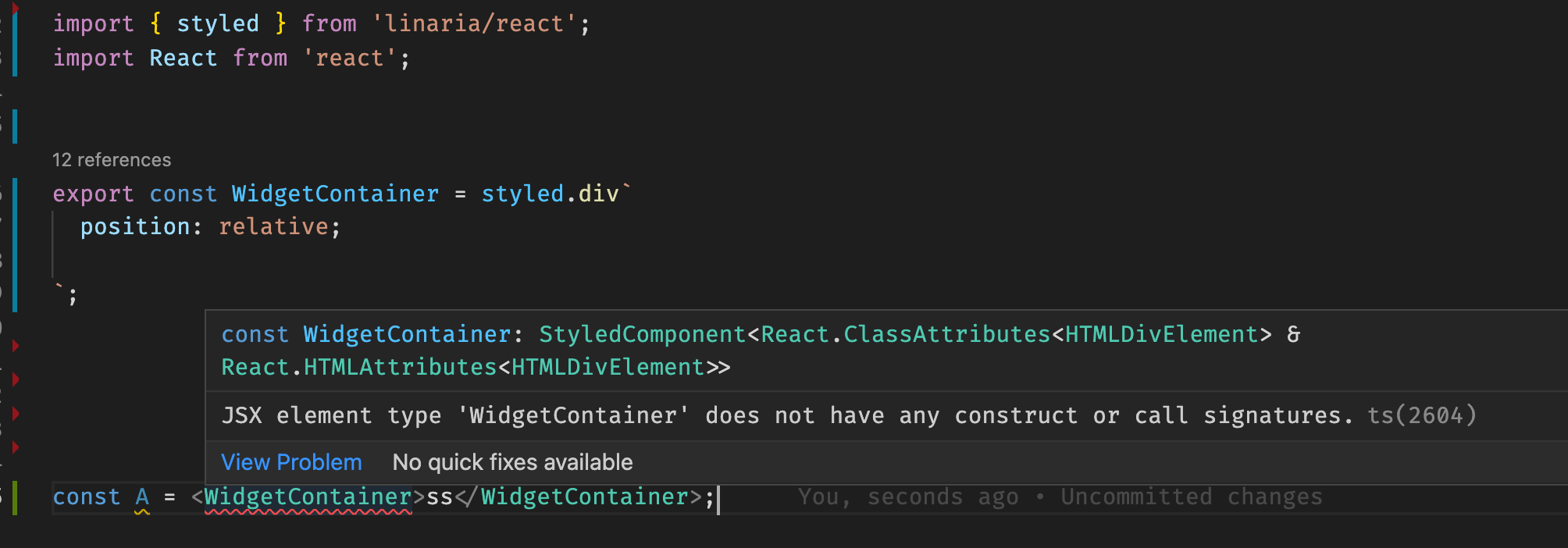

@Anber thank you, but it doesn't work. I downgraded TS to 4.3.5 but it doesn't help.
Another idea is yarn 3, I use it in my project with yarn workspaces
@fabulator do you use yarn / yarn workspaces? I just checked on my working simple project: updated TS to 4.6 and everything is fine there. Yarn@1, no workspaces
After I upgraded yarn to version 3 - everything is fine.
After moving this simple project to yarn workspaces - it works too.
The difference was in yarn@3 approach: everything works with node-modules linker, but with yarn pnp it fails even on my small working project
@fabulator Here is the decision. May be I broke anything, but it works for me. Move it's content to linaria.d.ts file and include it in tsconfig
/** Override of incorrect Linaria typings */
declare module 'linaria/react' {
	import { FC } from 'react';

	type StyledMeta = {
		__linaria: {
			className: string;
			extends: StyledMeta;
		};
	};

	type CSSProperties = {
		[key: string]: string | number | CSSProperties;
	};

	declare type StaticPlaceholder = string | number | CSSProperties | StyledMeta;

	declare type HtmlStyledTag<TName extends keyof JSX.IntrinsicElements> = <
		TAdditionalProps = {}
	>(
		strings: TemplateStringsArray,
		...exprs: Array<
			| StaticPlaceholder
			| ((
					props: JSX.IntrinsicElements[TName] & Omit<TAdditionalProps, never>
			  ) => string | number)
		>
	) => FC<JSX.IntrinsicElements[TName] & TAdditionalProps>;

	declare type StyledJSXIntrinsics = {
		readonly [P in keyof JSX.IntrinsicElements]: HtmlStyledTag<P>;
	};

	declare type Styled = StyledJSXIntrinsics;
	declare const styled: Styled;
}
I have problem too: JSX element type 'Container' does not have any construct or call signatures. ts(2604). My env: yarn@3 + workspaces, [email protected], typescript@4.
import { styled } from 'linaria/react';
import React from 'react';

const Title = styled.h1`
  color: red;
`;

const Container = styled.div`
  border: 1px solid red;

  &:hover {
    border-color: blue;
  }

  ${Title} {
    margin-bottom: 24px;
  }
`;

() => (
  <Container color="#333">
    {
      // JSX element type 'Container' does not have any construct or call signatures. ts(2604)
    }
    <Title>Hello world</Title>
    {
      // JSX element type 'Title' does not have any construct or call signatures. ts(2604)
    }
  </Container>
);

Adding esModuleInterop option to tsconfig.json has fixed the issue for me, dunno why ¯\_(ツ)_/¯
{
  "compilerOptions": {
+    "esModuleInterop": true,

+1 Have same issue
export interface ITextProps extends HTMLElement {
   size: string;
   someOtherCustomProp: unknown;
}

export const TextStyled = styled.div<ITextProps>`
    font-family: 'Noto Sans', sans-serif;
    font-size: ${({size}) => size};
`;

export const Text: FC<ITextProps> = ({ size = '16px', ...props }) => {
    // JSX element type 'TextStyled' does not have any construct or call signatures error
    return <TextStyled  size={size} {...props} />;
};

This worked for me:
Use
import styled from "@emotion/styled"
Instead of
import styled from "@emotion/react"
