

 callstack
Gatsby develop vs gatsby build show differences in css rules priority with globals
When developing a site with linaria and gatsby, I'm usually struggling in css rules priority since what seems that should come first comes later and so on, so that at the end I need to add a bunch of !important (not ideal)
Now I've seen that this priority changes when comparing gatsby develop with gatsby build, these 2 screenshots show the background-color rule that is applied in one but not in the other
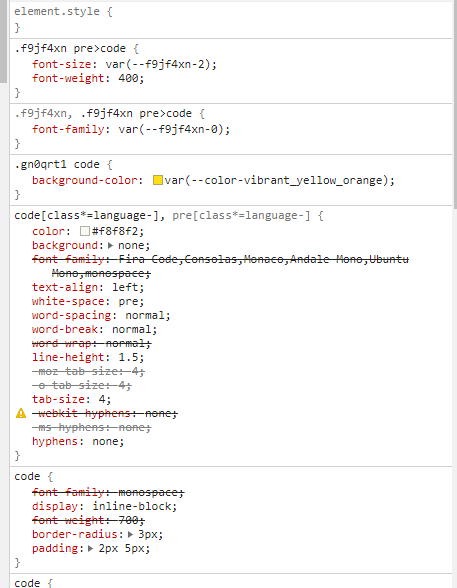
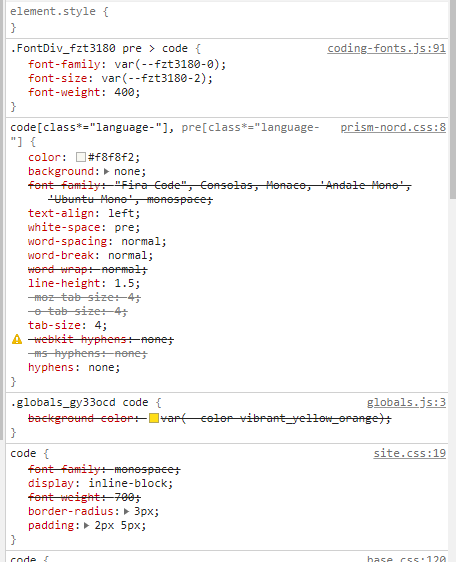
What prevails in build is the generic rule imported in the layout component
import { css } from 'linaria'

export const globals = css`
  background: var(--color-background);
  color: var(--color-text);

  a {
    color: #ff6a00;
  }
  a:hover {
    color: #79cdff;
  }

  blockquote {
    background-color: var(--color-grey_light_dark);
  }

  blockquote em {
    color: #ff6a00;
    background-color: #ffffff;
  }

  em {
    color: var(--color-white);
    background-color: var(--color-vibrant_orange_grey); /* THIS ONE */
  }

  code {
    background-color: var(--color-vibrant_yellow_orange);
  }
`
This style prevails over the one applied by Prism in the component
Since Prism changes styles through the Prism.highlightAll() that I use in that component, I don't know which one should prevail, but what is important is that this priority should be consistent between develop and build
Any idea?
