

 calcom
Fix not able to reschedule an event/meeting when new time slot overlaps with old selected time slot
What does this PR do?
Fixes #2668
Fix not able to reschedule an event/meeting when new time slot overlaps with old selected time slot
Environment: Staging(main branch) / Production
Type of change
- Bug fix (non-breaking change which fixes an issue)
How should this be tested?
- Create a new event type of length 60 minutes
- Use
Time-slot intervalsas 15 minutes and save the event - Now open the event link and schedule a booking
- Now try to re-schedule the event and verify the time slot near to the previously selected time slot is available
Checklist
- I haven't added tests that prove my fix is effective or that my feature works
- I haven't checked if new and existing unit tests pass locally with my changes

The latest updates on your projects. Learn more about Vercel for Git ↗︎
| Name | Status | Preview | Comments | Updated (UTC) |
|---|---|---|---|---|
| cal | ✅ Ready (Inspect) | Visit Preview | 💬 Add feedback | May 25, 2023 6:57pm |
| ui | ✅ Ready (Inspect) | Visit Preview | 💬 Add feedback | May 25, 2023 6:57pm |
![vercel[bot] avatar](https://avatars.githubusercontent.com/in/8329?v=4 "Published by a pub.dev verified publisher")
@asadath1395 is attempting to deploy a commit to the cal Team on Vercel.
A member of the Team first needs to authorize it.
@joeauyeung I tested this again and i can see it working as expected in my local and deployed link. Mind sharing the event details you created? Also i tested this from 2 places, one using the link as an attendee and the other as a creator. Is there any other place where we can modify this?
📦 Next.js Bundle Analysis for @calcom/web
This analysis was generated by the Next.js Bundle Analysis action. 🤖
Ten Pages Changed Size
The following pages changed size from the code in this PR compared to its base branch:
| Page | Size (compressed) | First Load | % of Budget (350 KB) |
|---|---|---|---|
/[user]/book |
256.2 KB |
407.15 KB | 116.33% (🟡 +0.14%) |
/apps/[slug]/[...pages] |
457.87 KB |
608.82 KB | 173.95% (🟢 -0.25%) |
/auth/setup |
174.22 KB |
325.17 KB | 92.91% (🟢 -0.16%) |
/d/[link]/book |
255.84 KB |
406.8 KB | 116.23% (🟡 +0.14%) |
/event-types/[type] |
479.43 KB |
630.38 KB | 180.11% (🟢 -0.19%) |
/getting-started/[[...step]] |
426.91 KB |
577.87 KB | 165.10% (🟡 +0.23%) |
/new-booker/[user]/[type] |
291.42 KB |
442.37 KB | 126.39% (🟡 +0.14%) |
/new-booker/team/[slug]/[type] |
291.42 KB |
442.38 KB | 126.39% (🟡 +0.14%) |
/settings/my-account/calendars |
253.07 KB |
404.02 KB | 115.43% (🟡 +0.24%) |
/team/[slug]/book |
255.85 KB |
406.8 KB | 116.23% (🟡 +0.14%) |
Details
Only the gzipped size is provided here based on an expert tip.
First Load is the size of the global bundle plus the bundle for the individual page. If a user were to show up to your website and land on a given page, the first load size represents the amount of javascript that user would need to download. If next/link is used, subsequent page loads would only need to download that page's bundle (the number in the "Size" column), since the global bundle has already been downloaded.
Any third party scripts you have added directly to your app using the <script> tag are not accounted for in this analysis
The "Budget %" column shows what percentage of your performance budget the First Load total takes up. For example, if your budget was 100kb, and a given page's first load size was 10kb, it would be 10% of your budget. You can also see how much this has increased or decreased compared to the base branch of your PR. If this percentage has increased by 20% or more, there will be a red status indicator applied, indicating that special attention should be given to this. If you see "+/-
![github-actions[bot] avatar](https://avatars.githubusercontent.com/in/15368?v=4 "Published by a pub.dev verified publisher")
It is throwing an error when I am trying to book the same slot when rescheduling:
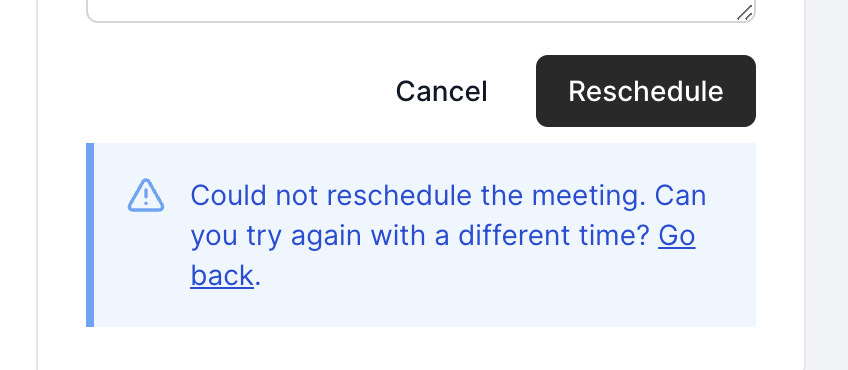

@asadath1395 I was able to get it working. In terms of @CarinaWolli's comment, we should hide the slot of the booking we're rescheduling in order to reduce any confusion.

@CarinaWolli @joeauyeung I have added the fix to remove current schedule's time slot from the list. There is another problem which i noticed, my fix works fine if the user doesn't have any calendar linked but fails if he has any calendar linked. It happens because when any user books a slot, immediately a booking is marked in organiser's calendar and i couldn't find a way to distinguish whether the booking came from cal or the user had the slot marked in some other way. Let me know if i am not clear
@CarinaWolli @joeauyeung I have added the fix to remove current schedule's time slot from the list. There is another problem which i noticed, my fix works fine if the user doesn't have any calendar linked but fails if he has any calendar linked. It happens because when any user books a slot, immediately a booking is marked in organiser's calendar and i couldn't find a way to distinguish whether the booking came from cal or the user had the slot marked in some other way. Let me know if i am not clear
Not sure about that. @alannnc and @joeauyeung what are your opinions on that?

@CarinaWolli @joeauyeung I have added the fix to remove current schedule's time slot from the list. There is another problem which i noticed, my fix works fine if the user doesn't have any calendar linked but fails if he has any calendar linked. It happens because when any user books a slot, immediately a booking is marked in organiser's calendar and i couldn't find a way to distinguish whether the booking came from cal or the user had the slot marked in some other way. Let me know if i am not clear
Good job testing this out @asadath1395. My first thought would be to grab the external calendar event id from the Cal booking reference. Then when checking busy times of external calendars, ignore the calendar event that matches the id from the Cal booking reference.

@PeerRich It's not yet working when there is a calendar connected
@asadath1395 Did you look into @joeauyeung's suggestion?
This PR is being closed due to inactivity. Please reopen if work is intended to be continued.