

 calcom
[CAL-644] Caches are not cleared when changing locations or recurring event settings
Issue Summary
Changes to events are not reflected on the public event type pages immediately.
Steps to Reproduce
- Enable/disable recurrence, or add/remove/amend a location on an event type.
- Visit the event's public page and observe the old settings in the sidebar. Wait several hours and observe the same old settings.
- Select an available time, then return to the event page to see the cache has been updated.

that is odd. I cant reproduce this. my changes are immediately when doing command + R hard reload

that is odd. I cant reproduce this. my changes are immediately when doing command + R hard reload
Replicated, video here:
https://user-images.githubusercontent.com/3164166/209448849-90ee95cf-767a-4ea6-8b3c-d733da4b4db9.mp4
Video shows the following test criteria in order (checkmark = pass):
Authenticated browser session:
- [x] Enable recurring events
- [x] Changes visible on the public event list screen (following a soft refresh)
- [ ] Changes visible on the event screen (confirmed with a soft refresh)
- [ ] Changes visible on the confirmation screen
- [x] Cancel booking on the confirmation screen
- [x] Changes visible on the event screen
Clean browser session (also confirmed on another device/network):
- [x] Changes visible on the public event list screen
- [ ] Changes visible on the event screen (confirmed with a soft refresh)
- [x] Changes visible on the confirmation screen
- [x] Cancel booking on the confirmation screen
- [x] Changes visible on the event screen
@ChipWolf are you still facing the issue. i am unable to reproduce this.

@ChipWolf are you still facing the issue. i am unable to reproduce this.
I have successfully replicated this again with the steps above on a fresh account with different devices/browsers.
@PeerRich I'll write some selenium unit tests for this to make sure you guys can replicate it
@PeerRich I'll write some selenium unit tests for this to make sure you guys can replicate it
I did write some tests for this but they're not rugged enough to distribute yet. For now I can say I can replicate this repeatedly without fail on different accounts/devices.
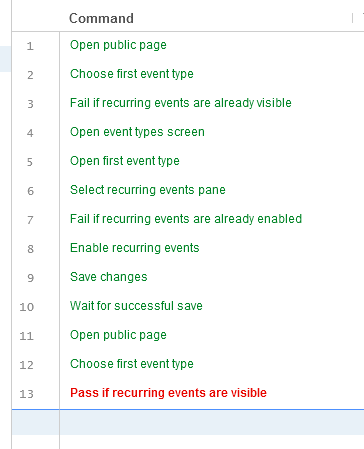
@PeerRich as promised; attached is a Selenium IDE file to replicate some of the behavior described in this issue:
This test is very basic, it demonstrates the simplest route to observing a caching issue.
In the spirit of keeping it simple and usable, the test does not automatically demonstrate the issue being cleared, but it should be a good starting point:
Note The test suite assumes the first event type in your list is both public and has recurring events disabled.
- First; it checks the state of your public page to ensure recurring events are not already visible,
- if not; then it checks if recurring events are enabled in the event type config,
- if not; then it enables recurring events before checking the public page again,
- if the public page still shows recurring events are not available for the event type; the test fails, per this issue.
- This is where the automation ends. You can experiment at this point with some manual activites to explore the issue. I find getting the state to update to the expected config is mostly unpredictable:
- Observe the page on a different device; you may see the event still allows recurring bookings.
- Try a hard refresh; sometimes it requires several or it may not change the state at all.
- Try making a booking, then return to the page; I find this always causes the page to update as expected.
Warning The two
Open public pagesteps will need the target adjusted to match your username.
thank you very much for your comments @ChipWolf they help us a lot,
I will try to replicate it locally, but I am almost sure that we must revalidate the cache when updating the event type.
