

 calcom
NEW Team Availability Bug not Pulling
Issue Summary
I’m not sure if this is affecting more than just our team (I assume so?), but our collective team links are not pulling the proper availability from both parties. See Loom here explaining the first use case. — https://cal.com/team/cal/shiraz
It’s also not pulling in the normal availability for these links:
https://cal.com/team/cal/sales https://cal.com/team/cal/hiring This one looks like it’s working: https://cal.com/team/cal/marketing https://cal.com/team/cal/product
I checked it against individual team members’ availability:
https://cal.com/bailey/30min https://cal.com/ciaran/design https://cal.com/peer/30min https://cal.com/sydney/30min https://cal.com/shiraz/30min
To reiterate, I believe ALL are available for the slot. That’s why I checked each event type and ensured that there were mutual times available, but that isn’t pulling onto the collective event.
For example: cal.com/peer/30 - Peer is available at 7:00a PST on 9/15
cal.com/shiraz/30min - Shiraz is available at 7:00a PST on 9/15
cal.com/team/cal/shiraz (collective of Peer and Shiraz) - does not show availability at 7:00a PST on 9/15
See here for a real example: https://share.cleanshot.com/zGW55v
Steps to Reproduce
- Navigate to a collective link between two or more people
- Check to see if all the mutual availability is being pulled

This is not the same as this issue: https://github.com/calcom/cal.com/issues/3575
I have also witnessed the same issue in my self hosted testing. The collective team slot logic is flawed.

Please Note: I already reported this in #3853. In some instances the array return for the collective team event type is empty. Some cases, it is showing incorrect limited slots which seem to vary depending on who is first in the team, similar to what @shirazdole has stated here.
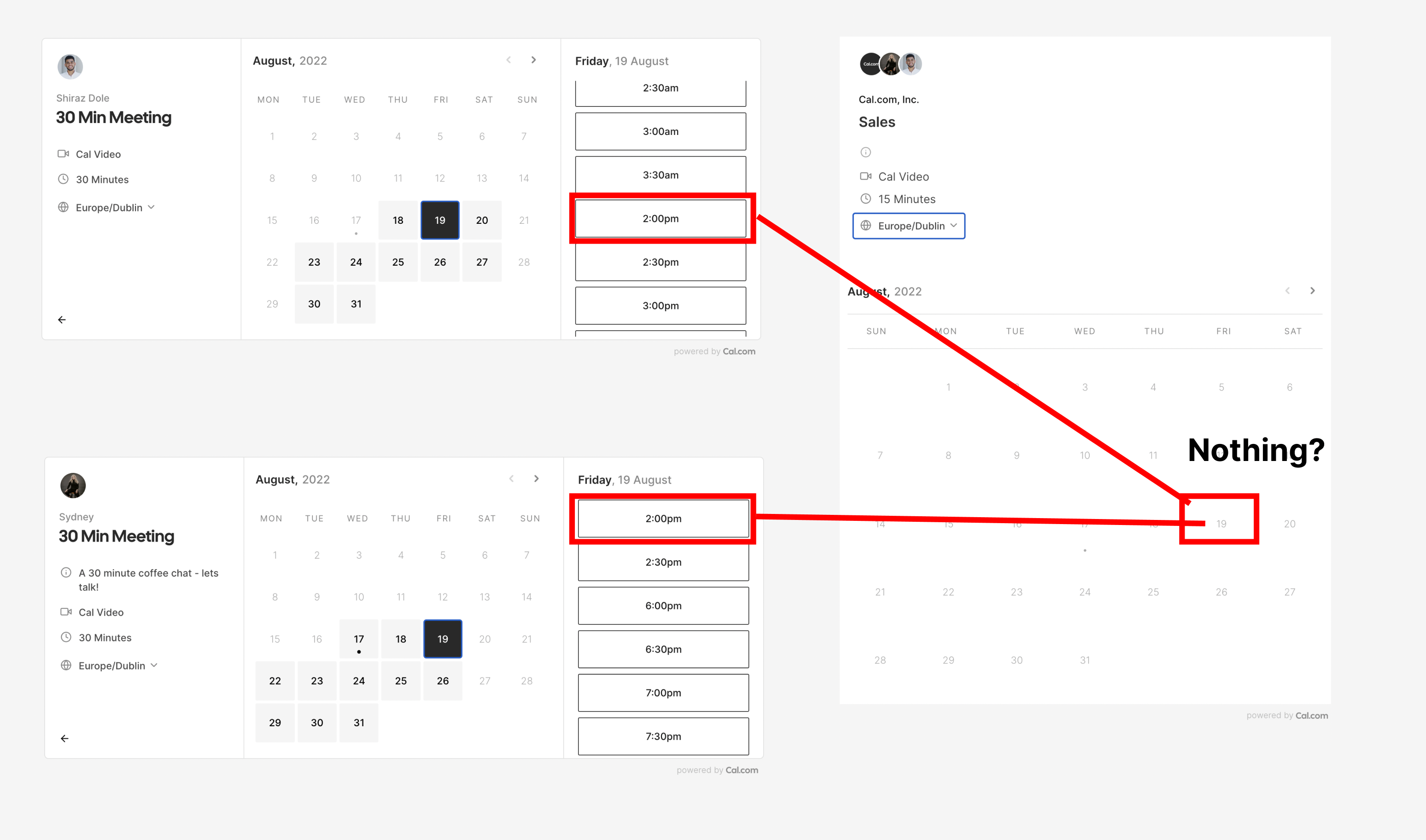

My investigation shows a flaw in the workingHours object return for Team.
For example in my case:
User 1 individual calendar returns - WorkingHours [{"days":[1,2,3,4,5],"startTime":60,"endTime":540}]
User 2 individual calendar returns - WorkingHours [{"days":[1,2,3,5],"startTime":60,"endTime":450}]
Team Calendar where both User 1 and User 2 are in a collective Schedule - WorkingHours [{"days":[2,3],"startTime":60,"endTime":540}]
Trying to now look further into the WorkingHours logic for Team - Also should all team members have the same first day of the week set in settings for the logic to work (is this how the logic is designed?) because i see the array returning days as 1,2,3 etc and i am assuming this is based on the user's defined day 1 in settings? or is day 1 always globally a sunday / monday , irrespective of user configuration?
Another Update:
workingHours const return in line number 233 of slots.tsx is somehow flawed and i suspect this is the reason why we are not seeing all slots.