

 botfront
Botfront up: Couldn't find env file
Describe the bug
After command "botfront up" an error occurs with below messages:
✖ Couldn't start Botfront. Retrying in verbose mode... ⠧ Starting Botfront...The IMAGES_CURRENT_RASA variable is not set. Defaulting to a blank string. The IMAGES_CURRENT_ACTIONS variable is not set. Defaulting to a blank string. Couldn't find env file: /home/geovana/code/t2/.env
To Reproduce Steps to reproduce the behavior:
- "botfront init" on a new directory
- Create in current directory
- botfront up
Additional context Botfront latest version

Did you recently upgrade Botfront? Have you looked at the migration guide? https://botfront.io/docs/migration/

Yes, but in this case, I was starting a project from scratch to test the new version, using cli. If I build using my own docker-compose botfront works.
Can you attach a screenshot of your folder content and the output of botfront -v?
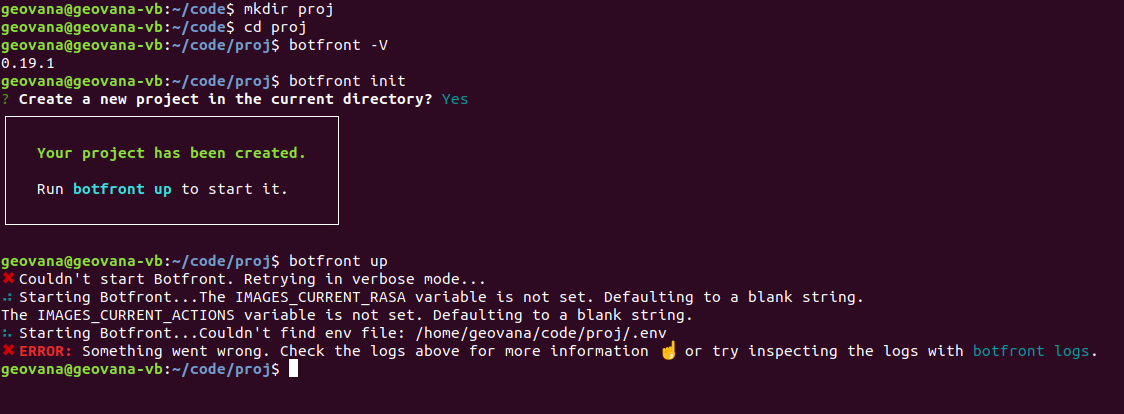
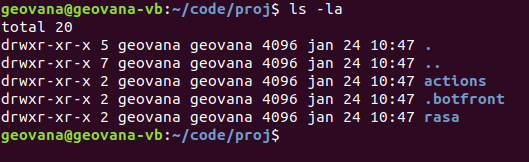
Can you confirm your project has the following structure: https://botfront.io/docs/rasa/custom-actions/#development
When you run botfront up it generates a docker-compose.yml file and a .env files at the root of your project (which seems not to be the case based on your logs).
The question is why isn't it there.
I think we can exclude the permission issue since the project folder is copied without any problem.
Is it possible that you have conflicting versions? are you using nvm? Did you install the cli from the source with npm link?
I suspect you have conflicting versions installed on your computer
It seems you were right. Tried in another computer with a clean install and the project folder was created as it should be. Just to register for anyone who has the same problem, I updated to the new version using npm install -g botfront and had the problem. Tried with sudo and updated just fine. Problem solved! Thanks for the support. We're loving Botfront.
Hi, just so you know, you shouldn't have to use sudo with npm. If you have to, it's symptomatic of a larger problem with you npm installation. Refer to this documentation on how to fix it. https://docs.npmjs.com/resolving-eacces-permissions-errors-when-installing-packages-globally

Hi, I am also facing the same issue after upgrading the bot front in windows. Can anyone suggest me how to solve the issue. Please see the screenshot for more information. Thank You @znat Please look into this. Thank you.
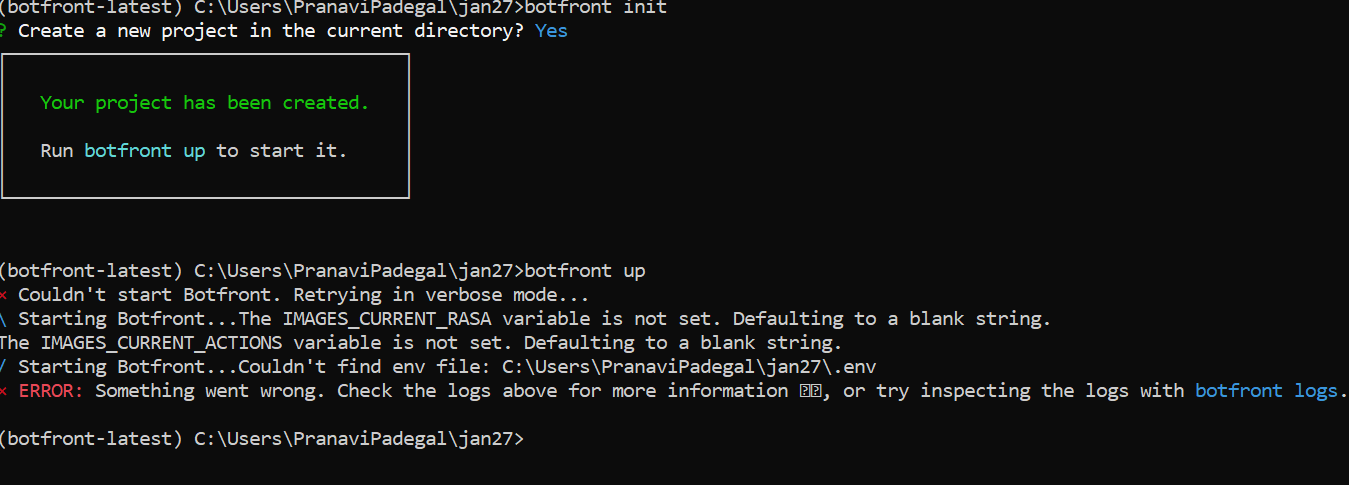

It seems that upgrading the cli with npm install is not enough and let conflicting versions in place. Try uninstalling and reinstalling the cli
Le lun. 27 janv. 2020 06 h 28, pranavi padegal [email protected] a écrit :
Hi, I am also facing the same issue after upgrading the bot front in windows. Can anyone suggest me how to solve the issue. Please see the screenshot for more information. Thank You @znat https://github.com/znat Please look into this. Thank you.
[image: Botfront] https://user-images.githubusercontent.com/22297243/73171193-28f61500-4126-11ea-873a-696eff11c2cc.PNG
— You are receiving this because you were mentioned. Reply to this email directly, view it on GitHub https://github.com/botfront/botfront/issues/446?email_source=notifications&email_token=AA4GAKVZFCONGIGL7TN67KTQ73ANHA5CNFSM4KLEPQ32YY3PNVWWK3TUL52HS4DFVREXG43VMVBW63LNMVXHJKTDN5WW2ZLOORPWSZGOEJ7FVJQ#issuecomment-578706086, or unsubscribe https://github.com/notifications/unsubscribe-auth/AA4GAKSW73RURQPZ3O6NT6TQ73ANHANCNFSM4KLEPQ3Q .
Yup, that worked for me Znat. But came up with another issue. Please see the following link. https://github.com/botfront/botfront/issues/399#issuecomment-579175623
I am on macOS Catalina 10.15.6 and facing the same issue. I have tried uninstalling and reinstalling the cli with no joy. Also uninstalled node completely and tried again. But the same issue persists.
