

 bitwarden
Imported nested folders from keepassx are wrong
Steps To Reproduce
Export KeepassX as CSV Import via webinterface
Expected Result
A folder for each database and their content as subfolders
Actual Result
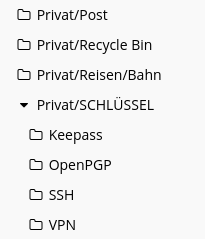
Randomly either I have subfolders or folders with the name
-
A/B/C -
A/B/Y -
A/X
Screenshots or Videos
Additional Context
I imported 2 keepassXC DB's Their folderstructure is:
- DB-Name
- A
- A
- B
- B
- A
- B etc.
- A
I get either nested folders or folders with the name
-
A/A -
A/B
It seems, that somehow the import not always creates a parent folder to enable the nested folder feature. Maybe if a folder only contains sub-folders. But such folders to organize a password safe are important.
Build Version
1.30
Environment
Cloud (bitwarden.com)
Environment Details
Arch Linux BitwardenApp Bitwarden Browser Extension for Firefox Bitwareden Website

Had the same issue with LastPass; I'm pretty sure it's not specific to KeePassXC, though it may be specific to CSV.
I agree that the bug only occurs if folders are imported which do not contain passwords themselves, but only sub-folders.
Here's how the behavior looked in LastPass (exported as .csv via LastPass Vault extension on desktop Mozilla Firefox, then imported in Bitwarden Web Vault):
The problem: If you import a LastPass vault (csv file), and the vault contains a folder A with subfolders A1 and A2 but no passwords directly inside, then Bitwarden will incorrectly import these folders.
Example folder structure from LastPass: A [contains sub-folders but no passwords] A1 [subfolder of A, contains passwords] A2 [subfolder of A, contains passwords]
Resulting imported folder structure in Bitwarden: "A/A1" "A/A2" In other words, the folder A is not created, and instead the imported subfolders have been renamed.
Note that once one then manually creates the folder A in Bitwarden, then this folder structure once again correctly becomes: A A1 A2
-> So the suggested fix is simple: If Bitwarden imports a folder which contains sub-folders but no passwords, it should nonetheless create this folder.
