

 bigskysoftware
Calling function on element which matches an 'attribute equals value' query
Greetings,
I'm having trouble scrolling to an element which matches an attribute value. This is what I have:
on bookUpdated scrollIntoView({block: 'center'}) the [@data-id='{{ b.id }}']
then send click to <#update-book-form #cancel-button />
I have also tried:
on bookUpdated scrollIntoView({block: 'center'}) the <[data-id='{{ b.id }}'] />
then send click to <#update-book-form #cancel-button />
Both fail with scrollIntoView({block: 'center'}) the [@data-id='70735b47-4300-451f-aaa6-e5d50ef60688']' is null. If I replace the attribute query with a simple id match the function call is successful, something like:
on bookUpdated scrollIntoView({block: 'center'}) the #books
then send click to <#update-book-form #cancel-button />
Unfortunately, I'm not able to use the id attribute because they are not allowed to start with a number, and I'm using UUIDs for my resource which do sometimes.
I have also tried to insert a wait 5s before the function call just to make sure the element I'm trying to scroll to was settled into the DOM, same error.
Any comment appreciated, thank you.


I've tried to hardcode the ID to eliminate any possible mistakes in that regard but ended up with the same problem. I'm also waiting for five seconds to eliminate any race condition with the HTMX swap this is supposed to follow.
on bookUpdated wait 5s
then scrollIntoView({block: 'center'}) the <[data-id='55e204b8-b6a7-48c9-ab6e-553cc11cfd6a'] />
then send click to <#update-book-form #cancel-button />
These are the errors I end up with:

Is there any place already setup where I can create a reproducible example? Something like code sandbox.
I've also tried
on bookUpdated wait 5s
then log <[data-id='55e204b8-b6a7-48c9-ab6e-553cc11cfd6a'] />
then send click to <#update-book-form #cancel-button />
Which does produce a log:
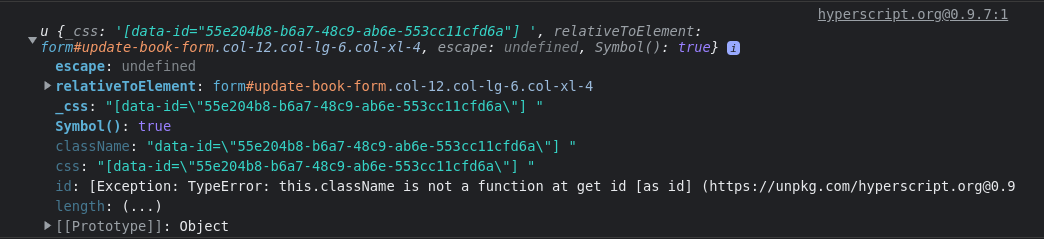
Hi there,
I would assign the thing to a variable and log it, easier to see what's going on:
on bookUpdated
  set the elt to <[data-id='55e204b8-b6a7-48c9-ab6e-553cc11cfd6a'] />
  log the elt
  call elt.scrollIntoView({block: 'center'})
  send click to <#update-book-form #cancel-button />
If you are willing, we can probably help a lot more efficiently if you jump on the htmx discord and check out the #hyperscript channel
