

 beryx
beryx
Question - JavaFX .so files missing
Question, How this library determine what jars to include into the build/images/lib directory? for me some .so files are missing from the JavaFX SDK, so I have to download the JavaFX SDK, copy the lib folder into the image/lib folder that runtime plugin generated for the app to run on linux environment.
The issue is, the library is not automatically copy all the lib files from JavaFX SDK. Any workaround for this to include all the jars into build/image/lib?


I'm not able to reproduce this issue. Do you get the same error when executing ./gradlew runtime on the badass-runtime-example-javafx project?
if you are using Java 9+, you need to use an additional plugin org.openjfx.javafxplugin - helped me

if you are using Java 9+, you need to use an additional plugin
org.openjfx.javafxplugin- helped me
I already have this plugin
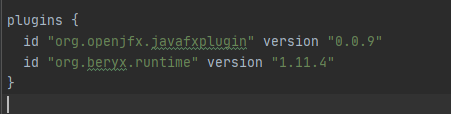
You also need to specify the javafx modules you need
javafx {
    version = '11.0.2'
    modules = [
        'javafx.controls',
        'javafx.fxml'
    ]
}
