
BZGFormViewController
 BZGFormViewController copied to clipboard
 benzguo
Forms with validation
BZGFormViewController 
BZGFormViewController is a simple library for making dynamic forms.
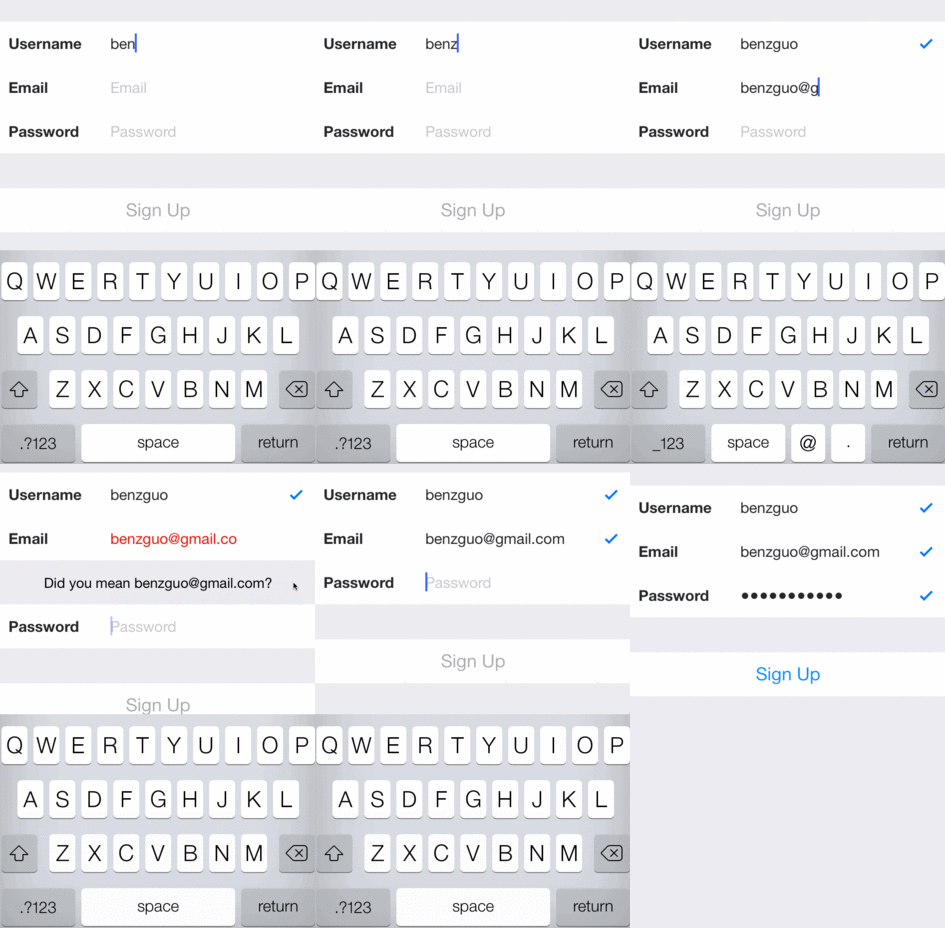
Demo app
Navigate to SignupForm, run pod install, and open SignupForm.xcworkspace. Build and run to see BZGFormViewController in action.
Installation
Cocoapods is the recommended method of installing BZGFormViewController. Add the following line to your Podfile:
pod `BZGFormViewController`
Quick start
First, subclass BZGFormViewController.
@interface SignupViewController : BZGFormViewController
Next, import "BZGTextFieldCell.h" and create a cell.
#import "BZGTextFieldCell.h"

// ...

self.usernameCell = [BZGTextFieldCell new];
self.usernameCell.label.text = @"Username";
To validate text and update the cell when the cell's text changes, use the cell's shouldChangeTextBlock.
self.usernameCell.shouldChangeTextBlock = ^BOOL(BZGTextFieldCell *cell, NSString *newText) {
    if (newText.length < 5) {
        cell.validationState = BZGValidationStateInvalid;
    } else {
        cell.validationState = BZGValidationStateValid;
    }
    return YES;
};
Each BZGTextFieldCell contains a BZGInfoCell. The info cell will be displayed if the cell's validationState is either BZGValidationStateInvalid or BZGValidationStateWarning. You can set the info cell's text using setText:.
self.usernameCell.shouldChangeTextBlock = ^BOOL(BZGTextFieldCell *cell, NSString *newText) {
    if (newText.length < 5) {
        cell.validationState = BZGValidationStateInvalid;
        [cell.infoCell setText:@"Username must be at least 5 characters long."];
    } else {
        cell.validationState = BZGValidationStateValid;
    }
    return YES;
};
BZGFormViewController automatically scrolls the tableview when you begin editing a text field and moves to the next field when you hit return.
You should use BZGTextFieldCell's shouldChangeTextBlock, didBeginEditingBlock, didEndEditingBlock, and shouldReturnBlock for validation and any other logic you would usually put in UITextFieldDelegate methods.
After you've configured your cells, add them into the desired section
[self addFormCells:@[self.usernameCell, self.emailCell, self.passwordCell]
         atSection:0];
[self addFormCells:@[self.phoneCell] atSection:1];
Custom sections
BZGFormViewController will only manage sections containing form cells. If you'd like to have other sections containing custom cells, you'll have to manage them yourself via the UITableViewDataSource methods. Be sure to use the values from super for the table view's form section.
- (NSInteger)numberOfSectionsInTableView:(UITableView *)tableView
{
    return 3;
}

- (NSInteger)tableView:(UITableView *)tableView numberOfRowsInSection:(NSInteger)section
{
    if (section > 1) {
        return [super tableView:tableView numberOfRowsInSection:section];
    } else {
        return 1;
    }
}

- (UITableViewCell *)tableView:(UITableView *)tableView cellForRowAtIndexPath:(NSIndexPath *)indexPath
{
    if (indexPath.section > 1) {
        return [super tableView:tableView cellForRowAtIndexPath:indexPath];
    } else {
        return self.otherCell;
    }
}
Contributing
Please write tests and make sure existing tests pass. Tests can be run from the demo project in /SignupForm. See the Roadmap for planned improvements.
 benzguo