

 benjamine
Missing array item in HTML formatted diff
It seems like the HTML formatter is missing unchanged values in arrays when an array item is added (for certain cases). I used the following JSONs to test array diffs: Left:
{
  "item": [
    {
      "id": 1,
      "name": "item1"
    },
    {
      "id": 3,
      "name": "item3"
    }
  ]
}
Right:
{
  "item": [
    {
      "id": 1,
      "name": "item1"
    },
    {
      "id": 2,
      "name": "item2"
    },
    {
      "id": 3,
      "name": "item3"
    }
  ]
}
This ended up with this diff JSON:
{
  "item": {
    "1": [
      {
        "id": 2,
        "name": "item2"
      }
    ],
    "_t": "a"
  }
}
Here it is in HTML formatted visual form:

The option to show unchanged is enabled. The item with ID of 3 doesn't show up on the diff view when it should show IDs 1 (unchanged), 2 (added), and 3 (unchanged).
Interesting note: if ID3/item 3 is changed to ID2/item2 in the first JSON, it works properly.

A simpler way to see this is to diff [1,2] and [2,3] with showUnchanged on. The 2 value is not included in the formatted diff.
I think another way to describe what's happening is that unchanged values that change indexes are not included in the diff.

In the diff this is what I get when i diff
const left = [1, 3];
const right = [1, 2, 3];
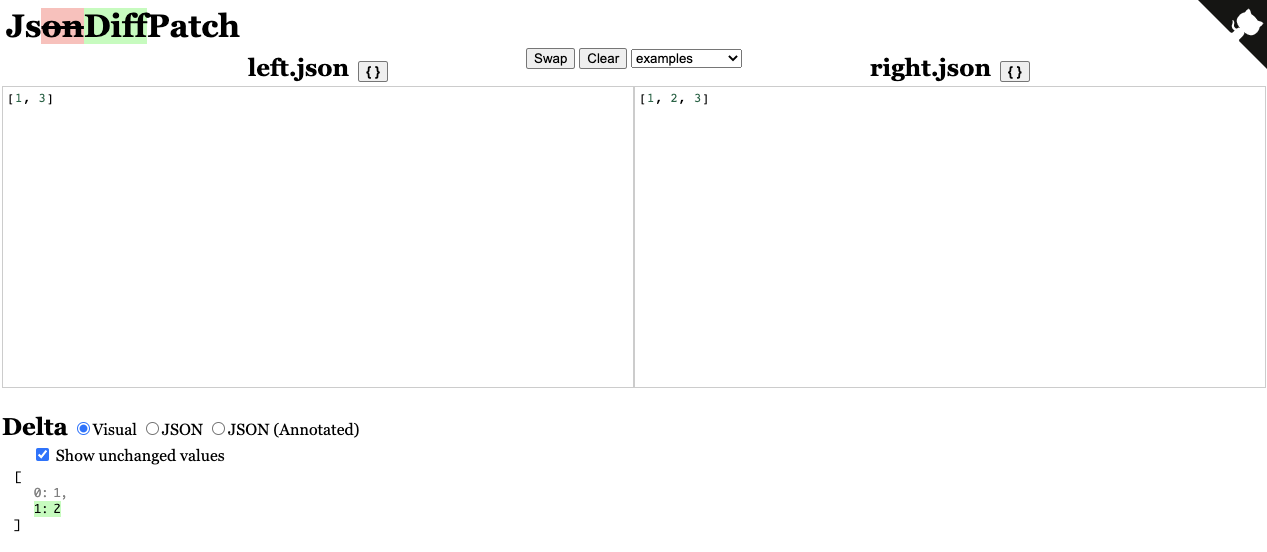
With the delta being:
{
  "1": [
    2
  ],
  "_t": "a"
}
What would be the expected output?
Would we want the delta to include that key 1 has moved to key 2 and a new value has been inserted at key 1 or should the formatter include all keys when we want to see the unchanged value?
