

 benbaker76
Issue with "Local Kexts" and "Current Patches" menu options in latest Hackintool version(s)
Hello @headkaze thanks again for your support of Hackintool !
1. Local Kexts
I have been trying to do some advanced use of Hackintool and realise there is a some problem and bug when using "Local Kexts" menu.
I switch to "Patch" tab and any other sub-tab e.g. "Connectors" section, and once I select "Local Kexts", the dropdown list for "Intel Generation" behaves erratically, the resulting dropdown list "Platform ID" gets empty and I discovered this as it was not possible to select "Coffee Lake" from the "Intel Generation" list at all.
You can easily reproduce this on your local machine, you will understand what I am talking about.
On a side note: Can I possibly ask you to consider improving the menu "Local Kexts" and change it to e.g. "Use Local Kexts" instead that is more clear as to what it refers to? It is referring to the reading of the macOS booted version and its kexts versions currently running, correct? Perhaps a name such as "Current Local Kexts" or "Active Local Kexts" makes sense?
2. Apply Current Patches
With the menu "Apply Current Patches" I see some not-so-sure-it's-expected behaviour 😄
So again I am in the "Patch" tab and "Connectors" section; when I enable it, it is supposed to show the bootloader-injected properties of my system, correct?
Can I ask you where it reads them from?
I noticed that when I inject these two framebuffer-con2-enabled properties, the system does not show AppleIntelFramebuffer@2 in IORegistryExplorer as expected, but Hackintool only shows -1 in the first case (for connector index 2 always):
  "framebuffer-con2-enable" = <01000000>;
  "framebuffer-con2-index" = <FFFFFFFF>;
vs.
  "framebuffer-con2-enable" = <00000000>;
  "framebuffer-con2-index" = <FFFFFFFF>;
Perhaps the latter is incorrect? I've been studying the General Framebuffer Patching Guide using Hackintool guide.
I also see that, upon relaunch of Hackintool, the menu "Apply Current Patches" remains active (ticked); does it read the applied patches correctly? I have the impression that I need to press on the EYE or REFRESH icon to get them to show the applied ones. In general I see that there may be some kind of mix when "Apply Current Patches" is enabled/active and the user clicks on EYE or REFRESH icon. If we change the Platform ID and come back, the plugged display is not highlighted in RED. Anyway I am still trying to figure out the list of exact steps to communicate to you...
Again on a side note, could you also consider renaming this menu to "Display Applied Patches" which is a little friendlier as menu option label?
Thank you for your time!

1. Local Kexts
The Local Kexts setting is for older versions of macOS when the the framebuffer data was stored directly in the framebuffer kexts. This is no longer the case and now it has to be extracted from memory. So in most cases you should not use this option.
Actually looking at the code it looks like this setting does nothing. It will be removed in the next release.
2. Apply Current Patches
This setting will read the patches from the IGPU entry in IORegistry and apply them.
I admit the patching system is old and probably broken. I welcome people to report any issues with a simple list of steps to reproduce the issue or submit a fix via a pull request.

Hi @headkaze thanks for your feedback.
- Local Kexts
So you remove this menu, OK, no need to deal with it anymore.
- Apply Current Patches
a) I would like to ask you to consider renaming this (EN) to "Display Applied Patches" which is more meaningful, in my humble opinion.
b) Since you say it is reading the current IGPU entry in IORegistry then please know that it is a little broken 😄
In newer tests, I have been re-injecting the following parameters, and when I check (activate) this menu, I only get the updated busID but not the index to -1:
  "framebuffer-con2-enable" = <01000000>;
  "framebuffer-con2-index" = <FFFFFFFF>;
vs.
  "framebuffer-con2-enable" = <00000000>;
  "framebuffer-con2-index" = <FFFFFFFF>;
(not even sure which one works with WhateverGreen, the purpose is to disable con2 really)
Is it because I excluded in my config.plist any previous con0 and con1 parameters ? I have only framebuffer-con1-enable where I define busID and type, whilst not referencing con0 at all (as it is for the LVDS/PNLF so I leave it as is...)
Also, for some reason, when checking/unchecking this menu, the Connector Type is not brought back to the Framebuffer default (even when I press the eye or refresh icons). I use Coffee Lake's 0x3EA50009 FB.
If you have time and wish to have a look into this, let me know what debug logs or screenshots you require and I can provide them, as I do not want to flood the thread here with useless logs and debug text.
Thank you again!
Setting framebuffer-conX-enable to 0 does nothing. It's only used for enabling a patch for the connector. If you set it to 0 then none of your other patches for the connector will be applied. Only setting it to 1 with framebuffer-conX-index set to -1 will disable the connector.
It should set the Connector Type back to the default when you uncheck Apply Current Patches but it probably won't if you don't have framebuffer-conX-enable set to 1.
Only setting it to 1 with framebuffer-conX-index set to -1 will disable the connector.
Sure, I did that (as every posted config has it enabled; was experimenting) and my settings have framebuffer-con2-enable = 1 but still, the -1 is not shown in Hackintool when switching to "Apply Current Patches" menu.
It should set the Connector Type back to the default when you uncheck Apply Current Patches but it probably won't if you don't have framebuffer-conX-enable set to 1.
OK to be clear, with or without the "Apply Current Patches" enabled, the only thing I see a visible change is the busID. The index doesn't change and for some reason, with "Apply Current Patches" checked or unchecked it shows HDMI instead of toggling between DP and HDMI.
Is there any log or anything I can offer for you to check the behaviour and determine the existence of a bug?
Hi @headkaze here you go. The OC config itself has been sanitised (MLB, serials etc.) Hope these are good for you. Let me know if you need anything else. The IGPU patching is straight-forward, nothing fancy as you will see.
Can you make sure you have Framebuffer->macOS 10.14 set
If you use File->Open and select your config.plist does it display correctly then? Then clicking on Reload should set it back to defaults.
This appears to be working for me (see attached screenshot). Also Apply Current Patches appears to be working for me but obviously for what is contained in my IORegistry.
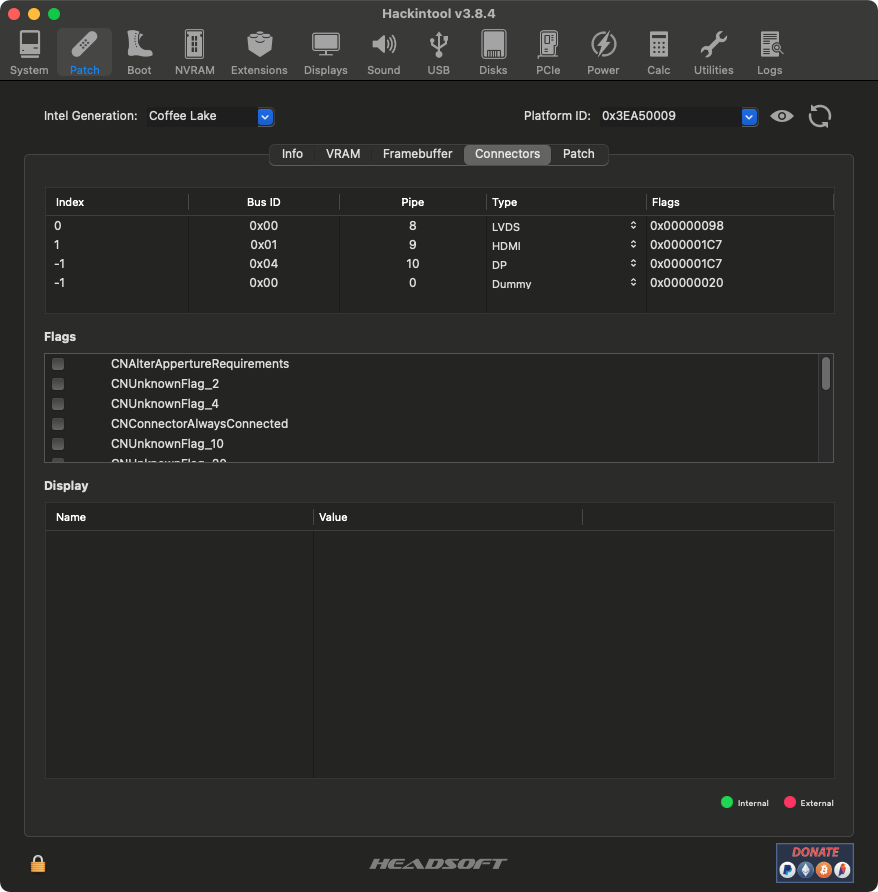
Hello @headkaze thanks for your time on this.
Can you make sure you have Framebuffer->macOS 10.14 set
I removed any files with AppCleaner except the tool and restarted it. Framebuffer was macOS 10.14 anyway.
If you use File->Open and select your config.plist does it display correctly then? Then clicking on Reload should set it back to defaults.
Yes, I was not aware of this feature; loading my config shows the "Connectors" tab as expected from the injected stuff. Clicking on reload icon does bring back now the details to the Platform ID original data in the table/grid.
I repeated the process via AppCleaner and now tried only the "Apply Current Patches" menu, toggling it seems to work. Not sure what was going on.
May I kindly propose the following for clarity's sake?
a) Consider renaming "Apply Current Patches" to "Display Current Patches" because the verb apply implies changes.
b) When Hackintool shows the system's injected data from IORegistry, change the colour of the data in the table/grid to yellow (that also read OK on dark mode, dark-blue for normal mode?). When the menu is unticked, change back to white. This way, it's more obvious to the user that something is different in case the menu was forgotten ticked, and also will indicate something to notice (like toggling on/off the menu). This is more visually helpful, I mean.
Now that we're talking more UI and since you will remove the menu "Local Kexts" allow me a couple of proposed improvements:
c) Menu "Patch" : change "System Configs" to "System Configs Templates" to suggest something that's "ready"
d) Menu "Framebuffer" as the tick mark may be visually confusing at first, consider replacing the comparison signs with a word i.e. "macOS 10.13.6 or earlier" and "macOS 10.14 and later"
Thank you for your consideration. Seems that using AppCleaner made Hackintool work as expected (regarding my original request of this ticket).